You’ve probably got a domain in one of three states right now. You’re about to register one, you just bought one, or you already own one and suddenly realized the whole setup depends on a login, a renewal notice, and a few settings you haven’t touched in ages.
That’s normal. It’s also where people get sloppy.
Most advice on how to secure a domain name starts too late. It starts after registration, after DNS is live, after email is connected, after the site has rankings and revenue attached to it. In practice, security starts before you buy anything. A bad domain with a dirty history can hurt you before an attacker ever shows up. Then, if you choose a weak registrar, skip the account protections, or ignore DNS security, you’re stacking risk on top of risk.
I’ve seen people spend serious money polishing a site on top of a shaky domain setup. Cheap registrar, shared login, no lock, no renewal process, no DNS monitoring. Then one weird email, one missed card update, or one unauthorized DNS change sends them into panic mode.
A secure domain setup isn’t glamorous. It’s a chain of boring decisions made correctly. That’s what works.
Finding Your Digital Real Estate and Checking the Foundation
Often, domain security is treated like a padlock you add after purchase. That’s backwards. The first security decision is the domain you choose in the first place.
If you’re registering a brand new name that has never been used, the risk profile is usually simpler. If you’re buying a previously owned domain, especially one that expired or dropped, you need to investigate its history before you touch your wallet. A domain can look clean on the surface and still carry baggage from spam, manipulative backlinks, malware abuse, or a sketchy past owner.
Know the difference between dropped and expiring domains
A dropped domain is one that has fully expired and become available to register again. That can be useful if you want a clean starting point and don’t want to fight through auction drama.
An expiring domain is still in the post-expiration pipeline. Sometimes that’s where the best opportunities sit, because strong names get noticed before they hit the open market. The flip side is obvious. The closer a domain is to prior ownership, the more carefully you need to vet what came before.
Traditional domain security guides usually focus on locks, passwords, and DNS. They often skip the front-end risk of acquiring a domain with hidden problems. That’s a blind spot. The verified data here specifically calls out that underserved angle and notes that NameSnag analyzes 170,000+ domains daily with spam-free verification and scoring to surface cleaner opportunities and flag penalty risks, according to this supporting reference.
That matters because a domain with a bad history can become a security and trust problem, not just an SEO problem.
What I check before buying
You don’t need a massive checklist, but you do need discipline. I usually look at a candidate domain like I’m inspecting a building before purchase.
- Past use: Was it a real business, a content site, a parked page, or a spam machine?
- Brand risk: Does the name look too close to an existing brand?
- Backlink quality: Are links relevant and natural, or do they look manufactured?
- Index and reputation signals: Does the domain show signs of being deindexed, abused, or poisoned?
- Ownership consistency: Sudden shifts in use can signal prior churn or abuse.
Practical rule: If a domain’s story doesn’t make sense after a few minutes of checking, walk away.
That sounds simple, but it saves money. People get hypnotized by a short name, a pretty TLD, or a tempting backlink profile. Trust me, a domain with “hidden upside” is often just hidden cleanup work.
Use filters before you use hope
Manual checking is fine for a handful of names. It’s miserable when you’re screening lots of them.
That’s why it helps to start from curated lists instead of random brainstorming. If you want names that have already dropped and can be registered right away, browse available dropped domains. If you want names that are expired and moving toward release, use expiring domains. Both views are more useful when you narrow by timeframe so you’re not wading through stale junk.
Then do your due diligence. History still matters.
A solid primer is this guide on how to check domain history. It’s the kind of step too many buyers skip because they’re excited to “secure the name” and move on. That’s how they inherit someone else’s mess.
Security starts with asset quality
People hear “how to secure a domain name” and think settings. I think asset quality first.
A clean domain is easier to protect, easier to trust, and easier to build on. A contaminated one drags problems into every later stage, from search visibility to email trust to brand credibility. You can lock down a bad asset perfectly and still be stuck with a bad asset.
That’s why the first move isn’t to buy fast. It’s to buy smart.
Choosing Your Domain's Landlord Wisely
Your registrar is your digital landlord. If you pick one based on the lowest promo price and nothing else, don’t act surprised when support is weak, security controls are thin, and recovery becomes a nightmare.
This is one of the least exciting buying decisions and one of the most important. The registrar holds the keys to transfer approval, contact records, DNS settings in many setups, and account-level control. If that account gets compromised, an attacker doesn’t need to break your website. They can reroute the whole property.
The verified guidance from ZeroFox is blunt on this point. Selecting a reputable domain registrar is the foundational security control, because a compromised registrar account can lead directly to unauthorized transfers and traffic diversion, as noted in ZeroFox’s domain security steps.
What to look for beyond price
A registrar doesn’t need flashy branding. It needs operational maturity.
Here’s what I care about:
- ICANN accreditation: This is table stakes. If a registrar isn’t properly accredited, keep moving.
- Serious account security: App-based 2FA support matters. Good login controls matter. Audit trails matter.
- Clear locking options: You want registrar lock available by default and stronger controls if your domain is valuable.
- Responsive support: If something goes wrong, you need humans who understand domain transfers and account recovery.
- Separation of access: Team management features beat passing one shared password around in Slack.
A registrar can be cheap and competent. It can also be cheap and reckless. Those are not the same thing.
The real trade-off
People compare registrars like they’re buying printer paper. Lowest annual fee wins. That’s shortsighted.
A registrar with better security tooling may cost a bit more, but what you’re buying is friction for attackers and fewer ways for your own team to make a catastrophic mistake. That’s worth more than shaving a few dollars off a renewal.
The wrong registrar doesn’t just increase technical risk. It increases recovery time when something breaks.
That last part gets ignored. A lot of domain incidents become expensive because the owner can’t prove control quickly, can’t reach support, or discovers the account was tied to a former employee’s email.
Questions worth asking before you transfer in
If I’m evaluating a registrar, I want clear answers to these:
| Question | Why it matters |
|---|---|
| Do they support app-based 2FA? | SMS is better than nothing, but app-based is usually the cleaner choice. |
| Is domain lock easy to verify and re-enable? | People often disable it during changes and forget to turn it back on. |
| Are activity logs available? | You want visibility into login attempts and account changes. |
| Can multiple users have separate access? | Shared master logins are asking for trouble. |
| Is support equipped for domain recovery issues? | Billing support is not the same as domain incident support. |
A registrar should make safe behavior easy. If basic protection feels buried, confusing, or optional, that’s a warning sign.
For high-value domains, especially recently acquired ones, I’d rather use a registrar that feels slightly overbuilt than one that feels “simple” because it skipped the important stuff.
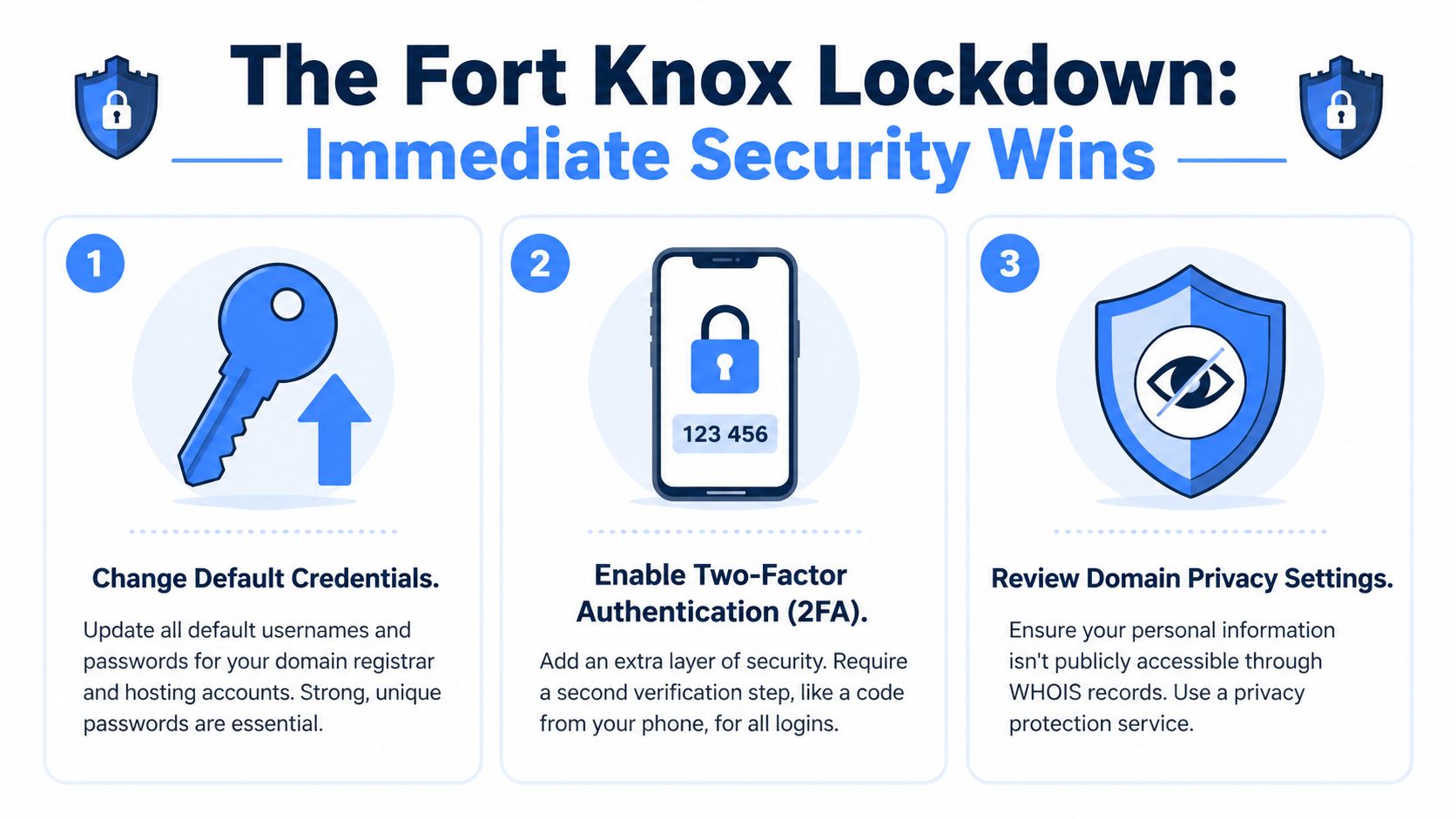
The Fort Knox Lockdown Three Immediate Security Wins
You buy a strong domain, move fast on branding, and start wiring up hosting. Two days later, someone is probing the registrar account, your contact details are exposed, and a routine DNS edit leaves the domain vulnerable longer than anyone realized. I’ve seen good domains put at risk in the first hour after acquisition.
That risk starts earlier than most owners think. If you picked up a clean expired domain through a tool like NameSnag, you already did part of the security work by avoiding a name with baggage, spam history, or messy ownership patterns. Now protect the asset before you touch launch tasks.
Win one hide your details where possible
Enable WHOIS privacy if your registrar supports it and the TLD allows it.
Public contact data gives attackers a head start. It helps with phishing, social engineering, impersonation, and account recovery abuse. Privacy will not stop a transfer attempt or fix a weak registrar login, but it does remove easy reconnaissance, which is often enough to make an attacker look for an easier target.
There is a trade-off. Some buyers, brokers, and legal teams want direct visibility into ownership records. If the domain is a serious brand asset or acquisition target, decide that deliberately instead of leaving contact data exposed by default.
Win two lock the domain
Turn on Registrar Lock immediately. If the domain matters to revenue, brand protection, or email, look at Registry Lock too.
Registrar lock blocks casual transfer and update mistakes. Registry lock adds another approval layer and usually involves manual verification through the registry or registrar. It is slower, and that is the point. For a high-value name, a little friction is cheaper than a recovery fight.
A few checks prevent the common failures:
- Verify the lock status yourself: Do not assume the registrar applied it automatically.
- Check it again after account or DNS work: People disable protection during changes and forget to restore it.
- Assign one clear owner for requests to modify domain lock status: Ambiguity is how bad approvals happen.
- Record current name server and DNS settings: If you need to confirm or audit changes later, having a baseline matters. If your team needs a refresher, this guide on DNS entries and what they control is a useful reference.
Win three harden the registrar account
Domains are usually lost at a different point than often assumed. It's not the website, nor WordPress, but the registrar login or the email account tied to it.
Set a unique password. Turn on app-based 2FA. Secure the inbox used for resets and ownership notices. Keep registrar access limited to the few people who need it.
I would also avoid shared master logins unless there is no other option. Shared credentials kill accountability, make incident response messy, and tend to survive employee departures far longer than they should.
If your team uses push approvals anywhere in the access chain, read how to combat MFA fatigue. I’ve seen companies enable 2FA and still get burned because someone approved prompts out of habit.
Treat the registrar account and the email behind it like crown jewels. If an attacker gets either one, the domain is in play.
Mistakes that keep causing domain incidents
These are not rare edge cases. They are the same preventable errors that show up again and again.
- Using a shared inbox as the only owner account
- Letting a freelancer register the domain inside their own registrar account
- Reusing passwords from hosting, email, or the CMS
- Delaying 2FA until after launch
- Assuming WHOIS privacy protects ownership
- Leaving an expired domain acquisition in a default account setup without tightening access first
Trust me, cleanup is always harder than setup. The first hour after registration or acquisition is when you put the simple controls in place that stop stupid losses later.
Building a Moat with DNS Security
A domain theft does not always start with a stolen registrar login. I’ve seen clean domains acquired carefully, locked down properly, and still exposed because nobody treated DNS as part of the attack surface.
That mistake gets more expensive with better names. If you used NameSnag to chase a strong expired domain with real type-in traffic, backlink equity, or brand value, DNS is part of the foundation check, not an afterthought. A valuable acquisition attracts more attention from competitors, scammers, and anyone watching for weak setups.
DNSSEC solves a specific problem. It helps resolvers verify that DNS answers are authentic and have not been altered in transit. If someone tampers with the route users take to your site, browser encryption does not help until after the visitor has already been sent to the wrong place.
That is the gap a lot of owners miss.
Why SSL is not enough
SSL protects the session between the visitor and the server they reached. DNSSEC helps make sure they reached the right server first.
For a plain-English refresher before you touch records, review this guide on what DNS entries are. It will save you from changing the wrong record in a hurry.
I see this problem a lot on acquired domains. The buyer checks the registrar lock, updates nameservers, gets the site live, and assumes the job is done. Meanwhile, old DNS habits, rushed record changes, or weak provider choices leave the domain open to spoofing, misrouting, or downtime caused by bad changes.
The practical setup
DNSSEC setup differs by provider, but the decision process is pretty consistent.
- Use a DNS provider that handles DNSSEC cleanly
- Verify it is active, not just supported
- Test resolution after you turn it on
- Restrict who can change DNS records
- Document the current zone before major edits
The trade-off is real. DNSSEC adds integrity checks, but it also adds failure points if the chain is set up wrong. I would not ignore that. A broken DNSSEC setup can make a legitimate site disappear until the mismatch is fixed.
For a hobby project with no revenue, some owners accept that risk differently. For a commercial site, a lead-gen asset, or an expired domain you paid up for because NameSnag surfaced a clean opportunity worth protecting, I would rather spend extra time validating DNSSEC than leave the routing layer exposed.
DNS hygiene also affects email trust. If the domain sends mail, use DNS cleanup as the moment to create SPF records and stop spoofing problems before they spread to deliverability and brand abuse.
A short explainer can also help if DNSSEC still feels abstract:
The moat mindset
DNS is not background plumbing. It is part of ownership control.
Trust me, the owners who lose good domains usually did not lose them in one dramatic breach. They left weak points around the asset. If the domain is worth acquiring proactively, it is worth protecting at the resolution layer too. DNSSEC will not fix every problem, but it closes one of the easiest paths attackers still count on.
The Long Game Staying Secure and Protected
A domain rarely slips away in one dramatic attack. The more common loss is slower and more frustrating. A renewal fails, an old recovery inbox goes dark, a contractor keeps access nobody reviewed, or a nameserver change sits unnoticed until traffic and email start breaking.
I’ve seen owners spend weeks chasing the perfect domain, sometimes even using NameSnag to secure a clean expired asset before someone else grabs it, then treat protection like a one-time setup task. That is a mistake. Good domain security starts with buying the right asset, but it only holds if you run the asset with discipline year after year.
Renewal discipline matters more than people think
A lot of domain losses start with expiration, not technical wizardry. That makes renewal control one of the highest-return habits you can build.
Auto-renew should be on. Then verify the setup behind it works as intended.
Cards expire. Finance teams replace payment methods. Notice emails end up in an inbox tied to a former employee or to the domain itself, which creates a nasty recovery problem if DNS breaks at the wrong time. Trust me, relying on auto-renew alone is how owners talk themselves into a false sense of safety.
My baseline setup looks like this:
- Enable auto-renew on every business-critical domain
- Review the payment method on a set schedule
- Send registrar notices to an independent email account you control long term
- Keep registrant, admin, and recovery contacts current
- Audit the portfolio so you know which names still matter
That last point gets ignored. I’ve seen companies forget they still depend on an old domain for redirects, lead forms, login flows, or legacy email. Attackers love forgotten assets because nobody is watching them.
Monitor changes before they become incidents
Long-term protection depends on visibility. You need to know when something changed, who changed it, and whether it was expected.
Guidance from GoDaddy stresses ongoing DNS monitoring, managed DNS, and alerts for unauthorized record changes in their domain name security tips. That lines up with what works in practice. The faster you spot a nameserver swap, a modified MX record, or a surprise registrar login, the better your chance of containing the damage before customers notice.

This does not require enterprise tooling for every site.
It does require basic alerting and a routine review. A practical starting point is understanding domain name monitoring. If the domain has real value, especially one you acquired proactively because its history was clean and worth protecting, visibility is part of ownership.
Protect the brand, not just the single domain
A secure primary domain is only part of the job. Brand abuse often shows up on typo domains, look-alikes, and abandoned names that still carry trust with customers or search engines.
That matters even more if you buy expired domains strategically. The upside is clear. You can secure a clean name before a bad actor does. The trade-off is that a valuable domain also deserves better monitoring, tighter access control, and periodic checks for impersonation risk across related names.
Domain security also connects to the rest of the stack. Hosting, CMS accounts, email, forms, and user permissions all create paths back to the brand. If you want a broader operational checklist beyond registrar settings, this guide on mastering site security is a useful companion.
Secure owners run checklists.
Memory fails. Calendar reminders, access reviews, renewal audits, and change alerts do not.
Frequently Asked Domain Security Questions
What’s the difference between Registrar Lock and Registry Lock
Registrar Lock is the standard protection most owners should enable right away. It helps prevent unauthorized transfers or certain domain changes through the registrar.
Registry Lock is the heavier-duty version used for higher-value domains. It usually adds manual verification steps through the registrar and registry before sensitive changes go through. That extra friction can be annoying, which is exactly why it’s useful.
If the domain is tied to revenue, core brand identity, or business email, stronger locking is easier to justify.
Can a domain still be stolen if it’s locked
Yes.
A lock is powerful, but it’s not magic. If an attacker compromises the registrar account, compromises the email used for recovery, tricks support through social engineering, or exploits a process failure, a lock alone may not save you.
That’s why domain security has to be layered. Lock the domain. Harden the registrar login. Protect the email account behind it. Keep ownership details current. Watch for suspicious changes.
Single-point protection is where people fool themselves.
Should I use my domain email as the registrar contact email
I wouldn’t for the primary recovery path.
If your domain or DNS gets hijacked and your main contact email lives on that same domain, you can lose access to the exact inbox you need for recovery. Use an email account that is independent, secure, and controlled by the business owner or a tightly controlled admin function.
This is one of those boring setup details that feels unimportant until the day it becomes the only thing that matters.
Who should own the domain inside a company
The company should own it. Not the web designer. Not the agency. Not the founder’s cousin who “handles tech.” Not a contractor using their personal registrar account.
The registrar account should sit under controlled business ownership with documented access rules. A small number of trusted people should have admin rights. Everyone else should get only the access they need.
If an employee leaves and your domain leaves with their inbox, you didn’t have a security setup. You had a dependency.
What should I do if I think my domain has been compromised
Act fast and keep your steps organized.
- Check registrar account activity for logins, transfer attempts, contact changes, and DNS changes.
- Change the account password immediately and rotate the email password tied to the account.
- Re-enable or verify locks if they were changed.
- Contact registrar support and state clearly that you suspect unauthorized access or transfer activity.
- Document everything including timestamps, notices, screenshots, and billing records.
If email is affected too, treat it as a linked incident. Domain compromise and email compromise often travel together.
Is domain security a one-time setup
No. It starts with a clean purchase, gets stronger with proper registrar and DNS controls, and stays effective only if you maintain it.
This is the answer to how to secure a domain name. Buy carefully. Register with the right provider. lock down the account. secure DNS. keep renewals and monitoring under control.
Then repeat the boring habits that keep ownership boring.
If you’re hunting for domains worth protecting in the first place, NameSnag is built for that job. You can scan fresh opportunities, watch expiring names before they drop, and cut down the manual work of sorting promising domains from spammy leftovers.
Find Your Perfect Domain
Get access to thousands of high-value expired domains with our AI-powered search.
Start Free Trial