
A subdomain is a distinct section added before your main domain, like blog.yourbrand.com or shop.yourbrand.com, and it works as its own web property under the same brand. It can live on separate infrastructure, and in practice it often needs separate SEO handling because search engines may treat it as a different site.
If you're asking what is a subdomain, you're probably already staring at one in the wild. Maybe it's help.company.com, fr.brand.com, or developers.product.com, and you're trying to figure out whether that's just a naming trick or a real architectural choice.
It's a real choice.
Founders usually hit this question at a very practical moment. The team wants to launch a blog on WordPress while the main app runs elsewhere. Support wants a help center. Marketing wants a microsite. Engineering wants a staging environment that won't break production. Suddenly the clean little homepage has turned into a small digital neighborhood, and you need to decide whether to add a new room, build a guesthouse, or buy land across town.
That decision affects branding, operations, SEO, and security. Done well, subdomains keep a business organized. Done carelessly, they split authority, multiply maintenance, and create things nobody remembers to monitor.
Your Website Is a House Subdomains Are the Rooms
You've seen URLs like blog.google.com or support.somebrand.com and probably understood them instinctively, even if you didn't know the technical term. The part before the main domain is the subdomain. It's the label that tells visitors, browsers, and systems they're going to a distinct area of the same broader property.
A simple way to think about it is this: your main domain is the street address, and each subdomain is a separate building on that property. The buildings share the same land and brand identity, but each can serve a very different purpose.
One brand, separate entrances
If yourbrand.com is the main house, then blog.yourbrand.com might be the writer's studio. shop.yourbrand.com could be the storefront. support.yourbrand.com is the help desk by the driveway. They're all recognizably part of the same place, but people arrive with different intentions and expect different experiences.
That's why subdomains are useful. They create separation without abandoning the root brand.
Practical rule: Use a subdomain when a section feels like its own product, system, or operating unit. Don't use one just because the URL looks tidy.
For non-technical teams, this subject frequently causes considerable confusion. People mix up domain names, websites, and subdomains as if they're interchangeable. They aren't. If you want a clean primer on the distinction, this explainer on website vs domain name is worth a quick read.
Why founders care
The question isn't just vocabulary. It's control.
A subdomain lets you keep a consistent brand while giving a team its own space. That matters when your blog uses one CMS, your app uses another stack, and your support center lives inside third-party software. You don't need to cram everything into one system just to keep the URL under one umbrella.
It also changes expectations. Users often treat subdomains as distinct destinations. They'll forgive a help center for looking different from the homepage. They won't forgive a checkout flow that feels bolted together.
Here's the practical takeaway: subdomains are less about “extra pages” and more about separate functions. If a section deserves its own entrance, operating rules, and tech stack, a subdomain usually makes sense.
How Subdomains Work Their DNS Magic
Subdomains feel simple on the surface, but they work because DNS gives each one its own directions. DNS is the internet's address system. When someone types a URL, DNS tells the browser where to go.
A subdomain is a DNS-level subdivision of a root domain that can point to a different server or destination using its own DNS record. That's why blog.example.com can operate independently from example.com while still sitting under the same brand namespace, as explained in URLlo's definition of a subdomain.
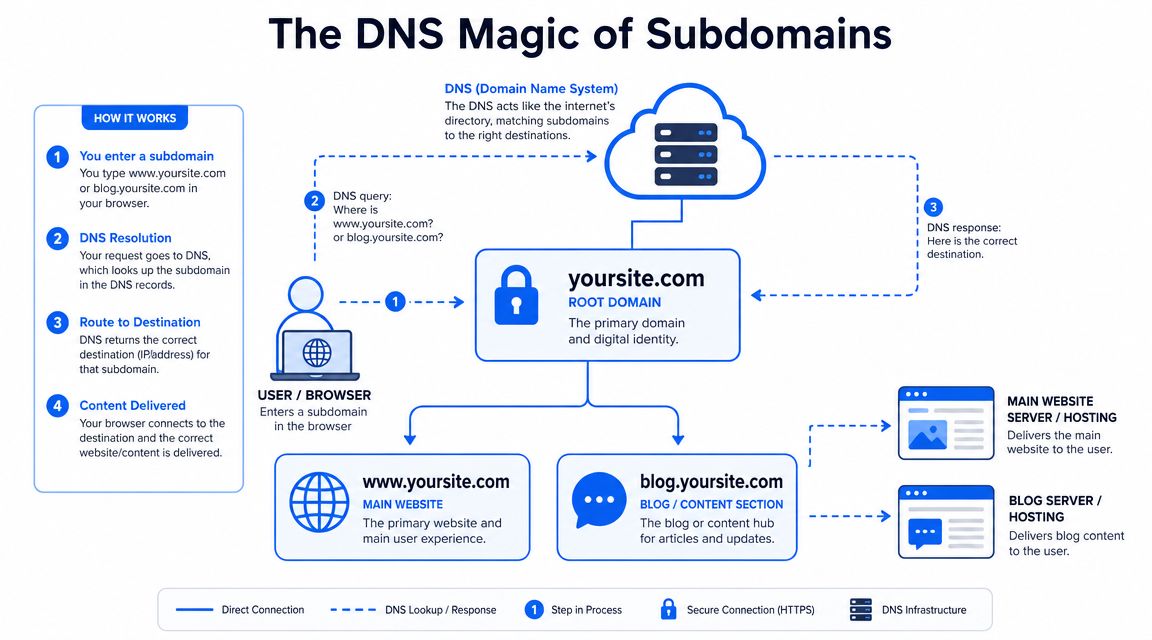
DNS is the routing layer
Think of your root domain as the name of a property, and DNS as the receptionist with a routing sheet. When a visitor asks for www.yoursite.com, DNS can send them one way. When they ask for blog.yoursite.com, DNS can send them somewhere else entirely.
That's the core power.
You can run the main site on one platform, the blog on another, and a support portal in a third system, all under the same brand. To the visitor, it looks coherent. Under the hood, it can be neatly separated.
If you want a more grounded explanation of how the records themselves work, this guide on what a DNS record is fills in the missing layer without turning it into a networking class.
The two record types you'll hear about
Most founders don't need to memorize DNS internals, but it helps to know the two common patterns:
- A record: Points a subdomain directly to a destination.
- CNAME record: Points a subdomain to another hostname instead of directly to a destination.
That distinction matters because many SaaS tools ask you to create a subdomain and connect it through DNS. A help center platform, ecommerce platform, or landing page builder may tell you to add one type of record or the other so traffic for that subdomain routes correctly.
Why the separation matters in real life
This isn't just technical trivia. It changes how teams work.
A separated subdomain can give engineering freedom to deploy a blog, store, or docs site without touching the main application. It can also reduce conflicts when one property needs a different CMS, plugin ecosystem, hosting setup, or release cycle.
Treat each subdomain like a mini-site with shared branding, not like a folder that automatically inherits every benefit and rule from the main domain.
That mindset saves a lot of pain later. If a team assumes the subdomain is “basically the same site,” they often skip proper analytics setup, forget search-console configuration, or overlook redirects and indexing controls. Then the subdomain launches half-connected and nobody understands why reporting is messy.
What works and what doesn't
A subdomain works well when you want clean isolation. It doesn't work well as a cosmetic shortcut.
Here's the difference:
| Approach | Usually works when | Usually fails when |
|---|---|---|
| Subdomain for a separate app or platform | The section has its own stack, team, or vendor | You expect it to behave exactly like a folder on the main site |
| Subdomain for testing or staging | You need controlled separation from production | You leave it crawlable or publicly exposed by accident |
| Subdomain for simple site categories | Rarely the best choice | The content belongs tightly with the main site |
If you remember one thing, make it this: DNS gives you freedom, but freedom creates responsibility. Every subdomain needs a purpose.
Strategic Use Cases for Subdomains
Subdomains shine when they solve an organizational problem, not when they exist because someone liked the look of the URL. The best use cases are the ones where separation helps the business run better.

Five cases where subdomains make sense
1. The content hub
A common example is blog.yourbrand.com. This can work well when the blog runs on a different CMS from the main site, or when the content team needs publishing freedom without touching core product pages.
This is especially common when the main site is a custom app and the blog runs on WordPress, Webflow, or another publishing tool.
2. The storefront
shop.yourbrand.com is a classic move when ecommerce needs different tooling, payment flows, or integrations. The store may have different templates, product logic, and operational owners than the marketing site.
In that setup, a subdomain can keep the shopping experience distinct without forcing the main site into an ecommerce-first architecture.
3. The support center
Many companies put help content at support.yourbrand.com or help.yourbrand.com, often because the knowledge base lives in Zendesk, Intercom, Help Scout, or another dedicated platform.
That's a good use of a subdomain because the support experience is functionally different. Search, article structure, login behavior, and user intent all differ from a homepage or pricing page.
4. Regional or language properties
Subdomains like fr.yourbrand.com or uk.yourbrand.com can make sense when teams need country-specific content, local operations, or separate publishing calendars. This is more compelling when regional sites aren't just translations, but operate as distinct properties.
5. Internal or pre-production environments
Developers often use subdomains for staging, previews, internal tools, and test environments. These uses are operationally clean because they separate work in progress from the public site.
The strategic thread across all five
The common pattern is meaningful difference. Different tech. Different team. Different audience. Different workflow.
From a site architecture perspective, subdomains are often used when a section has materially different technical requirements because they offer cleaner isolation than subdirectories, as noted in Wix's overview of subdomain use cases.
A subdomain is usually a business decision disguised as a URL decision.
That's why the root domain matters so much. Every subdomain inherits the brand frame of the main domain, even when the experience under it differs. If the root domain is weak, awkward, or forgettable, every subdomain built on top of it carries that baggage.
When teams are choosing the foundation, one option is to use NameSnag to search Available domains that have already dropped and can be registered now, or review Expiring domains that may become available soon. That's often useful when you're building a multi-property brand and want a root domain worth expanding.
What usually doesn't justify a subdomain
Some teams overuse subdomains for things that belong in plain subfolders. These are the usual offenders:
- Minor content categories: A blog category, service page type, or campaign archive usually doesn't need its own hostname.
- Temporary experiments with no owner: These tend to linger, get forgotten, and create maintenance clutter.
- Vanity structure: If the argument is “it looks more enterprise,” that's not enough.
The cleaner choice is often the better one. If the content belongs to the main site, keep it there.
The Great SEO Debate Subdomains vs Subfolders
Here, the friendly house analogy meets hard reality.
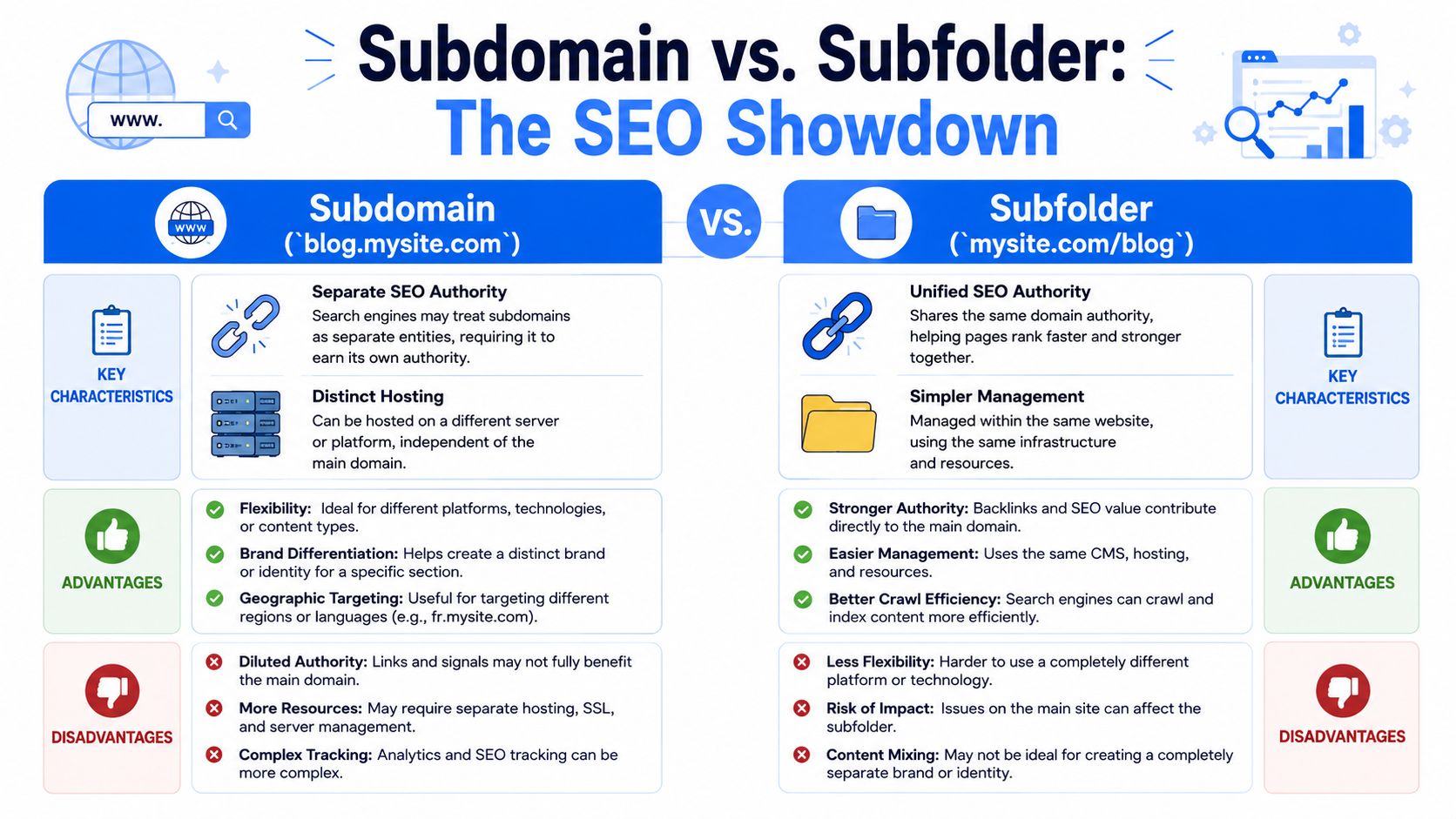
Google has long said it is “fine with using either subdomains or subdirectories,” and that position was publicly reiterated in 2018 by John Mueller. In day-to-day SEO practice, though, subdomains are often treated as separate entities that need their own indexing setup, sitemaps, and backlink-building, because links to the main domain don't automatically build the subdomain's authority, as summarized in Search Engine Journal's breakdown of subdomain vs subdirectory SEO.
That gap between platform guidance and field reality is why this debate never dies.
What usually wins for SEO
If your goal is to publish content that strengthens the main site, subfolders usually win.
A subfolder like mysite.com/blog keeps content close to the main domain. Internal links, relevance, and site structure tend to stay more unified. Reporting is cleaner. Technical oversight is simpler. This approach also avoids asking a separate hostname to earn visibility from scratch.
A subdomain like blog.mysite.com can still rank. Plenty do. But it often behaves like a separate property, which means you need a stronger operational reason to accept the extra SEO friction.
A plain decision table
| Structure | Better for | Main trade-off |
|---|---|---|
| Subfolder | Content marketing, SEO consolidation, simpler management | Less technical isolation |
| Subdomain | Separate platforms, distinct products, isolated teams | More SEO fragmentation |
If the content is core to the brand's authority, keep it under the main site unless there's a compelling technical reason not to.
The authority problem founders underestimate
People hear “Google says both are fine” and assume the outcome is identical. In practice, SEO teams still have to build relevance, links, crawl paths, and trust signals around what search engines index and evaluate.
That's why the term domain authority keeps coming up, even if it's often used loosely. If you want a practical refresher on how people use that concept in SEO discussions, this X8 Web Design guide to DA does a solid job of framing why authority signals matter in planning.
Here's the candid version: if your content team wants a blog to support the main commercial site, putting it on a subdomain usually creates extra work. Not impossible work. Just extra work.
If you need separation for engineering, use a subdomain. If you want SEO consolidation, default to a subfolder.
That rule isn't perfect, but it's dependable.
A quick visual explanation can help if your team is split on the issue:
When a subdomain is still the right SEO choice
Sometimes the technical case is stronger than the SEO downside.
Examples:
- Your docs live in a dedicated platform with limited URL control.
- Your support center is hosted by a vendor that's awkward to reverse-proxy into a subfolder.
- Your store uses a separate system with its own stack and release cycle.
- Your regional sites operate more like independent business units than translated pages.
In those cases, chasing perfect consolidation can create a bigger mess than accepting a separate property.
A note on scale
At larger organizations, subdomains become operationally significant fast. A 2024 CircleID analysis reported that researchers could identify almost two-thirds of a million subdomains across just 50 websites using several discovery methods, a detail included in the Search Engine Journal reference above. That tells you something important: mature brands don't just “have a site.” They manage fleets of web properties.
Small teams should learn from that without copying it blindly. Complexity is easy to add and annoying to remove.
Setting Up Subdomains and Avoiding Common Pitfalls
Creating a subdomain is usually the easy part. Managing it well is the part people skip.
Most registrars and DNS providers let you add one from a dashboard in a few steps. You create the subdomain, connect the DNS record your host or SaaS platform requires, wait for propagation, then test whether the destination loads correctly. If you've never done it before, a provider-specific walkthrough like this guide to setting up DNS in Namecheap helps reduce the guesswork.
The setup checklist that matters
You don't need a giant runbook for a first launch, but you do need discipline.
- Define ownership: Someone needs to own the subdomain after launch. Not during setup. After launch.
- Map the purpose: Decide whether it's public, private, indexed, or temporary before you touch DNS.
- Connect analytics and search tooling: If the subdomain is meant to perform, track it like a real property.
- Secure it properly: HTTPS, certificate handling, and redirect behavior should be settled before anyone promotes the URL.
The pitfalls that bite teams later
The first trap is forgetting that a subdomain is independently reachable. If you publish it, people and crawlers can find it. That includes half-finished environments, old campaign sites, and abandoned vendor connections.
The second trap is certificate sprawl. Teams launch blog, then help, then app, then staging, and nobody keeps track of SSL coverage, renewal paths, or which systems terminate traffic where.
The third trap is governance. A subdomain may start as a quick experiment and end up becoming customer-facing infrastructure with no clear maintenance plan.
Public subdomains are part of your brand surface area, even when they started as technical convenience.
Security is the other reason to stay organized. A DNSRF study found that 36.27% of phishing attacks in its dataset used subdomains from commercial providers, which is why every subdomain deserves active monitoring and cleanup, not just initial setup, according to the DNSRF analysis of subdomain abuse in phishing.
A safer operating habit
The teams that avoid headaches usually do three things well:
- They keep an inventory of active subdomains.
- They remove old DNS entries when tools are retired.
- They audit indexability, redirects, certificates, and crawl exposure on a routine basis.
If you want a broader process for checking those issues systematically, this in-depth technical SEO audit guidance from UFO Performance Marketing is a useful companion.
Subdomains don't create chaos on their own. Unowned subdomains do.
Making the Final Call for Your Project
A founder asks the same question in different words every week: should this new section live on example.com/blog or blog.example.com?
The right answer has less to do with what looks tidy in the browser bar and more to do with ownership, platform constraints, search goals, and future maintenance. Subdomains are a business decision disguised as a technical one.
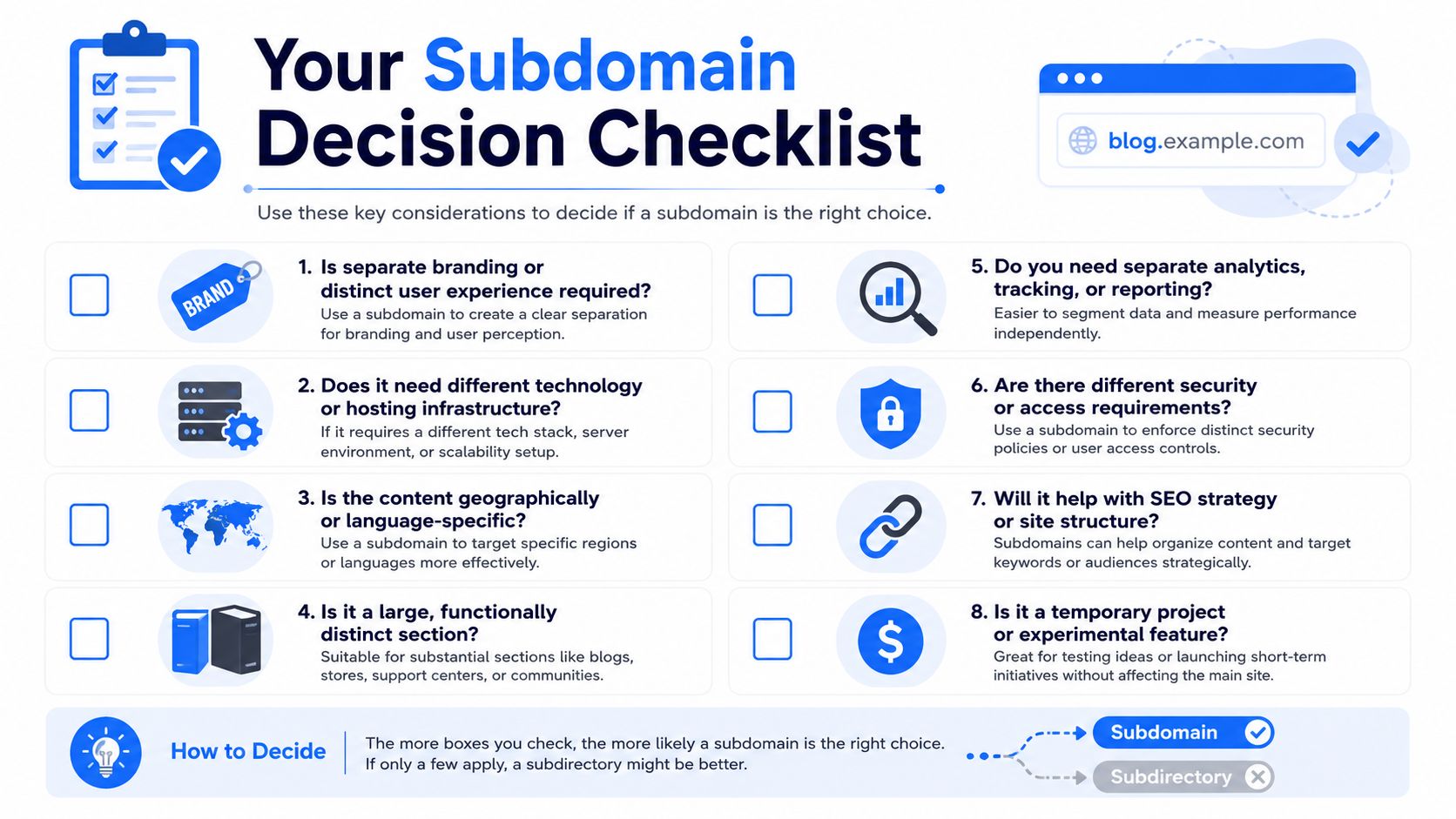
Ask these questions before you choose
- Does it run on a different system? A separate CMS, ecommerce platform, or app stack often fits better on a subdomain because deployment, hosting, and security stay cleaner.
- Does another team own it? Different owners usually means different release cycles, approval processes, and support responsibilities. A separate hostname can reduce operational friction.
- Is this content meant to build your main site's organic visibility? If yes, a subfolder is usually the better starting point.
- Will visitors treat it like a separate destination? A help center, customer app, partner portal, or country site may deserve its own front door.
- Can your team maintain it for years, not weeks? If the answer is shaky, do not create another public subdomain.
A simple rule works well here. If the section needs independence, use a subdomain. If it should strengthen the main site, keep it in a subfolder.
The shortest version
Use a subdomain for:
- Separate apps
- Support centers
- Stores running on different systems
- Regional sites with real autonomy
- Staging or internal environments
Use a subfolder for:
- Blog content tied to your main SEO strategy
- Service categories
- Resource libraries closely connected to core conversion pages
- Content that shares the same team, platform, and goals as the main site
I usually tell teams to ignore aesthetics for a minute. help.brand.com can be the right choice even if brand.com/help looks cleaner on a slide deck. The better structure is the one your team can ship, secure, measure, and govern without creating a maintenance mess six months from now.
If you are still choosing the root domain before splitting anything into subdomains, NameSnag is a practical place to research expiring and dropped domains with SEO and branding potential. Start with a strong base domain first. The subdomain decision gets easier after that.
Find Your Perfect Domain
Get access to thousands of high-value expired domains with our AI-powered search.
Start Free Trial