
You buy a domain. You're excited for about five minutes.
Then you open the registrar dashboard, see a tab called DNS, and suddenly it feels like you've walked into the boiler room of the internet. A records. MX. TXT. Nameservers. TTL. Nothing about that screen looks like “launch your site and make money.”
The good news is that DNS isn't magic, and it isn't only for sysadmins. If you own domains, build sites, buy expired names, flip digital assets, or care about SEO, DNS records matter because they control where your traffic goes, where your email goes, and whether outside services trust your domain in the first place.
A simple way to think about it is this. Your domain is like a building you just bought. The name is on the deed, but that alone doesn't make the place useful. People still need the street address, the lobby directory, the mail room, and the front desk instructions. DNS records are those instructions.
Your Domain Is an Empty Building Until You Have DNS
You buy a domain, point a logo at it in your head, maybe even picture the traffic or resale value. Then nothing loads, email does not work, and Google Search Console wants proof you own the name.
That gap is DNS.
A domain by itself is ownership on paper. DNS is the instruction set that makes the name usable. It tells browsers where the site lives, tells mail servers where to deliver messages, and tells outside services how to verify control of the domain. Without those records, a good domain is parked potential.
At the technical level, a DNS record is a resource record stored in your domain's zone file. The core format was defined in RFC 1035, and it still underpins how registrars, hosting companies, and DNS providers publish answers for the rest of the internet.
The simplest comparison is a building directory. The domain name gets someone to the property. DNS tells them which door to use, where the mail room is, who manages the place, and whether yesterday's directions should still be trusted.
That distinction matters more than beginners expect, especially if the goal is rankings, lead flow, or a profitable flip. I have seen strong expired domains lose momentum because the DNS was sloppy after a migration. The backlinks were still there, but the site resolved inconsistently, verification broke, or email for outreach never landed. On the other side, clean DNS setup makes a domain look well run, which helps with trust, indexing, and buyer confidence during a sale.
A few records carry most of the weight early on:
- A record points a hostname to an IPv4 address.
- AAAA record does the same for IPv6.
- MX record tells the internet where email for the domain should go.
- TXT record often handles verification and email policy.
If those are wrong, the usual symptoms show up fast:
- the site does not load
- email goes missing or bounces
- domain verification fails
- a host switch works for some users but not others
- crawlers hit the wrong destination
Good DNS is boring, and that is a compliment. It resolves cleanly, supports email, and stays out of the way while the domain does its job. If you use Namecheap and want a practical walkthrough, this step-by-step guide to setting up DNS in Namecheap is worth keeping open in another tab before you change anything.
How the Internet Finds Your Website
When someone types your domain into a browser, the browser needs directions. Not vibes. Not branding. Directions.
The easiest way to understand DNS is to treat it like the postal system. The visitor writes a letter addressed to your domain. The internet then figures out which office has the final delivery instructions.
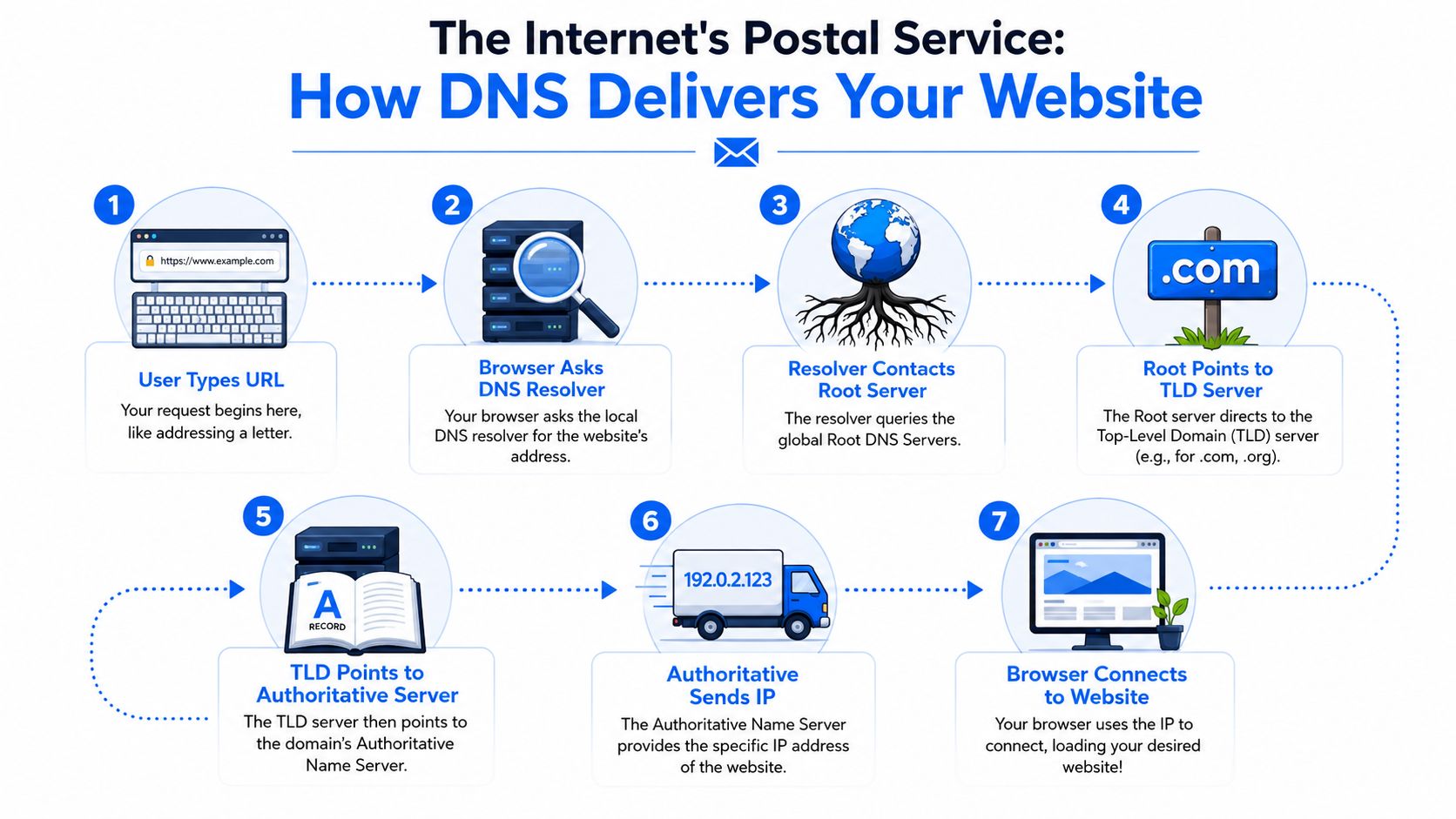
The lookup path in plain English
Here's what usually happens behind the scenes:
The user types your domain
A browser gets a request for your site. It doesn't automatically know which server hosts it.
The browser asks a DNS resolver
The resolver is like the local post office. It checks whether it already knows the answer from a recent lookup.
If it doesn't know, it starts asking up the chain
It checks the broader DNS system to find who's responsible for your domain's extension, such as .com.
It gets pointed to the authoritative nameserver
This is the final source of truth for your domain's DNS records.
The authoritative nameserver returns the record
If your website uses an A or AAAA record, it provides the browser with the machine-readable destination it needs.
The browser connects to the server
Once it has the answer, it can request the webpage and load it for the visitor.
Why this matters more than people think
This whole process usually feels invisible, which is why many site owners ignore it until something breaks. But when you understand the lookup chain, a lot of business problems stop being mysterious.
If the wrong nameserver is set, the resolver may get sent to the wrong place. If the right nameserver exists but the A record is wrong, the browser may go to the wrong server. If the DNS is correct but the hosting isn't, the browser finds the building and discovers the lights are off.
The internet doesn't “guess” where your site is. It follows instructions.
That's a useful mindset for SEO and domain investing too. A clean domain setup tells you the asset was managed by someone competent. A chaotic setup often hints at rushed migrations, abandoned tools, forgotten subdomains, or low-quality prior use.
A simple mental model
If you want the short version, keep this picture in your head:
- Resolver = local clerk
- Root and TLD system = regional sorting network
- Authoritative nameserver = building manager with the official tenant list
- DNS record = the instruction card
Once you get that, the phrase what is a DNS record stops sounding technical. It's just a way of asking, “Which instruction card is the internet reading for this domain right now?”
The DNS Record Cast of Characters
DNS records make more sense when you stop treating them like random letters and start treating them like staff roles inside a company. Each one has a job. Some handle visitors, some handle mail, some handle authority, and some handle trust.
What matters in practice is that DNS records don't just label a domain. They drive service-routing decisions. MX records decide which mail exchanger receives mail, and if there are multiple options, the lower-numbered preference gets tried first. NS records identify the authoritative nameservers, which are the final source of truth for the zone. TXT records often carry verification and anti-spoofing data such as SPF values, making them central to modern email and ownership workflows, as explained in Michigan State University's DNS records guide.
The quick-reference table
| Record Type | Job Title | What It Does |
|---|---|---|
| A | Street Address Clerk | Sends a hostname to its IPv4 destination |
| AAAA | IPv6 Address Clerk | Sends a hostname to its IPv6 destination |
| CNAME | Alias Manager | Points one hostname at another hostname |
| MX | Mailroom Supervisor | Tells mail servers where to deliver email for the domain |
| NS | Property Manager | Identifies which nameservers are authoritative |
| SOA | Operations Director | Holds core zone information and control details |
| PTR | Reverse Lookup Officer | Connects an IP back to a hostname |
| TXT | Compliance and Verification Desk | Publishes verification, policy, and security text |
Which ones matter most for most people
If you're not running a huge network, you'll usually care most about these:
- A and AAAA records for getting the website to load
- CNAME records for aliases like www
- MX records for business email
- TXT records for verifications and security policies
- NS records for who controls the DNS in the first place
That last one gets overlooked. People obsess over A records and then forget the nameservers determine who even has the authority to answer DNS queries for the domain.
What works and what fails in the real world
A record mistakes are usually obvious. The site breaks.
MX and TXT mistakes are nastier because the site can look fine while email suffers unnoticed. That's one reason I tell domain buyers to check mail-related setup whenever they inherit an older domain or reactivate a parked one. Reverse DNS, authentication, and validation all feed into how trustworthy a domain looks to other systems. If you want a practical companion read on this side of email hygiene, these insights on email list cleaning tools help explain why clean sender identity and clean recipient data need to work together.
A domain can look brandable on the surface and still carry a messy operational history underneath.
For a closer look at the workhorse record that sends browsers to your server, this explainer on what DNS A records are is worth reading. A lot of website problems come down to that one line being wrong, stale, or pointing at an old host nobody remembered to retire.
A good default mindset
Don't memorize every record type just to sound technical. Know who does what.
That's enough to make smart decisions, ask better support questions, and evaluate a domain like an operator instead of a spectator.
DNS Records That Guard Your Reputation
The biggest mistake in beginner DNS guides is that they treat DNS like a directions app and stop there.
That's outdated. DNS is also a security and abuse-control layer. Modern DNS records can publish controls such as SPF, DKIM, DMARC, and CAA, which help prevent spoofing, phishing, and unauthorized TLS certificate issuance. Many organizations still misconfigure these records or leave them out, even though TXT-based security controls have become a critical part of how mail and certificate ecosystems establish trust, as described in Cloudflare's DNS records learning guide.
The digital passport model
If your domain sends email, these records are your passport, signature, and border policy.
- SPF is the approved sender list. It tells receiving servers which systems are allowed to send on behalf of your domain.
- DKIM acts like a tamper-evident seal. It helps prove the message wasn't altered in transit and that it came from a server with the right signing setup.
- DMARC tells receiving systems how to handle mail that fails those checks and creates alignment between your visible From domain and the underlying authentication.
If you skip these, you're making life easier for spoofers and harder for yourself.
Why investors and operators should care
A domain's reputation affects more than outbound campaigns. It affects trust.
If you buy an expired domain and plan to use branded email, launch outreach, or build a company on it, you don't want to discover later that the security basics were never configured properly or were set up sloppily. A domain with weak trust signals can create headaches long after the purchase, especially if people start receiving suspicious-looking mail that appears to come from your brand.
That's one reason domain due diligence shouldn't stop at backlinks and archive snapshots. Reputation follows the asset. If you care about brand safety, this piece on domain name reputation is the kind of practical reading that helps you connect DNS, email trust, and real-world risk.
The records most people ignore until it hurts
Security-related DNS records don't usually generate applause because they don't make your homepage prettier. They make your operation safer.
Here's the blunt version:
- Ignoring SPF invites impersonation confusion.
- Ignoring DKIM weakens message integrity.
- Ignoring DMARC means you're not giving receivers a clear policy.
- Ignoring CAA gives up control over who can issue certificates for your domain.
If your domain is a business asset, security records aren't optional housekeeping. They're brand protection.
The good setup is rarely glamorous. It's disciplined. You publish the right records, keep them current when vendors change, and avoid stacking random verification TXT entries forever like junk in a garage.
The Waiting Game of DNS Propagation and TTL
This is the part people hate.
You update DNS, hit save, refresh the browser, and nothing changes. Or worse, it changes on your phone but not your laptop. Or the site works in one region while someone else still sees the old version. That's usually not chaos. It's TTL doing its job.
A DNS resource record includes type, class, TTL, and type-specific data, and TTL controls how long resolvers can cache the answer. That directly affects propagation speed, load on authoritative servers, and the chance of stale records during migrations or failover, as outlined in Wikipedia's Domain Name System reference.
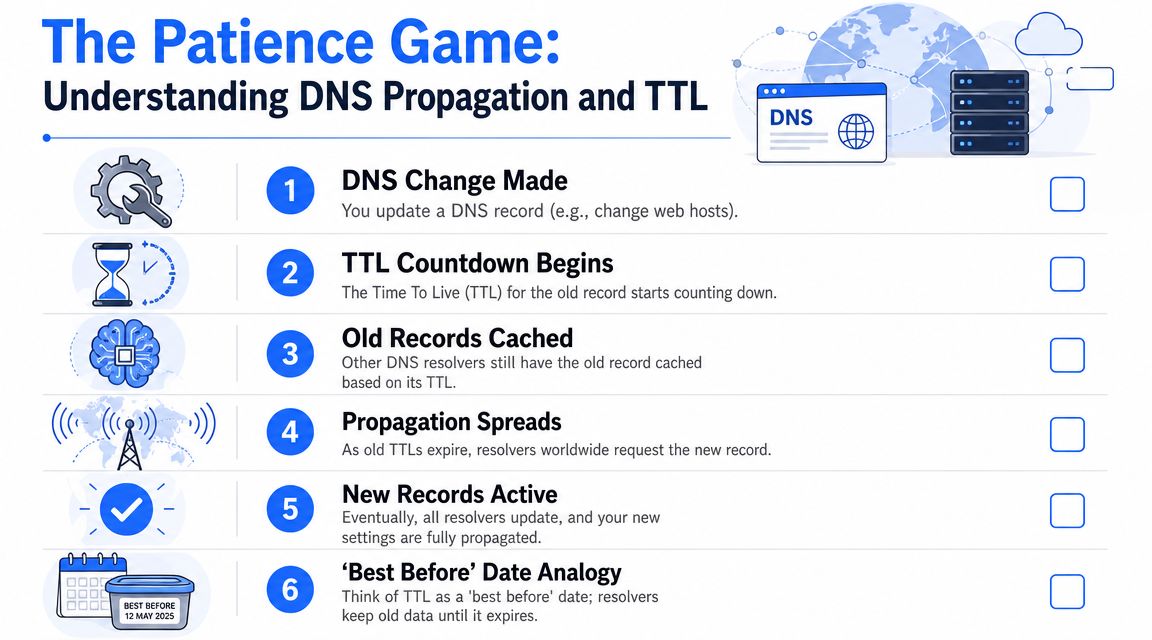
TTL is a best-before date
The cleanest analogy is food labeling.
A resolver stores a DNS answer and keeps using it until its best-before date expires. That date is the TTL. Until then, it doesn't need to ask the authoritative nameserver again.
That creates a trade-off:
- Higher TTL means more caching and fewer repeat lookups
- Lower TTL means changes can get picked up faster
- But lower TTL can mean more frequent requests back to the authoritative source
When to use lower or higher TTL
You don't need one perfect TTL for everything. You need the right TTL for the situation.
Use a lower TTL before planned changes such as:
- Host migrations where traffic will move to a new server
- Email cutovers when mail routing is changing
- Failover preparation if you may need to redirect quickly
Use a higher TTL for records that rarely change and don't need agility.
Operator note: Lower TTL helps when you expect change. It doesn't rewind caches that already stored the older answer.
That last part trips people up. If a resolver cached the old value before you lowered TTL, it may keep that answer until the older cache life runs out. That's why experienced operators adjust TTL ahead of time, not after the move is already underway.
Propagation is distributed by design
There is no giant red button labeled “update the internet now.”
Propagation takes time because DNS is a distributed system with caches spread across many resolvers. Some users will see the new answer sooner than others. That's normal.
A practical habit is to plan DNS changes during a calm window, document the old values before editing anything, and avoid making five other changes while you wait. If the website, email, and verification all change at once, you've created your own mystery.
How to Troubleshoot Common DNS Issues
Most DNS problems look dramatic from the outside and boring from the inside.
A site won't load. Email bounces. A verification record won't pass. The usual causes are a typo, the wrong record type, the wrong nameserver, or an old cached answer hanging around longer than expected.

A three-step DNS detective routine
You don't need to become a network engineer. You just need a repeatable process.
Check the live records
Use a tool like MXToolbox or Google Admin Toolbox Dig to see what the internet currently sees for A, MX, NS, and TXT records.
Check the control point
Confirm where the authoritative nameservers are. People often edit DNS in one dashboard while the domain is using nameservers from another provider.
Check whether the problem is DNS or the destination
If DNS points correctly but the site still fails, the issue may be with hosting, SSL, or the application itself rather than the record.
Common symptom patterns
Here's the pattern recognition that saves time:
Website down, email fine
Usually points to web records or hosting, not full-zone failure.
Website fine, email broken
Often an MX, TXT, or provider-side mail issue.
Nothing works
Check nameservers first. If authority is broken, everything can unravel at once.
Verification fails but the record looks correct
Look for propagation delay, wrong host field formatting, or duplicate TXT entries.
Don't start by changing random records. Start by identifying which single function is failing.
If you work in SEO or technical site management, DNS checks should sit inside the broader process, not outside it. This guide to effective technical website audits is useful because it frames DNS as one piece of site health rather than an isolated puzzle.
A quick visual explainer
Sometimes it helps to watch someone walk through the logic instead of reading another checklist.
What not to do
The worst troubleshooting habit is panic editing.
Don't change nameservers, then swap hosts, then add extra records, then remove old ones, then clear local caches, then ask support why the internet is inconsistent. Make one diagnosis at a time. DNS rewards patience and punishes improvisation.
DNS Records as a Secret Weapon for SEO and Domain Investing
You find an expired domain with clean backlinks, a decent name, and a price that still looks sane. Before bidding, check the DNS trail. It often tells you whether you're buying a former business asset, a parked shell, or someone else's cleanup job.
For SEO and domain investing, DNS is less about setup and more about history. Records can show whether a domain once ran real email, used serious infrastructure, passed ownership checks for major services, or bounced between cheap hosts and abandoned tools. That context changes how I price a domain and how much risk I'm willing to absorb.
That matters because DNS records leave practical clues. MX records can suggest the domain supported an actual company. Nameservers can hint at whether the owner used a stable provider or a disposable stack. TXT records often reveal verification for Google, Microsoft, Shopify, Mailchimp, and other platforms. Old fragments can also expose sloppy migrations, neglected subdomains, or a spam problem that never got cleaned up. IBM's overview of DNS records covers the mechanics. For investors and SEOs, the value is in reading those mechanics like an audit trail.

What DNS can reveal about a domain
A domain name is branding. DNS is behavior.
When I review a domain, I look for signals like:
- MX records that suggest the domain handled real business email
- Nameserver choices that point to stable operations or low-effort parking
- TXT records tied to ownership verification, email policy, or third-party tools
- Leftover records from old services, which can reveal churn, neglect, or messy transfers
No single record gives a verdict. A pattern does.
A domain with clean branding but chaotic DNS history can still become a good buy, but it usually deserves a lower bid and a stricter rebuild plan.
Why this matters for SEO value
Search performance is not just content and links. Operational quality matters, especially when you're rebuilding an aged domain or deciding whether an expired one is worth reviving.
Domains that were run like real businesses often show cleaner infrastructure and fewer signs of abuse. Domains that were burned through affiliate pages, bulk mail, or short-term flips often leave behind junk records, inconsistent providers, and signs that trust was never a priority. That does not make the domain unusable. It does mean you should expect more due diligence, more cleanup, and sometimes a longer road back.
If you want the broader playbook beyond DNS, this guide to learn Google ranking methods connects technical trust, site quality, and search visibility in a useful way.
The investor's practical filter
Expired domain buyers tend to focus on backlinks, anchor text, and archive history first. I check those too. But DNS adds a layer many buyers skip, and that creates an edge.
Use DNS history to ask sharper questions:
- Was this domain attached to a functioning business or just a parked page?
- Did it send and receive real mail, or was it never used seriously?
- Do the records suggest continuity and maintenance over time?
- Are there signs of spam, abandoned tools, or careless ownership changes?
A polished domain can hide a messy operating history. DNS is often where that starts to show.
That's why DNS is useful in domain investing. It helps separate names that merely look good from assets that had been used, maintained, and more likely to carry clean commercial value.
If you're hunting for domains with real upside, NameSnag is built for exactly that job. You can browse available domains that just dropped and can be registered now, or review expiring domains that are still in their grace period and getting close to the drop. The time filters make it easy to narrow the list to today, the last few days, or a wider window when you want more inventory to inspect.
Find Your Perfect Domain
Get access to thousands of high-value expired domains with our AI-powered search.
Start Free Trial