Launching a new site is exciting right up until you remember one ugly truth. Google doesn't care that you bought a great domain on Tuesday and shipped polished pages on Friday.
That's the problem with SEO for a new domain. You're asking search engines to trust something with no history, no audience, and usually no backlinks. If you picked the wrong domain path, launched with weak structure, or rushed authority building, you can lose months before the site even has a fair shot.
The good news is that the playbook is pretty clear. The bad news is that the playbook is often executed out of order.
The First Big Choice Brand New vs Aged Domain
The first decision happens before design, content, or keyword research. You either start with a brand-new domain or you buy an aged domain with some history attached.
That choice changes the whole SEO game.
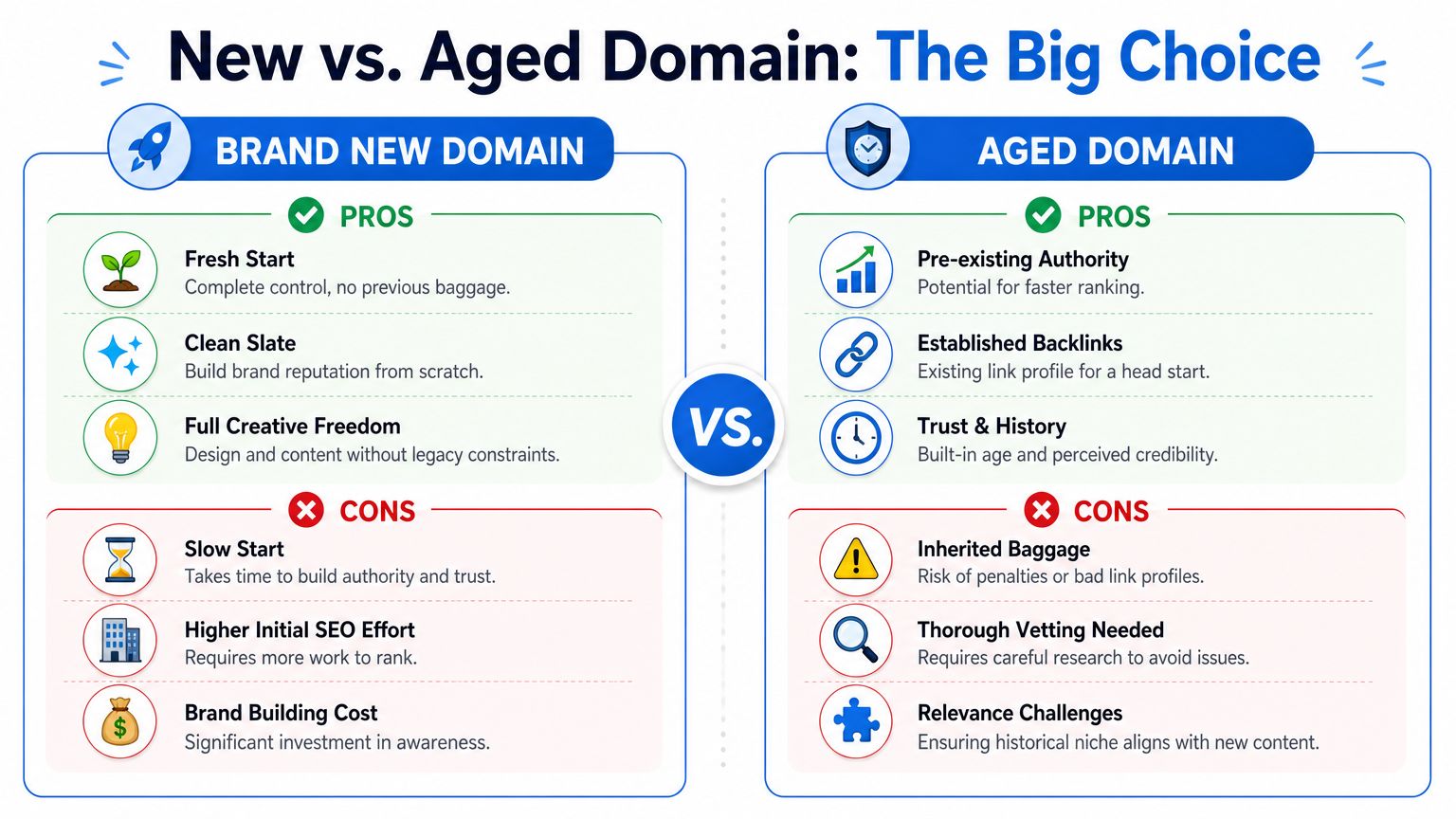
A fresh domain is clean. No weird redirects. No spam scars. No mystery backlinks from a casino forum in a language you can't read. You get full brand control and zero legacy mess.
The trade-off is brutal. You're starting from absolute zero, and visible SEO movement for a brand-new site commonly takes 3 to 6 months and often 6 to 12 months, as reflected in guidance built around Google's view of SEO as an ongoing process of accessibility, content quality, and promotion in the Google SEO Starter Guide.
An aged domain can shorten the climb if it has relevant backlinks, a clean history, and topic overlap with what you're building now. It can also become an expensive mistake if the old link profile is junk or the previous site lived in a totally different niche. I've seen people get seduced by age alone. Age by itself doesn't save you. Useful history does.
When a brand-new domain makes more sense
A new domain is usually the better bet when:
- Brand matters most. You want a name you can build a company around, not just something with old links.
- You need a clean legal and reputational slate. No prior owner, no confusion, no inherited baggage.
- The site's long-term plan is larger than SEO. Investors, partnerships, and direct traffic care about naming quality too.
This is also the path I'd choose if I couldn't confidently audit an aged domain. If you don't know how to vet backlink history, indexation issues, and prior use, a “cheap shortcut” can become a long cleanup project.
When an aged domain is the sharper move
An aged domain is worth serious consideration when:
- Time matters. You need a head start, not a philosophical debate about starting from scratch.
- The topic match is tight. Old relevance supports new relevance.
- You can inspect the history properly. Not guess. Inspect.
Aged domains are leverage. They're also liability if you buy one blindly.
Here's the quick comparison I use before committing.
| Factor | Brand New Domain | Aged Domain |
|---|---|---|
| Starting authority | None | May have existing trust signals |
| Risk profile | Low legacy risk | Higher due diligence burden |
| Branding flexibility | Maximum | Sometimes constrained by prior use |
| Early SEO speed | Usually slower | Can be faster if history is clean and relevant |
| Cleanup work | Minimal | Often significant before launch |
If you're weighing naming and SEO trade-offs side by side, this guide on domains for SEO is worth reading before you commit.
Building Your Technical Launchpad
A new site can lose its first month before anyone notices. I have seen polished launches sit invisible in Google because staging noindex tags stayed live, canonicals pointed to the old dev domain, or the sitemap only listed half the site. On a brand-new domain, those mistakes slow discovery. On an aged domain, they waste whatever trust and crawl demand you bought the domain for in the first place.
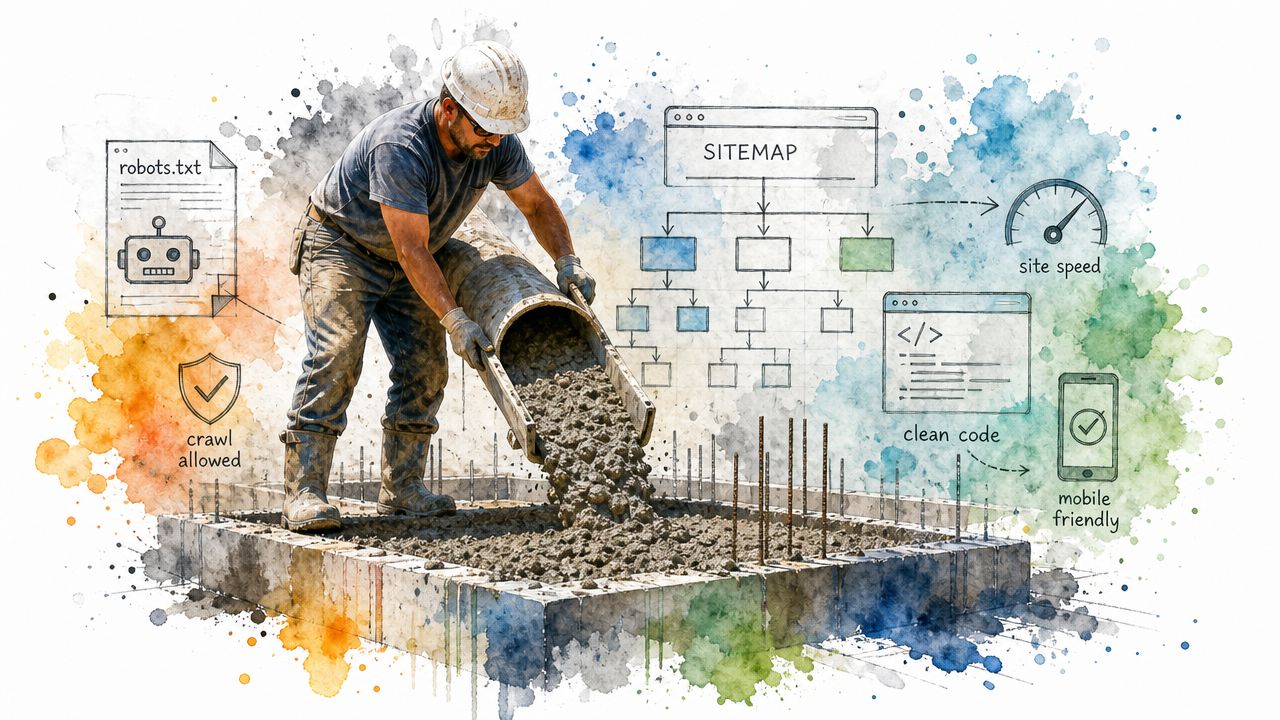
The job here is simple. Give search engines a clean path to your money pages, remove mixed signals, and launch with enough technical clarity that Google does not have to guess what belongs in the index.
Get the infrastructure right first
Start with DNS, hosting, and crawl access. If those are shaky, everything above them is cosmetic.
Use a DNS provider your team can manage without confusion, and use hosting that stays stable during normal traffic spikes. New domains need clean discovery. Aged domains need stability fast, because any downtime or redirect mess can disrupt pages that might already have backlinks or historical crawl patterns attached.
Teams also trip over basic setup more often than they admit. If developers, IT, and marketing are mixing up routing, verification, and email records, send them this explainer on what a DNS record is before launch week turns into a blame session.
If you need the broader build sequence before the SEO checks, this guide on steps for creating a website is useful because it covers the operational setup that often breaks search performance later.
The launch checks that prevent real damage
I keep this list short because long checklists hide the items that break indexation.
- Confirm the live site is crawlable. Check robots.txt, meta robots tags, x-robots headers, canonicals, and internal links on the production domain, not the staging copy.
- Submit a clean XML sitemap. Include indexable URLs only. Leave out redirected, canonicalized, noindex, and thin placeholder pages.
- Set up Google Search Console and Bing Webmaster Tools on day one. This gives you crawl visibility before problems spread across the site.
- Make primary navigation work without fragile workarounds. Key pages should be reachable through standard HTML links, not hidden behind search functions, faceted filters, or JavaScript states that fail on crawl.
- Check templates for duplication. New domains do not get much room for error, and aged domains can dilute inherited relevance if every service page reuses the same copy.
- Validate redirects before launch if you are using an aged domain. Historical URLs with backlinks should resolve cleanly to the closest matching page, not the homepage.
One rule saves a lot of pain. If an important page can only be found through internal search, a filter combination, or a click path that depends on heavy scripts, treat that page as weak until logs or Search Console prove otherwise.
Brand-new domains and aged domains need different technical discipline
Brand-new domains usually have one problem. Search engines do not know or trust them yet. Technical work should reduce friction. Keep the architecture tight, submit the sitemap immediately, and avoid publishing junk URLs that waste crawl attention.
Aged domains come with a different risk profile. They may have backlinks, prior indexation, and old URLs that still matter. Before launch, check archived versions, pull the backlink profile, map valuable legacy URLs, and decide what gets kept, redirected, or dropped. I have seen owners buy a strong expired domain, redesign it beautifully, then erase its advantage by deleting every old URL and replacing it with a clean but disconnected structure.
That is how people blame a sandbox when the actual problem was technical amnesia.
A quick visual walk-through helps if you're setting up the technical basics for the first time:
What not to overthink
Do not burn launch week on edge-case schema, fancy plugins, or perfect Lighthouse scores while crawl directives are wrong and the sitemap is missing.
Use this order instead:
- Crawlability
- Indexation signals
- Redirect and canonical accuracy
- Template-level on-page basics
- Speed and enhancement work after the site is discoverable
That order is boring. It also prevents the failures that keep new domains buried and aged domains from cashing in on their head start.
Your Content and Site Structure Blueprint
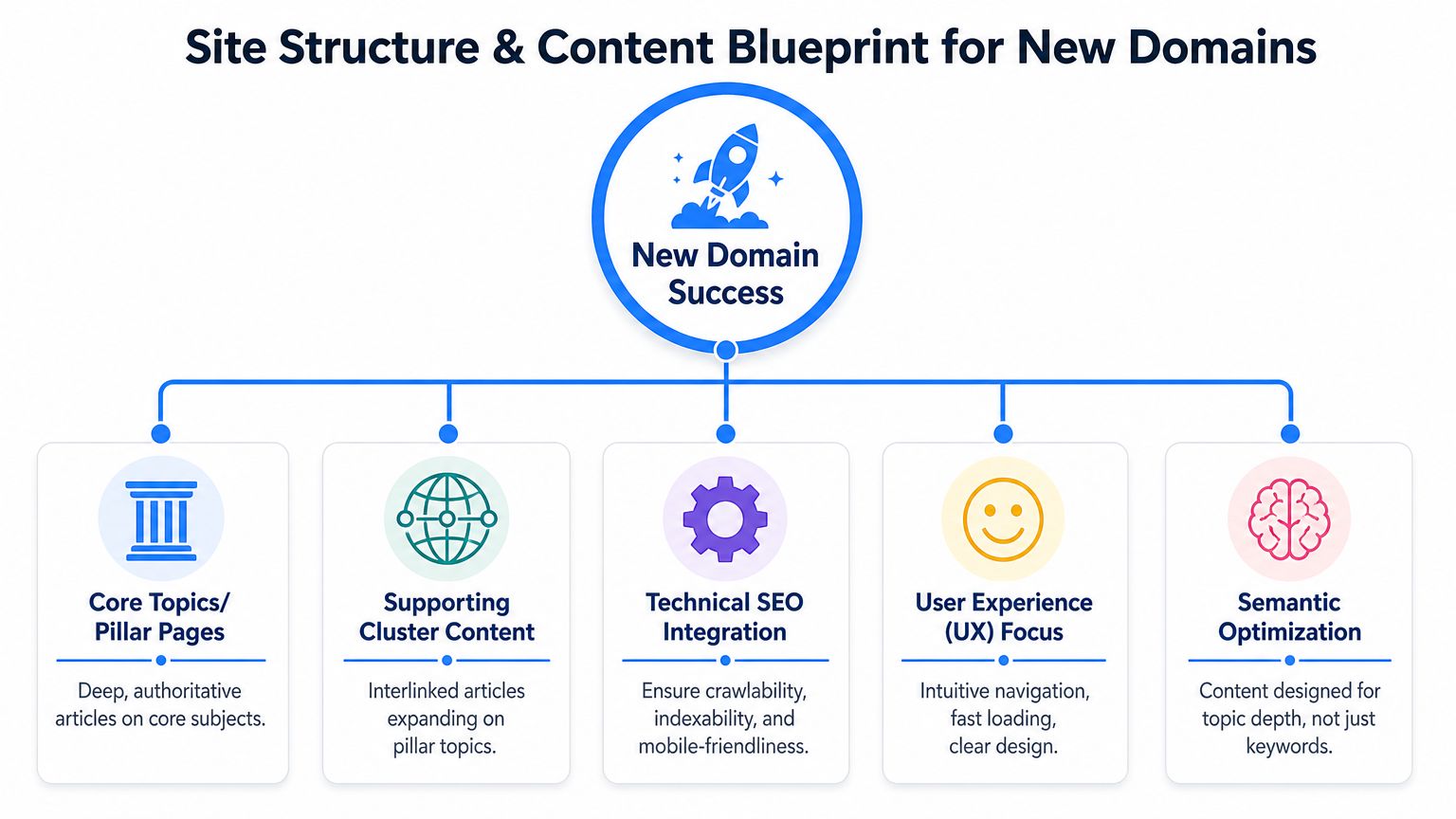
A new domain can't afford random publishing. You need a narrow structure, a clear topical center, and pages that do more than reword what fifty older sites already said.
Generic top-of-funnel content is slower to rank in the current AI-shaped search environment. Commentary on SEO strategy for 2026 argues that new domains should prioritize commercial-intent topics, question clusters, and unique insights from day one in order to show stronger information gain and avoid getting buried by summary-style content, as discussed in this SEO strategy discussion on YouTube.
Pick a smaller hill to own
Most new sites try to look big. Smart new sites try to look focused.
If you launch a cybersecurity blog, don't open with broad posts on “what is malware,” “what is phishing,” “what is antivirus,” and “best VPNs.” That's a content graveyard. Older domains already own those terms, and AI summaries can flatten generic explainers even further.
Pick one commercially useful lane and go deep. For example:
- Managed detection content for a B2B security service
- Local service pages and buyer FAQs for a home services company
- High-intent tool comparisons and use cases for a SaaS product
That creates topical clarity. Search engines can map your expertise faster when the first wave of content fits together.
Structure before scale
Content without structure is chaos. Structure without content is an empty shell.
I map new sites like this:
| Page type | Job | Common mistake |
|---|---|---|
| Pillar pages | Define the main topic clusters | Making them too broad to rank or too shallow to matter |
| Cluster pages | Answer specific questions and use cases | Publishing them without linking back to the pillar |
| Commercial pages | Capture buyer intent | Writing them like blog posts instead of decision pages |
| Utility pages | Add practical value and linkability | Treating them as isolated tools with no context |
The internal linking should feel obvious. Pillar pages link down to clusters. Cluster pages link back up. Commercial pages connect to supporting educational content. Related pages cross-link where the user would naturally want the next answer.
If your URL structure looks logical but your internal links don't reinforce that logic, search engines get mixed signals.
What launch content should actually include
A good launch set for a new domain usually includes a mix, not one content type repeated with different titles.
Here's a practical blueprint:
- One or two money pages. Service pages, product pages, or category pages tied to actual business intent.
- A small cluster of supporting articles. Not fluff pieces. Real buyer questions, objections, comparisons, or implementation topics.
- At least one trust-building asset. Original insight, expert perspective, unique process, or a valuable resource.
- Clear navigation paths. Users and crawlers should know where to go next.
Canonical tags matter from the start too. New sites create duplicate issues faster than people think, especially with tracking parameters, CMS archives, tag pages, staging leftovers, and printer-friendly versions nobody meant to expose.
What works better than “just publish blogs”
I'd rather launch with eight tightly connected pages than thirty weak articles.
Strong early pages tend to share a few traits:
- They answer a specific job to be done
- They include real point of view
- They support a commercial path somewhere on the site
- They link into a coherent cluster
That's how you make a new domain look intentional instead of unfinished.
Building Authority Without Raising Red Flags
New domains need authority, but it's common for people to get impatient and do dumb things. They buy sketchy links, blast cold outreach to anyone with a contact form, or swap links with irrelevant sites that would never send a real visitor.
That approach doesn't build trust. It creates noise.
Do this, not that
There's a clean way to build links on a new domain, and it looks a lot less exciting than the junk sold in link marketplaces.
Do this
- Pitch useful assets. Original resources, strong comparison pages, useful tools, or data-backed pages people can reference.
- Target relevant sites. Industry blogs, niche publications, local organizations, partner sites, and communities tied to your topic.
- Use guest posts selectively. Not as mass production. Use them where audience fit is obvious.
- Follow up like a person. Short outreach, specific angle, no fake familiarity.
Not that
- Don't buy volume packages. “Hundreds of links” usually means hundreds of problems.
- Don't chase irrelevant authority. A strong-looking site in the wrong niche can still be a bad link.
- Don't outsource judgment. Many link vendors optimize for deliverables, not consequences.
- Don't spray the same email template everywhere. Editors can smell this instantly.
If you want a modern perspective on authority building in an AI-shaped search environment, this practical guide for AI-driven SEO is useful because it ties domain strength to relevance and quality rather than brute-force link accumulation.
The first links matter more than the fiftieth bad one
A new domain doesn't need a giant pile of links right away. It needs the right kind of validation.
The best early links usually come from:
- Existing relationships. Suppliers, associations, partners, podcasts, communities, or founders' networks.
- Useful resources. Tools, templates, glossaries, calculators, or pages people reference naturally.
- Focused digital PR. A story, angle, or original insight that's worth covering.
I like to ask one question before any outreach campaign. “Would this link still be worth getting if Google didn't exist?” If the answer is no, I usually skip it.
A safe link usually has a human reason to exist.
How to avoid toxic growth
Not every bad link is a crisis. But if you build a pattern of junk, you create your own cleanup project.
Watch for warning signs:
- Fast bursts of unrelated links. That often points to low-quality placement networks.
- Repeating anchor text patterns. Looks manipulated because it usually is.
- Links from expired-domain junk sites. Especially when every article exists only to host outbound links.
- No referral value at all. Not the only test, but a helpful gut check.
If you're auditing questionable history or cleaning up a messy profile, this guide on what toxic backlinks are is a practical place to start.
The safest authority play is still the least glamorous one. Publish something worth citing, put it in front of the right people, and build relationships that can outlast one campaign.
Measuring Progress and Setting Realistic Expectations
Two sites launch on the same day. The brand-new domain sits in crawl-and-index mode for weeks. The aged domain gets impressions faster, then hits a ceiling because its old history does not match the new topic set. Both owners panic for different reasons, and both can make the wrong call if they watch rankings alone.
New-domain SEO gets misread all the time because people expect visible wins before the foundation is in place. An Ahrefs analysis cited in this overview of how long SEO takes found that nearly 95% of new pages do not reach the top 10 within a year. That does not mean the launch failed. It means early progress shows up in quieter places first.
The signals that matter first
I track new and aged domains differently in the first few months.
A brand-new domain needs proof that Google is discovering, trusting, and revisiting the right pages. An aged domain needs proof that any inherited trust is helping the current strategy instead of muddying it. If I bought an older domain, I also want to check if your domain is blacklisted before I read too much into early crawl activity or referral traffic.
Use Search Console and analytics to watch the signals below:
| Signal | What it tells you | Why it matters early |
|---|---|---|
| Indexation status | Whether key pages are being included | Indexed pages create the base for all later growth |
| Crawl activity | Whether search engines return to important URLs | Frequent revisits usually mean the site is discoverable and technically sound |
| Query spread | Whether more relevant searches trigger impressions | Expanding coverage shows topical relevance is building |
| Referring domains | Whether authority is growing over time | Helps confirm that promotion efforts are creating trust |
| Organic conversions | Whether traffic has business value | Prevents vanity reporting and keeps SEO tied to revenue |
This is the stack that keeps teams calm. It also exposes bad assumptions fast.
What healthy early progress looks like
Healthy progress rarely looks clean in month one or two.
A new domain often gets scattered impressions across long-tail terms before clicks show up. An aged domain can do the opposite. It may pick up impressions faster because search engines know the hostname, but rankings stay unstable while Google works out whether the current content deserves the old domain's residual trust. That pattern is common. It is not a green light to publish faster and hope for the best.
Here is what I expect to see on a healthy launch:
- Important pages get indexed, but not all at once
- Long-tail queries appear before head terms
- A few pages pull ahead early
- Branded or near-branded searches show up first
- Impressions expand before traffic becomes meaningful
If impressions are spreading across the right topics and core pages are being crawled consistently, the site is usually on track.
What should worry you
Some patterns deserve action, especially if you are trying to tell whether the issue is normal sandbox behavior or a real problem.
- Core pages stay unindexed for too long. That points to weak content, duplication, poor internal links, or crawl waste.
- Only low-value pages get impressions. Category logic or internal linking may be sending the wrong signals.
- Visibility spikes and disappears repeatedly. That often means weak topical fit, thin pages, or inherited domain history that is confusing relevance.
- The aged domain ranks for old-topic queries that do not match the new business. Residual history is working against you.
- No growth in referring domains or mentions. The site may be waiting on authority, not more content.
One mistake I see a lot is treating the sandbox like a timer you can wait out. You cannot. A clean new domain earns its way through with better coverage, internal links, and clearer topical focus. An aged domain gets through faster only if its history supports the current build.
Build a dashboard that prevents bad decisions
Keep reporting tight enough that you review it every week and specific enough that it changes what you do next.
I use:
- Indexed pages versus submitted pages
- Non-branded impressions by page type
- Queries gaining impressions
- Referring domain trend
- Organic leads, sales, or qualified conversions
- Top pages by clicks and by impressions
- Brand-new domain versus aged-domain notes on crawl speed, ranking stability, and topic fit
That last point matters more than people think. A pristine domain usually asks for patience. A high-potential aged domain asks for skepticism first, then patience. If you measure both paths the same way, you will either overreact too early or miss the warning signs that should have changed the plan.
Dodging Common Traps and Using Aged Domains Safely
A launch can be technically clean and still go sideways later. Most damage on new-domain SEO comes from avoidable mistakes after the site is live.
The usual culprits are boring. Cloned pages from staging. Redirects that point everything to the homepage. URL changes with no mapping plan. A redesign that breaks internal links. None of this is exotic. It's just expensive.
The traps that quietly wreck momentum
Here are the failures I'd put money on seeing again next month:
- Cloned content across variants. Tag archives, filter pages, print views, and duplicate CMS routes can muddy relevance fast.
- Lazy redirect plans. If old URLs all point to one generic destination, you waste relevance and confuse users.
- Changing too much at once. New domain, new design, new CMS, new URL rules. That combo multiplies troubleshooting.
- Treating domain choice as the strategy. The name isn't the plan. The post-launch execution is.
One launch guide makes this point clearly. Domain choice matters less than the authority transfer plan, especially using the same TLD where possible, implementing 301 redirects, and preserving backlink equity in this new website launch SEO guide.
Due diligence for aged and expiring domains
If you're buying an older domain, assume nothing. Audit everything.
My checklist is simple:
- Check historical use. Look at archived versions of the site. Was it ever relevant to your niche? Was it obviously spam?
- Review the backlink profile. Not just quantity. Relevance, quality, and weird patterns.
- Inspect anchor text. If it screams manipulation, walk away.
- Check indexation and brand traces. You want evidence of normal use, not a ghost ship.
- Review blacklist status. For email reputation and broader trust signals, it's smart to check if your domain is blacklisted before building on it.
What makes an aged domain actually usable
The best aged domains aren't just old. They're usable.
That usually means:
| Check | Good sign | Bad sign |
|---|---|---|
| Topic history | Similar niche or adjacent audience | Totally unrelated past use |
| Backlinks | Relevant editorial mentions | Obvious spam patterns |
| Redirect potential | Old URLs can map logically to new pages | No sensible page matching exists |
| Reputation | Clean public footprint | Blacklist or abuse indicators |
Aged domains can work very well. They can also turn into a cleanup project wearing a shortcut's costume.
Buy aged domains for relevance and transferable trust. Don't buy them for vibes.
If you start fresh, keep your structure clean and your expectations sane. If you buy aged, do the forensic work before you fall in love with the metrics.
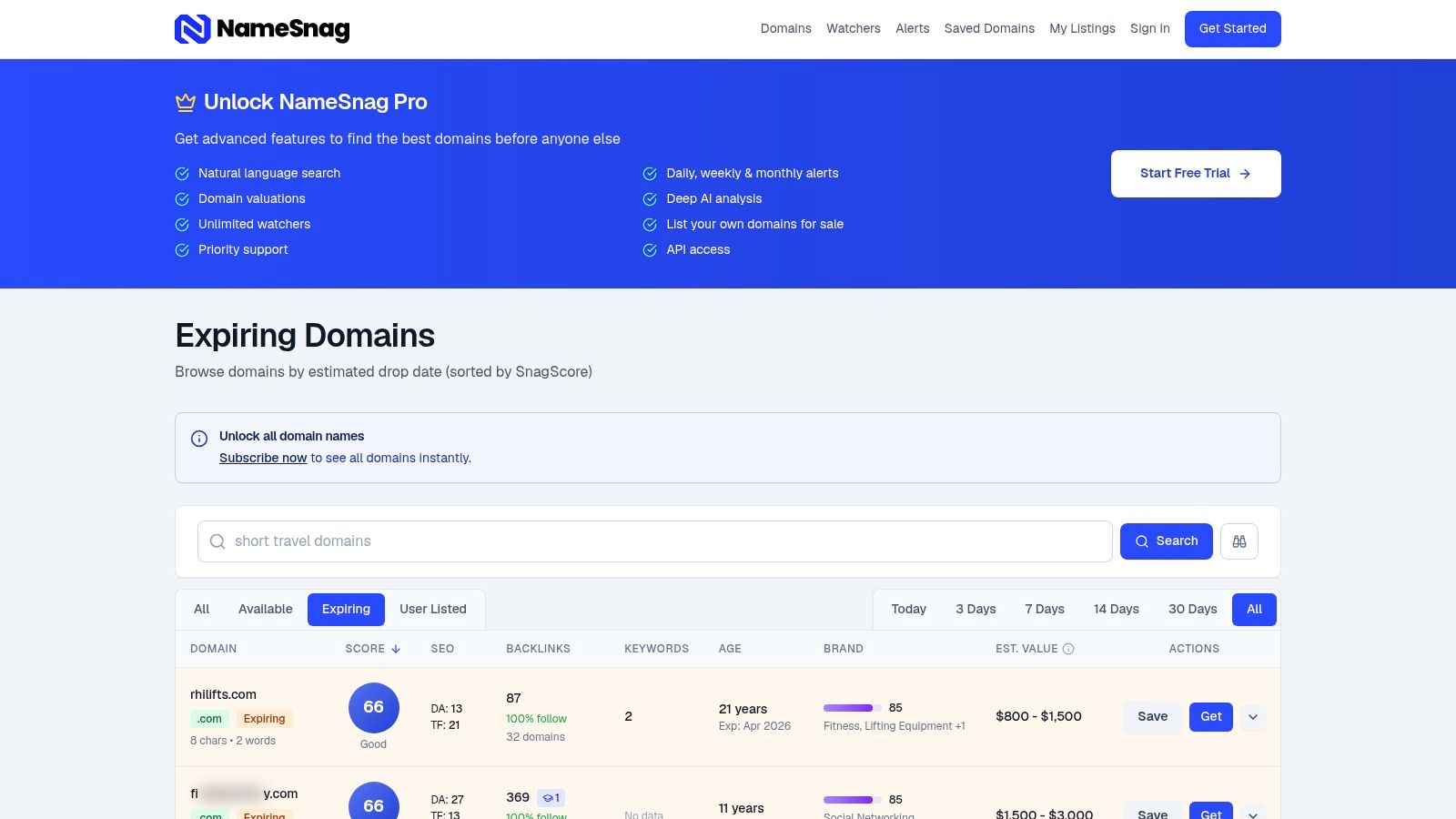
If you're weighing whether to start clean or hunt for an older domain with real SEO upside, NameSnag is a practical place to do the legwork. You can browse available dropped domains for fresh registrations, or scan expiring domains that are still in the grace window and likely to drop soon. The time filters make it easy to narrow by Today, 3 Days, 7 Days, 14 Days, 30 Days, or All, which is handy when you're trying to move fast without wading through junk.
Find Your Perfect Domain
Get access to thousands of high-value expired domains with our AI-powered search.
Start Free Trial