
You type remove dot net into Google and get a weird grab bag back. Half the results look like sysadmin surgery, a few look like string cleanup, and the rest sound like someone is about to talk you out of a domain renewal.
That confusion is fair. I’ve seen all three situations in the wild. A founder wants to ditch a tired .net brand. A developer needs to strip .net from a dataset without mangling everything else. A build agent is choking because old .NET SDKs piled up like forgotten coffee mugs.
Same search. Different problem. Very different consequences if you pick the wrong fix.
So You Want to Remove Dot Net
A domain investor usually means, “Should I let this .net domain go, redirect it, or replace it?”
A developer usually means, “How do I remove .net from strings or URLs without breaking edge cases?”
A sysadmin usually means, “How do I uninstall Microsoft .NET safely so Visual Studio, CI, or global tools don’t explode?”
Those are not small differences. If you let a decent .net expire without checking backlinks, you can throw away brand equity. If you run a sloppy regex, you can strip text you meant to keep. If you uninstall the wrong runtime, you can break builds, tools, and app dependencies in one confident command.
That is why this guide treats remove dot net as three separate jobs, not one fuzzy topic.
Some readers are here because they inherited a server with old SDKs everywhere. Some are cleaning exports from analytics, CRMs, or affiliate feeds. Others are staring at a renewal notice for a .net they no longer love. All of them need a practical answer, not fluffy advice.
The good news is that each path has a clean way forward. The bad news is that each path also has a very popular wrong way forward.
Choose Your Adventure Which Dot Net Are You Removing
The fastest way to solve this is to identify the exact object you want gone. Not the phrase. The thing.
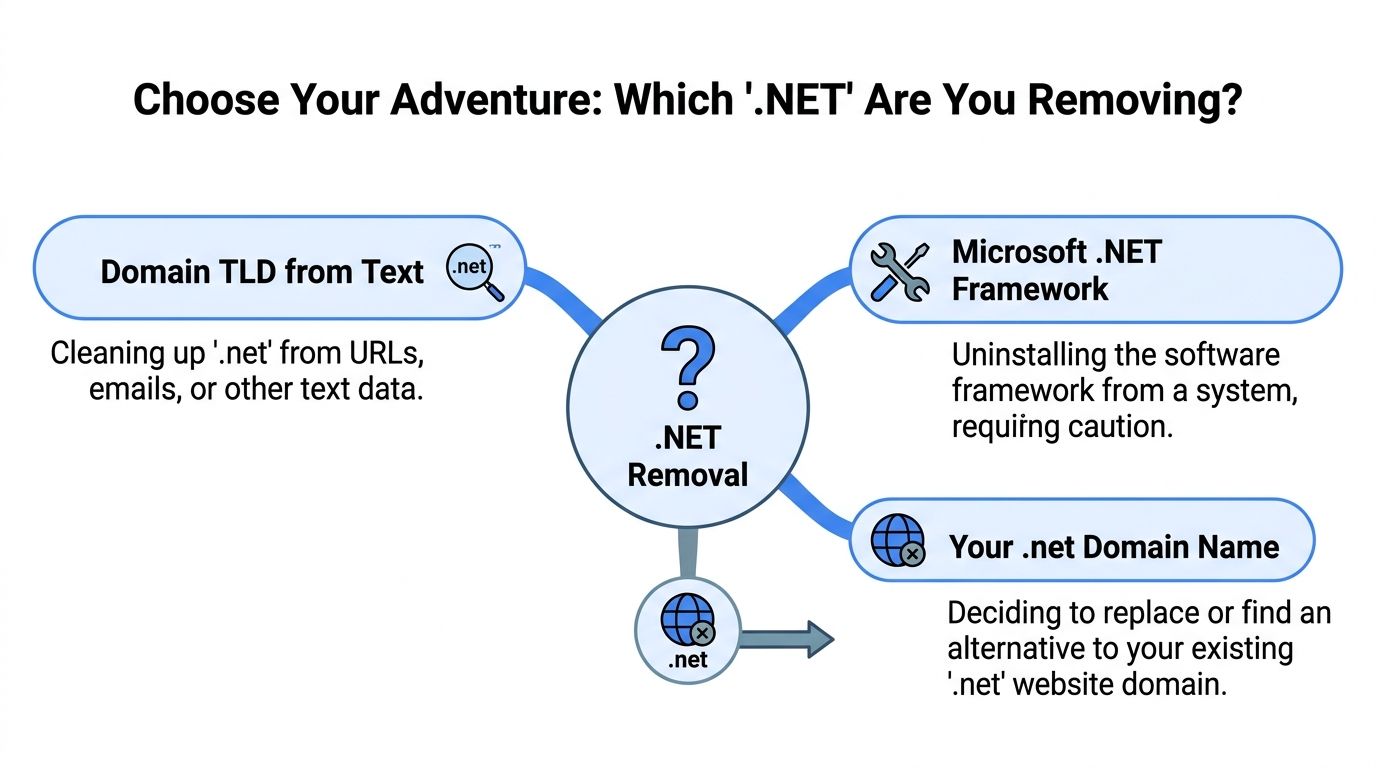
You mean a .net domain name
This is the brand and SEO path.
You own something.net, and you are deciding whether to keep it, redirect it, sell it, or let it expire. The question is not “can I remove dot net?” It is whether removing that TLD from your business creates more upside than risk.
Typical triggers:
- Brand mismatch: The .net no longer fits the company or project.
- Upgrade pressure: You found a better brand on another TLD.
- Portfolio cleanup: You are trimming low-conviction domains.
- Confusion issues: Customers keep typing the .com.
You mean the text .net inside code or data
This is the developer and data cleanup path.
You have strings like brand.net, hello@brand.net, or full URLs, and you need to remove the suffix or normalize the value. This comes up in migrations, reporting cleanup, slug generation, redirect mapping, and content operations.
Typical triggers:
- CSV cleanup: A column has domains and you need the base label.
- URL normalization: You want one canonical format for reporting.
- App logic: User inputs include
.netand need standard handling. - CMS cleanup: Old links or slugs need rewriting.
You mean Microsoft .NET on a machine or server
This is the system administration path.
You need to uninstall SDKs, runtimes, or framework components because disk usage is bloated, builds are inconsistent, or old versions are hanging around long after they should have been retired.
Typical triggers:
- Build conflicts: CI agents keep selecting the wrong SDK.
- Tooling mess: Global tools fail after partial removals.
- Security hygiene: Old runtimes are still installed.
- Space cleanup: Development machines and agents have years of leftovers.
Quick rule: If your concern is rankings or brand confusion, think domain. If your concern is regex or CSVs, think strings. If your concern is runtimes, SDKs, or Visual Studio, think Microsoft .NET.
The Domain Game When to Drop a Dot Net TLD
Dropping a .net is sometimes smart. Dropping it casually is how people lose value they already paid to build.
A domain is not just a renewal invoice. It can hold old links, branded searches, referral traffic, email history, and defensive value. If it points anywhere useful today, or used to, then “remove dot net” is not a domain deletion task. It is a migration task.
When dropping the .net makes sense
There are clean cases where letting go is rational.
Maybe the .net was a placeholder and the brand now lives on a stronger domain. Maybe it has no backlinks worth saving, no traffic, no email use, and no defensive value. Maybe it creates more confusion than protection.
That last one matters. If customers keep landing on the wrong property, a weak side domain can become a brand tax.
A simple decision filter helps:
| Question | If yes | If no | |---|---| | Does it receive useful traffic? | Keep or redirect it | Move closer to dropping | | Does it have backlinks you care about? | Redirect it | Less risk | | Does it protect your main brand from confusion? | Keep it parked or redirect | Less defensive value | | Does anyone still use email on it? | Migrate first | Safer to retire |
What people forget before letting it expire
Backlinks are the first thing I check. Not because every old link is gold, but because people regularly drop domains that still have legitimate mentions, citations, or old campaign links pointing at them.
Then I check whether the .net is protecting a better primary brand. If you own the .com and use it actively, letting the .net fall away can invite a cheap nuisance. A competitor, spammer, or opportunist may not need the domain to outrank you. They only need it to confuse your audience.
There is also the human side. Someone bookmarked the old URL. Someone has it in an old deck. Someone still types it from memory.
Practical rule: If the .net has history, treat it like an asset transfer. If it has no history, treat it like inventory cleanup.
The right way to sunset a .net
If you are moving from .net to another domain, the cleanest path is usually a 301 redirect plan. Page to page where possible. Section to section when that is all you have. Home page redirect only if the old site was tiny and structurally simple.
People often get lazy here and lose the upside.
A proper sunset usually includes:
Crawl the old site Export all live URLs and obvious legacy URLs.
Map old pages to new equivalents Don’t send everything to the home page unless you enjoy wasting relevance.
Keep the old domain active long enough Expiry is not a redirect strategy.
Update key links you control Profiles, citations, partner links, newsletters, and social bios.
Watch indexed pages and errors The move is not finished when the redirects go live.
If you want a deeper migration checklist, this guide on changing domains is the one I’d read before touching redirects: SEO steps for a domain change
Keep, redirect, or drop
This is the actual business decision.
- Keep it if it protects the brand, still receives useful traffic, or still anchors working email.
- Redirect it if you have moved to a better domain and want to preserve whatever value remains.
- Drop it only when it is dead weight, not quiet value.
A lot of weak domains deserve to expire. A surprising number of useful ones only look weak because nobody checked before making the call.
Find a Better Domain with NameSnag
If you are replacing a .net, the moment after that decision is where people often make the second mistake. They rush into the first “available enough” name they can live with.
That is how you trade one compromise for another.
A better move is to split the search into two buckets. First, names you can register immediately. Second, names that are expiring and might be worth waiting for.
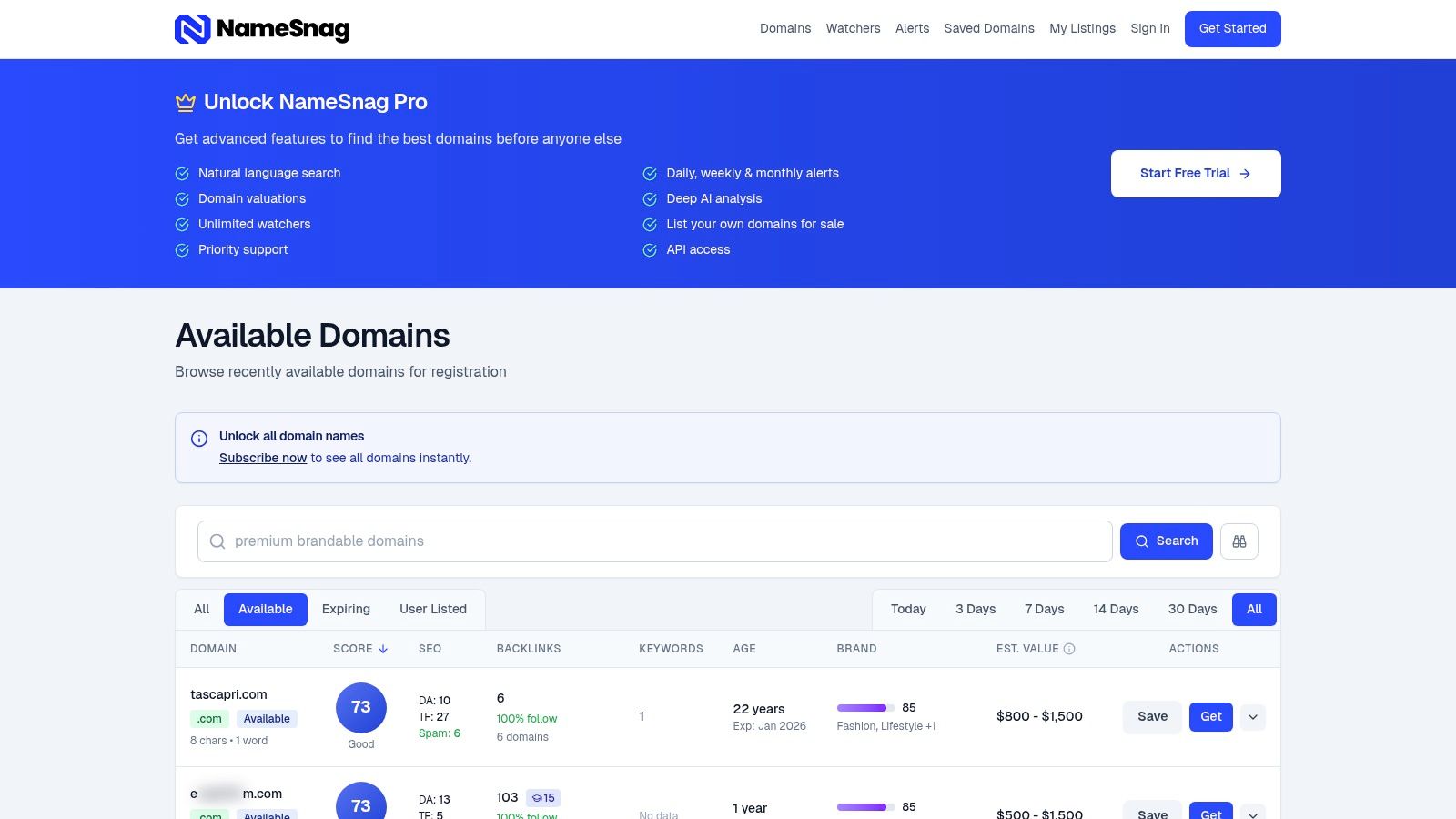
If you want something now
The fastest route is the Available view: https://namesnag.com/domains?filter=available
That surfaces domains that just dropped and can be registered immediately. For a rebrand or project launch, that matters because you are not stuck waiting around for a future drop window.
The useful way to search is not by scrolling forever. It is by narrowing intent.
Try filtering by:
- Time window: Today is good for fresh inventory. Broaden to 3 Days or 7 Days if the shortlist is too thin.
- Keyword fit: Use root terms tied to your niche, product, or audience.
- Brand feel: Say the domain out loud. Good domains survive being spoken.
- History quality: Check whether the name feels like a real asset or a cleanup job in disguise.
If you need a refresher on screening candidates before you commit, this overview of a domain name availability checker is a solid companion read.
If you can wait for a stronger one
The second route is the Expiring view: https://namesnag.com/domains?filter=expiring
Patience can pay off here. A lot of better domains are not available right now. They are in a grace period and moving toward drop.
That changes the strategy. You are no longer asking, “What can I buy this minute?” You are asking, “Which upcoming domains are worth tracking before the crowd notices?”
The useful move here is to narrow by time horizon:
| Time filter | Best use |
|---|---|
| Today | Fast-moving daily monitoring |
| 3 Days | Tight shortlist building |
| 7 Days | Weekly prospecting |
| 14 Days | Broader planning |
| 30 Days | Longer-range tracking |
| All | Research mode, not action mode |
What to look for in a replacement
A better domain is not just “not .net.” It should solve a real problem the old name created.
Sometimes that means cleaner branding. Sometimes it means a name with a more natural fit for your niche. Sometimes it just means you stop having to explain the domain every time you say it out loud.
When I review replacement candidates, I want three things:
Clarity The name should be easy to hear, spell, and remember.
Transferability It should work in ads, outreach, podcasts, bios, and email signatures without friction.
History sanity You do not want your “upgrade” to inherit someone else’s mess.
Shortcut: If the new domain needs a paragraph of explanation, it is probably not the upgrade you think it is.
A cleaner domain search workflow
If you are replacing a .net, keep the process simple:
- Audit whether the current domain should be redirected rather than dropped.
- Build a shortlist from Available names for immediate options.
- Build a second shortlist from Expiring names for higher-upside options.
- Compare for brand clarity, not just TLD preference.
- Only switch once the new name beats the old one in real use, not just in theory.
That is the part many people skip. A new domain should not merely be different. It should be easier to build on.
A Developer Guide to Removing Net From Strings
If your version of remove dot net lives in code, the first question is not “what regex do I use?” It is “what exactly should be removed?”
That distinction saves a lot of cleanup later.
Removing .net from the end of a hostname is one task. Removing .net from an email domain is another. Removing every occurrence of the letters net everywhere is how you turn dotnet into dot and annoy everyone.

Remove only a trailing .net
For a plain hostname string, target the end of the value.
JavaScript
const cleaned = host.replace(/\.net$/i, '');
Python
import re
cleaned = re.sub(r'\.net$', '', host, flags=re.IGNORECASE)
PHP
$cleaned = preg_replace('/\.net$/i', '', $host);
That handles example.net and leaves mydotnetapp.com alone.
Remove .net from a full URL safely
If the input is a URL, parse it first. Do not regex the whole thing unless you enjoy edge cases.
JavaScript
const url = new URL("https://example.net/path");
url.hostname = url.hostname.replace(/\.net$/i, '');
Python
from urllib.parse import urlparse, urlunparse

u = urlparse("https://example.net/path")
host = u.hostname.replace(".net", "") if u.hostname and u.hostname.lower().endswith(".net") else u.hostname
Parsing beats guesswork. It prevents accidental edits to paths, parameters, or content fragments.
Bulk cleanup for CSVs and exports
This shows up all the time in SEO and reporting work. You export domains, normalize them, then map or cluster them.
A practical batch approach:
- Normalize case first: Decide whether everything becomes lowercase.
- Strip protocol separately: Handle
httpandhttpsbefore suffix cleanup. - Trim trailing slash and whitespace: Small junk creates ugly duplicates.
- Write to a new column: Never overwrite the raw field on pass one.
If you later need to map old hosts to new redirects, this can pair nicely with server-side redirect work. For Apache environments, this walkthrough on a 301 redirect with .htaccess is useful once the cleaned dataset is ready.
Developer tip: Keep the original value, the normalized value, and the final transformed value as separate fields until the migration is done.
WordPress and CMS edge cases
If your goal is cleaner URLs in a CMS, do not treat permalink structure and string cleanup as the same job.
In WordPress, a .net in the domain itself is a domain decision, not a permalink issue. A .net inside imported content or custom fields is content cleanup. That may require a scripted search-and-replace, not a settings change.
Also, never run blind global replacements in a live database. Export first. Test on a staging copy. Then validate links, media references, and canonical output.
The safest mental model
Ask this before writing the replacement rule:
| Input type | Best tactic |
|---|---|
| Hostname only | Trailing suffix match |
| Full URL | Parse, then edit hostname |
| Email address | Split local part and domain |
| Free text blob | Match exact domain patterns, not raw letters |
That one habit prevents most accidental over-removals.
Uninstalling Microsoft Dot NET Without Breaking Your System
This is the dangerous version of remove dot net.
Uninstalling Microsoft .NET is not the same as deleting a normal app. SDKs, runtimes, global tools, CI agents, Visual Studio, and project pins can all depend on versions you forgot were there.

Start with an audit, not removal
Before touching anything, list what is installed.
Use:
dotnet --infodotnet --list-sdksdotnet --list-runtimes
Microsoft also documents that the .NET Uninstall Tool is a command-line utility for removing .NET SDKs and runtimes on Windows and macOS, but it does not handle everything. It targets installs from official installers and older Visual Studio Installer scenarios, while skipping manual extractions, script installs such as dotnet-install, and Linux situations outside the supported scope. Microsoft’s overview is here: uninstall tool overview
That limitation matters. A machine can show many installed SDKs and runtimes, while the tool only considers part of that inventory eligible for removal.
What the uninstall tool does well, and what it does not
The official tool is useful for controlled cleanup, especially when you use its simulation features first.
A cautious sequence looks like this:
List removable items Check what the tool can see.
Run a dry run Use
--dry-runbefore any destructive action.Remove previews first Preview SDKs are often the safest cleanup target.
Handle older SDK bands carefully Pay attention to project pins and IDE dependencies.
The problem is that admins often assume the tool is omniscient. It is not. If versions were installed manually, by tarball, by script, or through distro package paths, they may remain behind after the “cleanup.”
Linux is where most cleanup guides get vague
Manual Linux removals are where people get into trouble.
Microsoft’s removal guidance explains that manual uninstall on Linux means removing versioned directories, not nuking the root dotnet directory. The relevant paths include SDKs under /usr/share/dotnet/sdk/$version, runtimes under /usr/share/dotnet/shared/.../$version, and host components under /usr/share/dotnet/host/fxr/$version. Their install and removal guidance is here: remove .NET runtime and SDK versions
That distinction is not cosmetic. Delete the root folder and you can orphan global tools or break the host resolver. Delete the specific versioned folder and you have a controlled removal.
A safe manual workflow on Linux looks like this:
- Audit first:
dotnet --list-sdks --list-runtimes - Identify active LTS versions: Preserve what current projects use
- Remove versioned directories only: SDK, runtime, and host entries separately
- Re-check inventory: Confirm the version is gone
- Reinstall through package manager if needed: Prefer managed installs going forward
Do not delete the root dotnet directory. That is the shortcut that turns cleanup into recovery work.
Watch for global.json before you remove anything
This is the build-breaker people miss.
A repository can pin a specific SDK with global.json. If that file references a version you remove, local builds and CI jobs can fail immediately even if “a newer SDK is installed.”
So before removal:
- Search your repos for
global.json - Check CI templates and agent images
- Compare pinned versions against installed SDKs
- Update the file only when the project is ready for the new SDK band
The uninstall CLI has options that help avoid overly aggressive patch cleanup, but protection still comes from verification. Read the command options here: dotnet uninstall remove command
A good pattern is:
- List installed SDKs
- Dry run removals
- Check
global.json - Remove in phases
- Validate builds before continuing
That is slower than --all --force. It is also how you avoid spending the afternoon repairing agents.
Visual Studio and toolchain side effects are real
Some versions are used by IDEs and related tooling. On Windows and macOS, aggressive removal can leave you with a development environment that suddenly needs repair actions.
On Linux and in containers, the damage often shows up differently. Global tools stop resolving. Host entries go missing. Restore or migration tasks start failing in places that look unrelated to the uninstall.
That is why I treat .NET cleanup like dependency surgery, not janitorial work.
Here is a helpful walkthrough if you want a video before you touch a machine:
What works in practice
If I had to reduce this to one field-tested playbook, it would be this:
| Situation | Best move |
|---|---|
| Windows or macOS installer-based clutter | Use the official uninstall tool with --dry-run first |
| Linux manual or mixed installs | Remove versioned directories only |
| CI agent with multiple SDK bands | Check global.json before every removal |
| Broken environment after aggressive cleanup | Reinstall required SDKs and repair dependent tooling |
The official tooling helps. Blind trust in official tooling does not.
Your Next Move After Removing Dot Net
If your issue was domain-related, the next move is simple. Either keep the .net as a redirecting asset, or retire it only after you are sure it has no meaningful value left. The expensive mistake is treating a domain like a spare file.
If your issue was code-related, save the cleanup logic somewhere your team can reuse it. A small tested snippet for removing .net from the right place becomes surprisingly useful in migrations, import scripts, and analytics cleanup.
If your issue was Microsoft .NET on a machine or server, document the environment after cleanup. Record the installed SDKs, the pinned versions, and the commands you used. That turns future maintenance from archaeology into routine upkeep.
Different path, same goal. Less ambiguity, fewer self-inflicted problems, and a cleaner system than the one you started with.
Frequently Asked Questions About Dot Net
Can I just let my .net domain expire?
Yes, but only if you have checked whether it still has brand, traffic, backlink, or email value. If the domain still does useful work, redirect it before you think about expiry.
Will removing .net from a string break words like dotnet?
It can, if you use a lazy replacement rule. Match a trailing .net suffix or parse the hostname first. Do not remove every net substring globally.
Is the .NET Uninstall Tool enough on Linux?
Not always. Microsoft’s own guidance makes clear that manual Linux installs often require manual removal of versioned directories rather than relying on the uninstall tool alone.
What should I check before uninstalling old SDKs?
Check installed SDKs and runtimes, then inspect your repos for global.json. That file can pin a version your builds still need.
Is it safe to delete the whole dotnet folder?
No. Removing the root dotnet directory is the kind of shortcut that can break hosts and global tools. Remove versioned directories only.
What if Visual Studio or tools stop working after cleanup?
Reinstall the required SDK or runtime, then repair the affected tooling if needed. Most breakage comes from removing something that another part of the toolchain still expected.
Should I replace a .net just because .com feels stronger?
Not automatically. A stronger TLD does not guarantee a stronger brand. If the existing .net is established and clean, the switch needs to earn its complexity.
If you’re replacing a .net, building a new site, or hunting for stronger brand inventory, NameSnag is a smart place to search. You can browse freshly dropped available domains, track expiring names before they hit the market, and filter for options that are easier to build on than the compromise you’re trying to leave behind.
Find Your Perfect Domain
Get access to thousands of high-value expired domains with our AI-powered search.
Start Free Trial