
You register a domain at GoDaddy for pocket change, forget about it for a year, then log back in and see a renewal bill that feels like a prank. That’s the moment you search for “godaddy renew domain” and realize this isn’t just a button click. It’s a portfolio decision.
I’ve renewed domains at GoDaddy, moved them out, let some die on purpose, and bought better ones after someone else blinked. This is the strategic play. If you treat every renewal like an automatic yes, you’ll overpay. If you ignore expiry dates, you’ll lose names you wanted to keep. The sweet spot is control.
Your GoDaddy Renewal Options Explained
You open GoDaddy to renew one domain and end up facing three decisions instead of one. Do you renew it now, set it to auto-renew, or leave it alone and review the whole portfolio first? That choice matters more than the click.
A smart GoDaddy renewal plan has three lanes. Manual renewal for names you want to control closely. Portfolio review for batches of domains that need triage. Auto-Renew for domains you would hate to lose because the cost of a mistake is higher than the renewal fee.
Manual renewal when the name actually matters
Use manual renewal for a primary business domain, a client asset, or any name tied to live traffic, leads, or email. You want to see the term length, payment total, and add-ons before GoDaddy charges the card.
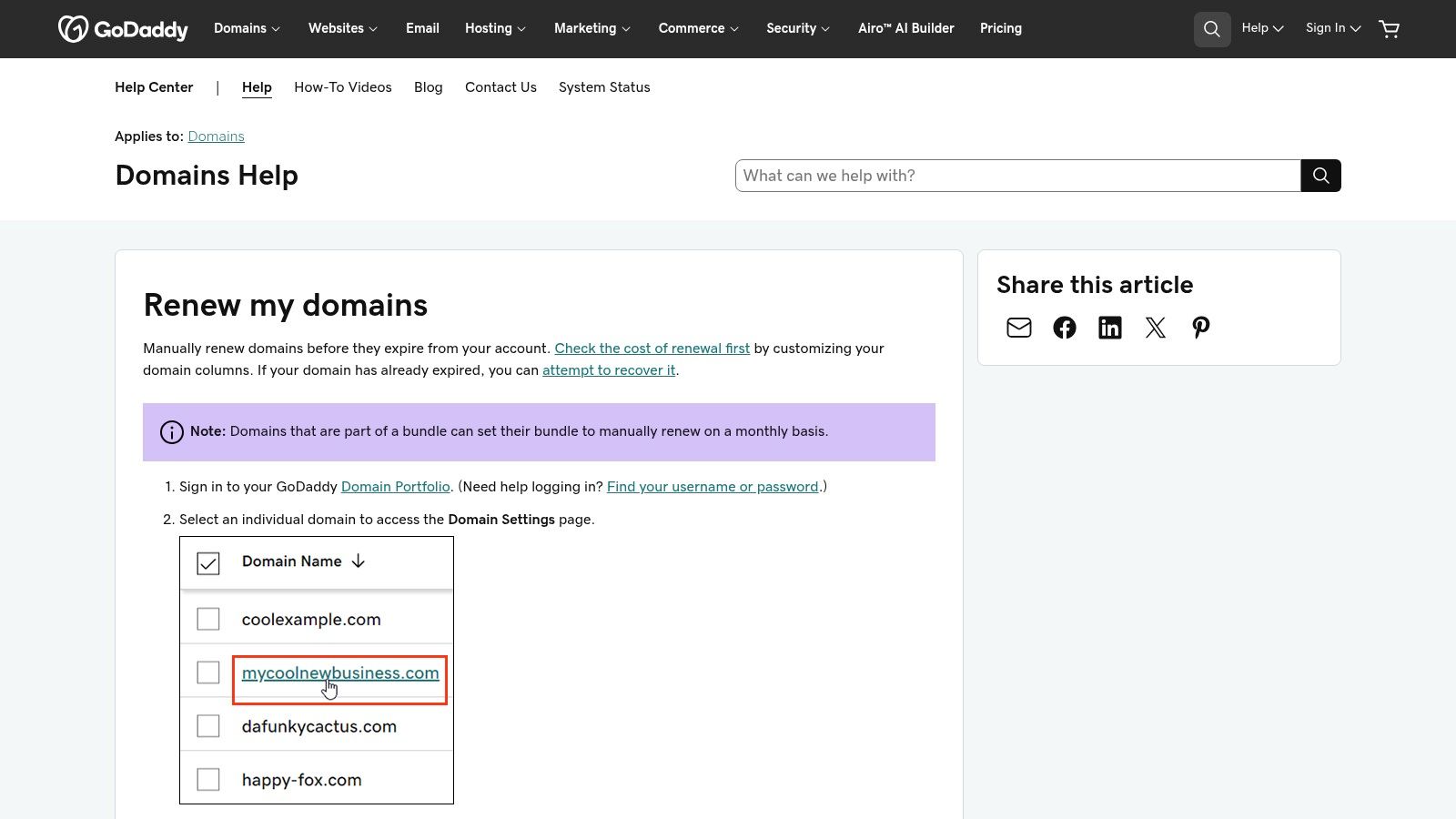
The process itself is straightforward. Open Domain Portfolio, pick the domain, go to Settings, click Renew Now, choose the term, confirm whether Auto-Renew stays on, and check out. The mistake happens at the last step. GoDaddy is very good at placing extras in front of you. Domain protection, email, hosting, and other add-ons can slip into the order if you rush.
My rule is simple.
Renew the domain. Audit everything else.
If you’re still getting clear on the basics, read what is a custom domain name before you pay for features you may never use.
Portfolio review is where you save real money
If you own more than a few domains, stop renewing one by one from random account pages. Use Domain Portfolio and review the list like an investor, not a distracted account owner.
I sort domains into three buckets:
- Keepers: Domains attached to a business, ranked site, active project, or strong brand.
- Watch list: Names with some upside, but not enough to justify blind renewal.
- Drops: Domains with no traffic, no inquiries, no build plan, and no resale angle.
That last category matters. A lot of domain owners waste money renewing names they already know are weak. If a domain is finished, cut it cleanly. This guide on how to cancel a domain name on GoDaddy helps if you need to shut down a name before another charge hits.
Auto-Renew works best on your best names
Auto-Renew is a safety system, not a strategy. Use it on domains where expiration would create real damage, such as your main brand, your email domain, or a name that brings in revenue.
Turn it off for speculative inventory unless you review that inventory on a schedule. Otherwise, forgotten domains turn into recurring bills. That is how portfolios get bloated.
The right setup is simple. Protect the few names that matter most. Review the rest with a cold eye. If a domain no longer earns its spot, let it go and keep your cash ready for a better buy.
Decoding GoDaddy Renewal Costs and Sticker Shock
You register a domain for pocket change, forget about it for a year, then GoDaddy sends the renewal bill. That is the moment many domain owners learn the actual price of the name they bought.

Intro pricing is marketing. Renewal pricing is the carrying cost. If you want to manage domains like an investor, focus on the second number first.
GoDaddy renewals are rarely painful because of one invoice. They sting because small annual costs pile up across names you no longer need, names you overpaid for emotionally, or names that looked better at checkout than they do a year later. A cheap first year can hide a mediocre long-term hold.
Renewal cost decides whether a domain deserves another year
There is no single “GoDaddy renewal price.” The amount changes by extension, term, and account setup. A weak domain on an expensive extension deserves harsher review than a solid brandable .com.
That is the right way to look at sticker shock. Do not ask, “Can I afford this renewal?” Ask, “Does this domain deserve more capital?”
A domain tied to revenue, rankings, lead flow, or your main email setup usually earns the renewal. A speculative name with no traffic, no inbound interest, and no clear resale case usually does not. Renewal day is your annual audit. Treat it that way.
The real mistake is renewing on autopilot
A lot of domain owners get trapped by the original buy decision. They paid for the name once, so they keep paying to avoid admitting it was a weak buy. That is how dead inventory survives for years.
Cut the emotion. Look at each renewal like a fresh acquisition decision.
Use a simple filter:
- Renew names that protect income, brand control, or obvious resale value
- Question names that only looked promising in the moment
- Drop names that need a long explanation to justify another year
That discipline matters more at GoDaddy because renewal costs can be high enough to punish sloppy portfolio management. One or two unnecessary renewals are annoying. Ten or twenty turn into a budget leak.
Before you pay, compare your options
You have three levers. Renew at GoDaddy, transfer the domain out before expiry, or let it go.
Renewing makes sense when speed matters or the name is too important to risk delays. Transferring can make sense when the domain is still worth keeping but the annual carrying cost at GoDaddy no longer makes sense. Dropping is the right move when the domain has no business case left.
If you are close to expiration, timing matters. Review the GoDaddy grace period for expired domains before you wait too long and turn a routine decision into a recovery problem. For another breakdown of the GoDaddy grace period for expired domains, use it as a cross-check before you decide whether to renew or walk away.
This short video gives a useful visual on pricing frustration and why so many domain owners double-check renewals before checkout.
Cheap registration prices sell optimism. Renewal prices force honesty.
Navigating The Domain Expiration Timeline
A domain doesn’t usually vanish the second you miss the renewal date. It moves through stages, and every stage gives you less control.
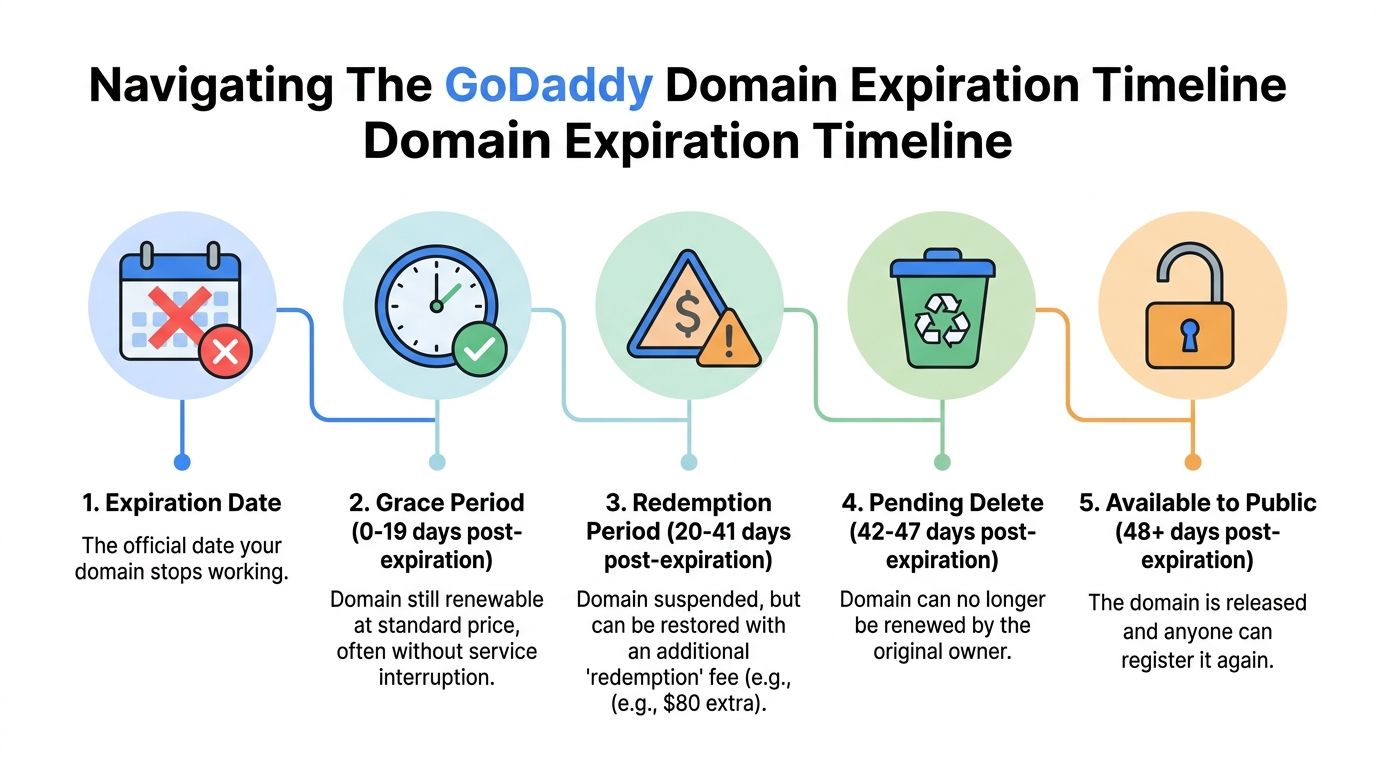
Take a simple example. You forget a domain tied to an old project. At first, nothing feels urgent. Then email stops working, the site goes dark, and now you’re trying to recover the name under pressure instead of making a calm decision before expiry.
The stages that matter
GoDaddy’s expiration cycle is easiest to understand as a countdown of shrinking options.
| Stage | Duration (Approx.) | Renewal Cost | Action Required |
|---|---|---|---|
| Expiration Date | Day 0 | Standard renewal may still apply initially | Check status immediately |
| Grace Period | 0-19 days post-expiration | Standard renewal price | Renew fast before recovery gets harder |
| Redemption Period | 20-41 days post-expiration | Higher restoration cost | Restore only if the domain is worth saving |
| Pending Delete | 42-47 days post-expiration | Not renewable by original owner | Prepare to backorder or move on |
| Available to Public | 48+ days post-expiration | Fresh registration price at available registrar | Re-register if you can catch it |
The timeline above follows the infographic brief and aligns with GoDaddy’s general expiration flow described in support materials. The practical point is simple. Early action is cheap. Late action is expensive or impossible.
Grace period is your recovery window
The first stage after expiry is where procrastination still feels fixable. You may still be able to renew at the normal rate, and in some cases the interruption is limited at first.
That’s the only comfortable part of this process. Once a domain drifts deeper into expiry, you’re no longer choosing from a position of control. You’re reacting.
If you want a broader explainer focused specifically on this stage, Domain Drake has a useful piece on the GoDaddy grace period for expired domains.
Miss the renewal date and your leverage drops fast. The domain may still be recoverable, but the decision is no longer cheap or relaxed.
Redemption and pending delete are where people panic
During redemption, the domain is effectively sidelined. This is the stage where restoring a name starts feeling punitive. The infographic example uses an additional redemption fee such as $80 extra, which captures the point even if exact recovery costs can vary by case and extension.
Then comes pending delete. At that stage, the original owner generally can’t just log in and renew. The name is on its way out, and everyone else starts watching.
That’s why investors track expiring names. One person’s forgotten asset becomes another person’s opportunity the moment the original owner stops acting.
Don’t confuse attachment with value
A lot of domains get renewed because the owner remembers what they hoped the name would become. That’s not the same as what the domain is worth today.
Ask better questions:
- Is this domain attached to a live business? If yes, renew early and remove drama.
- Does it still have strategic value? Brandability, search history, or a real buyer thesis matter.
- Would you buy it again today at the current carry cost? If the answer is no, don’t romanticize it.
That last question saves portfolios.
The Investor's Playbook Renew Drop or Transfer
You open your GoDaddy account, see a batch of renewals due, and the lazy move is obvious. Click renew, clean up later, and tell yourself you’re protecting optionality. That habit gets expensive fast.
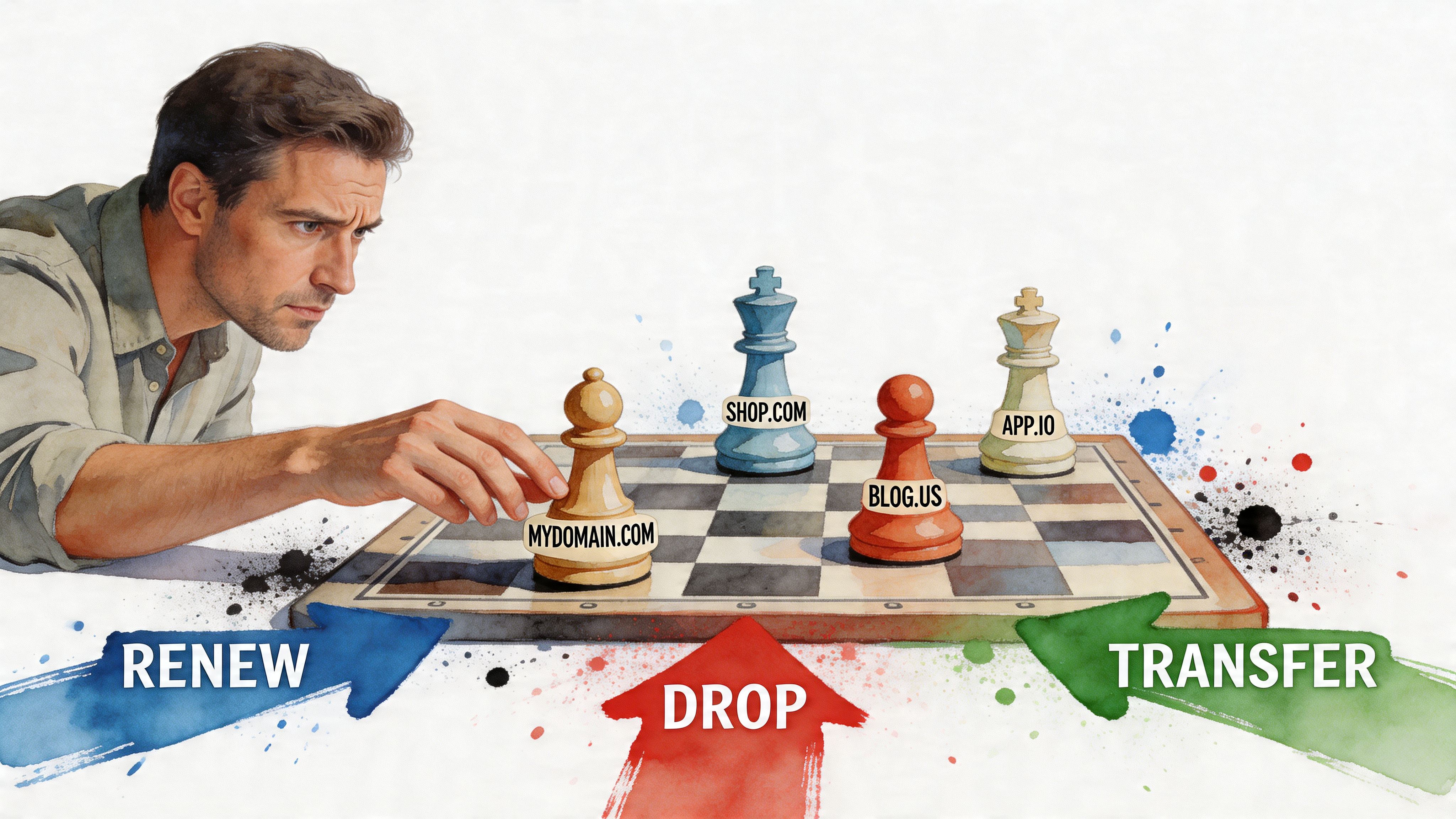
Smart domain owners treat every renewal like a capital allocation decision. Each name should justify its next year of carry cost. If it cannot, the right move is often to cut it, not babysit it.
Renew when the domain still does real work
Renew names that earn their keep. A live business domain gets renewed early. A defensive brand hold gets renewed. A name with a credible resale thesis gets renewed too, but only if you can explain the buyer profile and why that thesis still holds today.
Everything else belongs under review.
A sloppy godaddy renew domain habit drags down a portfolio because it rewards comfort, not judgment. Investors who keep their portfolios clean make more room for better buys.
Drop when you would not buy it again today
This is the cleanest test I know. If you did not already own the domain, would you buy it today at the current renewal cost?
If the answer is no, stop paying for yesterday’s idea.
Drop the names with no traffic, no buyer logic, no brand fit, and no realistic path to use. One weak renewal looks harmless. Twenty weak renewals drain the budget you could use on stronger inventory.
Use this filter:
- Active use or brand protection: Renew
- Clear resale thesis with real comps in mind: Renew
- Unclear use and weak conviction: Review once, then decide
- Dead project, stale thesis, no buyer story: Drop
Bad domains rarely announce themselves as bad. They just keep surviving one more billing cycle.
Transfer when the name is good but the math at GoDaddy is bad
Sometimes the domain is worth keeping and GoDaddy is the expensive part of the equation.
That is the moment to compare registrars, not out of principle, but out of margin discipline. If a name is a long-term hold, even a modest annual savings matters across several years and several domains. If your workflow feels clunky, your renewal settings need babysitting, or your portfolio is growing faster than your admin tolerance, moving the name can be the cleaner play.
Do not transfer blindly. Check the timing, confirm the name is eligible, and decide before you pay another renewal you do not need to pay at GoDaddy.
If you also buy in the aftermarket, studying how GoDaddy expired domain auctions work sharpens this decision. Sometimes the better move is not saving a mediocre name. It is letting it go and putting that money into a stronger replacement.
My rule
Keep the names that still matter. Move the names that deserve a cheaper home. Cut the names that no longer clear your standard.
That is how you manage renewals like an investor instead of a collector.
Troubleshooting Common GoDaddy Renewal Headaches
You log in to renew one domain and end up staring at a higher total, a failed card, or a transfer you suddenly cannot make. That is standard GoDaddy friction. Handle it like an operator, not like someone clicking through checkout on autopilot.
When you can’t pin down the real renewal cost
Start in Domain Portfolio and turn on the Renewal Price column. That gives you the fastest read on what each name is about to cost you, especially if you hold a mix of extensions.
Do not guess from last year’s bill. Renewal pricing shifts, TLDs vary, and memory is expensive. Use the column, sort your names by price, and identify which domains still deserve the carry cost.
If a renewal total still looks wrong, check for taxes, the selected term length, and any add-ons sitting in the cart. The domain fee is only part of the invoice.
When auto-renew fails or charges the wrong way
Check the payment method first. Expired card, old billing address, or a blocked transaction causes a huge share of renewal problems.
Then check the renewal term before you approve anything. A lot of “GoDaddy overcharged me” complaints come from owners who renewed for more years than they intended. Slow down and read the cart.
One more rule. Auto-renew is for names you cannot afford to lose. Everything else needs active review before billing day.
When you can’t transfer after renewing
This one hurts because it is preventable.
If you already suspect GoDaddy is the wrong home for the domain, make the transfer decision before renewal day. As noted earlier, some renewals can affect transfer timing and leave you stuck longer than planned. That means you pay the GoDaddy renewal and still cannot move on your preferred schedule.
The fix is simple. Decide early. If the name is a keeper but the registrar is the problem, line up the transfer before expiry pressure forces a bad move.
The cheapest renewal mistake is the one you catch before the billing date.
When bundled products create confusion
GoDaddy often sells the account, not just the domain. That is why people think they renewed one thing when they kept paying for three.
Review the cart and the account subscriptions separately. Domain renewal does not automatically mean your email, hosting, website tools, or security products should continue too. If the project is winding down, cut the extras and keep only the asset that still matters.
That is how you stop a simple domain renewal from turning into a bloated annual charge.
GoDaddy Renewal FAQs
Is Auto-Renew good or bad at GoDaddy
It’s good for domains you cannot lose. It’s bad for domains you haven’t reviewed in months.
The smart setup is selective. Use Auto-Renew for business-critical names and brand protection. Leave it off for speculative inventory unless you have a tight review process.
Can I renew a GoDaddy domain for multiple years
Yes. GoDaddy’s renewal flow allows 1 to 10 years for most TLDs, based on its support instructions already discussed earlier. Multi-year renewal can reduce admin work, but it can also lock you into carrying a name longer than you should if your original thesis weakens.
If the domain is core infrastructure, multi-year can be sensible. If it’s a speculative flip, I prefer shorter commitment and more frequent review.
What is the Domain Discount Club and who should consider it
GoDaddy introduced the Domain Discount Club Pro plan at $359.88 per year, up from $239.88 for Premium, and it offers .com renewals at $10.99, which is 50% below the standard price, according to GoDaddy’s registrar overview at best domain registrars overview. That same source notes a transitional grace period where existing Premium users renew once at the old rate before the increase.
My opinion is simple. If you hold a bigger portfolio and insist on staying at GoDaddy, this is worth looking at. If you own only a few domains, you should compare the membership cost against just transferring those names to a lower-cost registrar.
Why did my renewal term change after I manually renewed
Because GoDaddy’s policy can sync future Auto-Renew length to your latest manual renewal length. That’s the active policy noted on the GoDaddy Italy help page referenced earlier. If you manually choose a longer term once, you may be setting up a longer Auto-Renew next time too.
Always inspect the renewal term after checkout. Don’t assume future billing will revert to one year automatically.
Does renewing the domain also renew email or hosting
No. GoDaddy’s support content repeatedly states that renewing the domain does not renew email or hosting. Treat domain renewal as one line item, not a master switch for every bundled product tied to that name.
That matters a lot for agencies and anyone running multiple client domains. Domain active does not always mean the rest of the stack is covered.
Should I renew, transfer, or let the domain expire
Use this decision filter:
- Renew: The name protects revenue, supports a live site, or has clear resale logic.
- Transfer: The domain is worth keeping, but your annual carrying cost is too high at GoDaddy.
- Expire on purpose: The thesis is weak, the project is dead, or you wouldn’t buy it again today.
That last test is the best one. If you wouldn’t buy it today, why are you paying to keep it?
What if I miss every deadline
Then your options shrink from routine renewal to recovery, and eventually to watching the domain leave your control. Once the domain passes through the late stages of expiration, other buyers start circling and your ability to reclaim it drops hard.
That’s why the best renewal strategy is boring. Review early. Decide clearly. Don’t negotiate with a clock.
What’s the best way to manage a large GoDaddy portfolio
Use Domain Portfolio as your control panel. Turn on pricing visibility. Separate keepers from weak names. Review renewal terms after every manual action. Keep a short list of domains you’d transfer out before the next billing cycle.
GoDaddy renewal often becomes stressful because it's managed reactively. Professionals manage from a calendar, not from panic.
If you’re tired of overpaying to keep mediocre names alive, spend more time replacing weak inventory with stronger opportunities. NameSnag helps you do that by surfacing available domains that just dropped and expiring domains that are still in the grace window. Use the time filters to scan Today, 3 Days, 7 Days, 14 Days, 30 Days, or All, and build a cleaner portfolio instead of dragging dead weight through another renewal cycle.
Find Your Perfect Domain
Get access to thousands of high-value expired domains with our AI-powered search.
Start Free Trial