
You're probably here because a domain is stuck in the wrong registrar, a buyer wants delivery, your agency wants everything under one roof, or you're staring at a transfer screen and wondering whether this is going to break the site, nuke email, or burn a week for no reason.
That anxiety is justified. A domain name registration transfer is routine, but routine doesn't mean foolproof. The transfer itself is standardized. The mistakes around it are not. Most transfer problems come from timing, bad contact data, misunderstood locks, or sloppy DNS sequencing.
That matters in a market this large. The global domain market reached 362.3 million registered domains as of September 30, 2024, and .com and .net alone accounted for 169.6 million of them, which is a good reminder that transfer workflows are part of everyday operations, not some edge-case admin task (global domain market figures).
The Pre-Transfer Checklist You Can't Ignore
A lot of people mix up registration and transfer. Registration is when a domain is first created under a registrar. A transfer is when that already-registered domain moves from one registrar to another. Same domain, same ownership in many cases, different retail manager.
That sounds basic, but it changes how you prepare. When you register a fresh domain, you just pay and configure it. When you transfer one, you're dealing with registry rules, registrar locks, approval emails, and timing windows. Skip one of those and the process stalls.
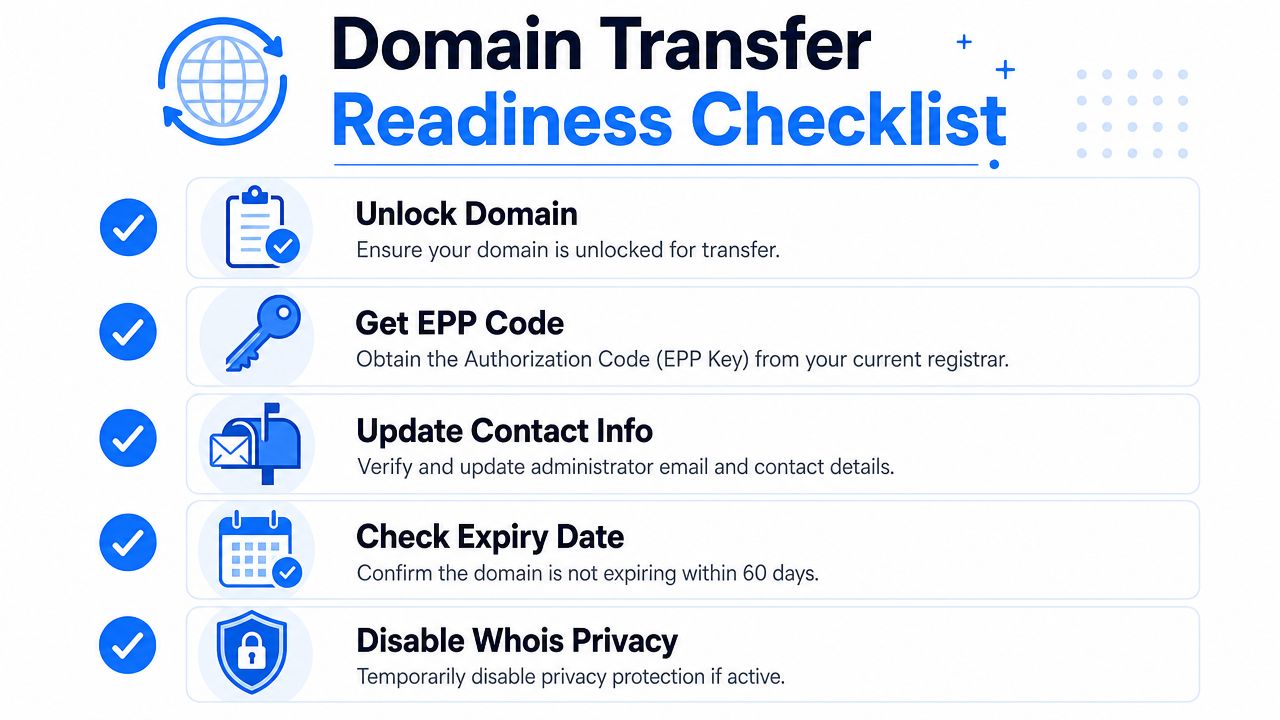
The five items that matter before anything else
I treat transfer prep like preflight checks. Boring, yes. Optional, no.
- Release the domain. Most registrars keep domains locked by default. That's good for security, bad for transfer attempts. If the lock stays on, the gaining registrar can accept your order and still get nowhere.
- Get the EPP or authorization code. This is the handoff key. Some registrars show it immediately. Others email it. A few bury it under security menus for sport.
- Confirm the admin contact email. If the approval message goes to an old inbox, an ex-employee, or a privacy relay you can't access, you've built your own roadblock.
- Check the expiry date and your calendar. A domain close to expiration adds unnecessary drama. You want room to troubleshoot if the first attempt fails.
- Temporarily disable Whois privacy if your registrar requires it. Not every provider handles this the same way, but enough do that it's worth checking in advance.
Practical rule: If you can't access the registrar account, the EPP code, and the approval email inbox on the same day, you are not ready to transfer.
What people miss in real life
The clean version of a transfer assumes the account is tidy. Real portfolios rarely are. Domains sit under old team logins, privacy is enabled, billing contacts are outdated, and nobody remembers who receives the transfer approvals.
That's why I clean the account first. If you're consolidating away from a provider with a cluttered panel, it can help to simplify account ownership before you start. If that includes a broader exit from a registrar account, this guide on how to delete a Namecheap account is useful background for thinking through what should be moved first and what should stay put until the transfer finishes.
What works and what doesn't
A simple checklist on paper isn't enough. The domains that move smoothly are the ones with current contacts, accessible inboxes, and no last-minute changes. The ones that fail usually fail for administrative reasons, not technical ones.
Here's the blunt version:
| Situation | What happens |
|---|---|
| Unlocked domain, valid EPP code, live admin inbox | Transfer usually proceeds cleanly |
| Locked domain | Transfer request hits a wall |
| Old contact email | Approval stalls in limbo |
| Privacy or contact confusion | You waste time proving control |
| Trying to "just see if it works" | You create avoidable delays |
If you do nothing else, do the boring checks first. That's what turns a registrar move into a normal task instead of an all-week cleanup project.
Your Standard Registrar-to-Registrar Transfer Playbook
A standard transfer isn't mysterious once you stop thinking of it as one event. It's a chain. You start it at the new registrar, but the old registrar still has a say until the domain is released.
The normal flow is consistent across many gTLDs. The domain is made transferable, the authorization code is pulled from the current registrar, the transfer is initiated at the new registrar, and the registrant confirms the request by email. For many gTLDs, that process finishes in about 5–7 days in practice (registrar transfer flow overview).
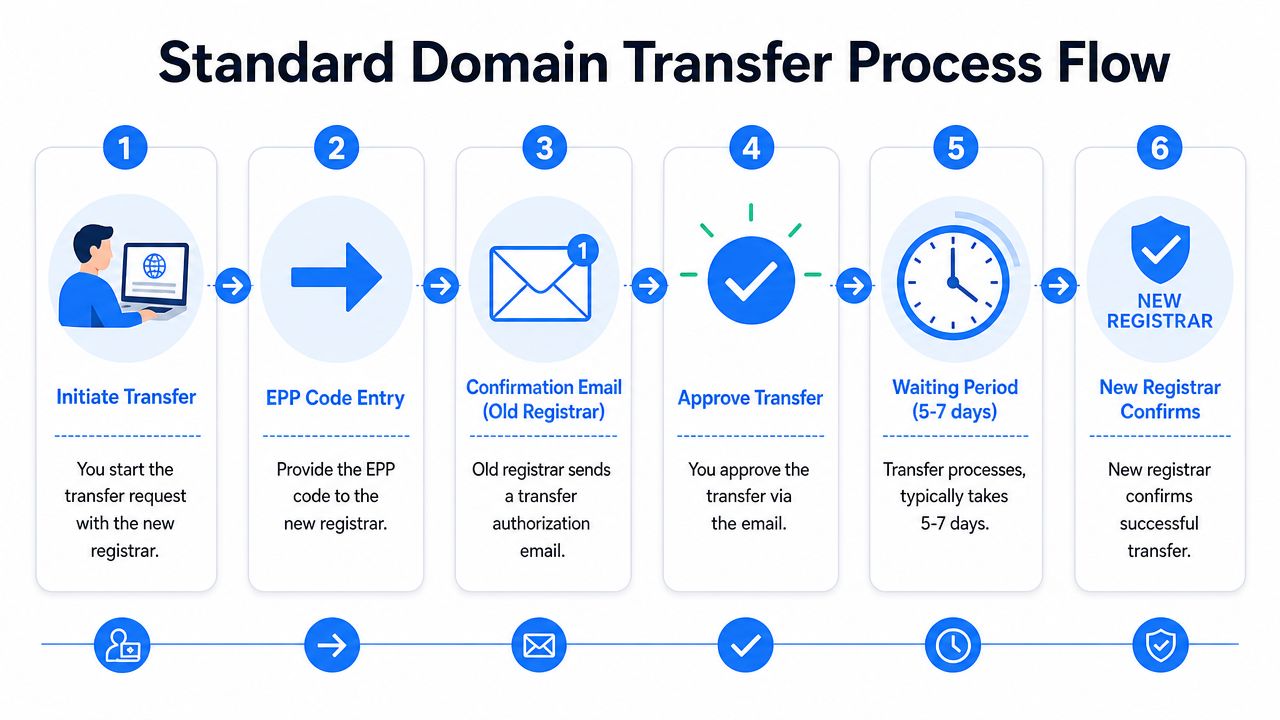
What the transfer actually feels like
You place the transfer order at the gaining registrar. That part feels like a checkout flow because it is one. You enter the domain, provide the EPP code, and pay the transfer fee.
Then the emails start. One registrar may confirm receipt. Another may ask for approval. The old registrar may send a “do you really want to leave?” message dressed up as a warning. Some panels let you expedite approval. Others wait out the full cycle unless you manually accept.
This is the part where inexperienced owners think something is broken. Usually, it isn't. It's just in motion.
A transfer is less like clicking “move” and more like passing a signed file between two clerks who each want confirmation.
Why the timeline is usually several days
Once a transfer is authorized, the losing registrar has up to five calendar days to release the domain under ICANN policy, which is why most registrar-to-registrar transfers land in about 5–7 days rather than instantly (ICANN transfer timing FAQ).
That's the official ceiling on the losing side. In practice, some transfers complete sooner, especially when the registrar allows explicit approval and pushes it through promptly. Others drift because someone misses an email or leaves the domain locked longer than they thought.
The handoff sequence that usually works best
I don't run transfers in random order. I use a sequence and keep screenshots if the domain matters.
Open the domain at the old registrar
Confirm the lock is off and the domain status has updated in the panel.Collect the EPP code and store it safely
Paste errors happen more often than people admit.Start the transfer at the new registrar immediately Don't set a domain for transfer and then wander off for two days.
Watch the approval inbox like it matters, because it does
Spam folders catch transfer mail all the time.Check for an approval option at the losing registrar
Some providers let you accept and speed up the release.
What you're really paying for
People often ask what a transfer fee covers. In most everyday cases, you're paying for the registrar change and the continuation of the registration term attached to that move. What matters operationally is not the accounting detail. It's whether the destination registrar is better for renewals, portfolio management, support quality, and security controls.
What doesn't work is treating transfer pricing as the only decision factor. Cheap transfer promos are nice. Bad support during a live business migration is not.
Navigating Special Transfer Scenarios
Not every move is a classic registrar-to-registrar transfer. Two situations trip people up more than they should. One is the internal move between accounts at the same registrar. The other is the scramble around expired domains and domains nearing drop.
These aren't interchangeable. If you use the wrong playbook, you waste time or lose the asset.
Internal push versus full transfer
If the domain is staying at the same registrar and only changing account ownership, you usually want an account change, often called a push. That's different from a transfer. No registrar handoff is happening, so the workflow is usually simpler and faster.
Here's the practical comparison:
| Scenario | Best move | What to expect |
|---|---|---|
| Same registrar, different owner account | Push or account change | Usually simpler than a transfer |
| Different registrar | Full transfer | Requires unlock, auth code, approvals |
| Marketplace sale with buyer at same registrar | Push first if possible | Faster delivery, less friction |
| Corporate consolidation across registrars | Full transfer | Better long-term centralization |
For domains held at GoDaddy, this background on how to unlock a GoDaddy domain helps when you need to decide whether you're preparing for a push or a full outbound transfer.
Expired domains are a different game
An expired domain creates a messy zone where ownership status, renewal timing, and transfer timing can conflict. If a name has expired but is still in a grace period, your first task is to find out whether you're dealing with a renewable asset, an account-level recovery situation, or a domain that's heading toward deletion.
For investors, this matters because expired opportunities don't behave like clean retail purchases. If you're watching domains in grace periods, the move isn't “transfer now.” The move is usually “track status, understand when acquisition becomes possible, and only then plan placement at your preferred registrar.”
Buying an expiring name is often easy. Securing it cleanly, on the right timeline, is where people slip.
What works for investors
If I'm targeting a domain that's near deletion, I plan the destination before the acquisition happens. I want registrar preferences, DNS intentions, and ownership details ready. The people who scramble after the catch are the ones who make rushed changes, miss emails, or transfer too early.
That's also why internal pushes can be so useful in private deals. If seller and buyer already use the same registrar, a push often avoids the full transfer machinery. For many investor transactions, that's cleaner than forcing a registrar change on day one.
How to Transfer Without Breaking Your Website or Email
The question everyone asks is the right one. Will the site stay up, and will email keep working?
Usually, yes. But only if you understand that domain registration and DNS hosting are separate services. People break websites during transfers because they change both at once, not because the transfer itself is dangerous.

DNSimple's guidance is the clearest practical version of this problem. To avoid downtime, the best practice is to move or verify DNS records at the new provider first, then switch nameservers after the transfer completes. If DNS is hosted externally, such as with Cloudflare, the transfer itself should not cause traffic or email interruptions (DNS transfer downtime guidance).
The real risk isn't the transfer
The registrar move rarely causes downtime on its own. The danger comes from changing the DNS host without carrying over the records correctly. If your old registrar also hosts your DNS zone, and you transfer the domain out without replicating that setup elsewhere, you can take down the website, email, or both.
That's why this isn't just a registrar task. It's an infrastructure handoff.
If you need a refresher on the components involved, this guide on what a DNS record is helps clarify why websites, mail, and verification services can fail independently during a move.
Two common setups and what to do in each
External DNS provider
This is the easy version. If your nameservers already point to a third-party DNS host, the registrar transfer is mostly administrative. The website and mail keep resolving through that external provider while the registrar of record changes in the background.
What I still verify:
- Website records are live and current at the external DNS host
- MX records are present for email routing
- TXT records still exist for mail authentication and third-party verifications
- No registrar-specific DNS dependency remains hidden in the old account
DNS hosted at the old registrar
People often run into issues here. Before the transfer starts, rebuild the DNS zone at the new provider or another DNS service you control. Then verify the records. Only after that should nameservers be changed on your timetable.
Use this sequence:
Audit the current DNS records
Don't assume the visible basics are the whole setup.Recreate the zone at the new DNS host
Include website, email, and verification-related records.Double-check mail-related records carefully
Email disruption is often noticed before web issues.Transfer the domain registration
Keep the existing DNS stable while the registrar move runs.Switch nameservers only when the new zone is confirmed
This is the point where planning pays off.
Don't forget SSL and email systems
SSL certificates don't usually fail because of the registrar move itself. They fail when the DNS or hosting side changes unexpectedly. If the certificate is tied to the hosting setup and that setup remains intact, the transfer should be uneventful.
Email is less forgiving. A missing mail-related DNS record can cause immediate delivery issues. That's why I always treat email as the critical service, even when the website is the more visible one.
A quick visual walkthrough helps if you're handing this off to a team member:
If your transfer plan doesn't include an explicit DNS check, it isn't a transfer plan. It's a gamble.
Fixing Common Transfer Fails and Frustrations
Most failed transfers aren't mysterious. They're annoyingly predictable. The same handful of issues come up over and over, and once you know the pattern, you can usually diagnose the problem fast.
The biggest operational trap is the ICANN 60-day transfer lock. A domain can't be transferred within 60 days of a new registration or a previous transfer. There's another ugly edge case too. If you renew an expired domain and then attempt a transfer within 45 days, you can forfeit the renewal year and fee in some situations (expired renewal transfer warning).
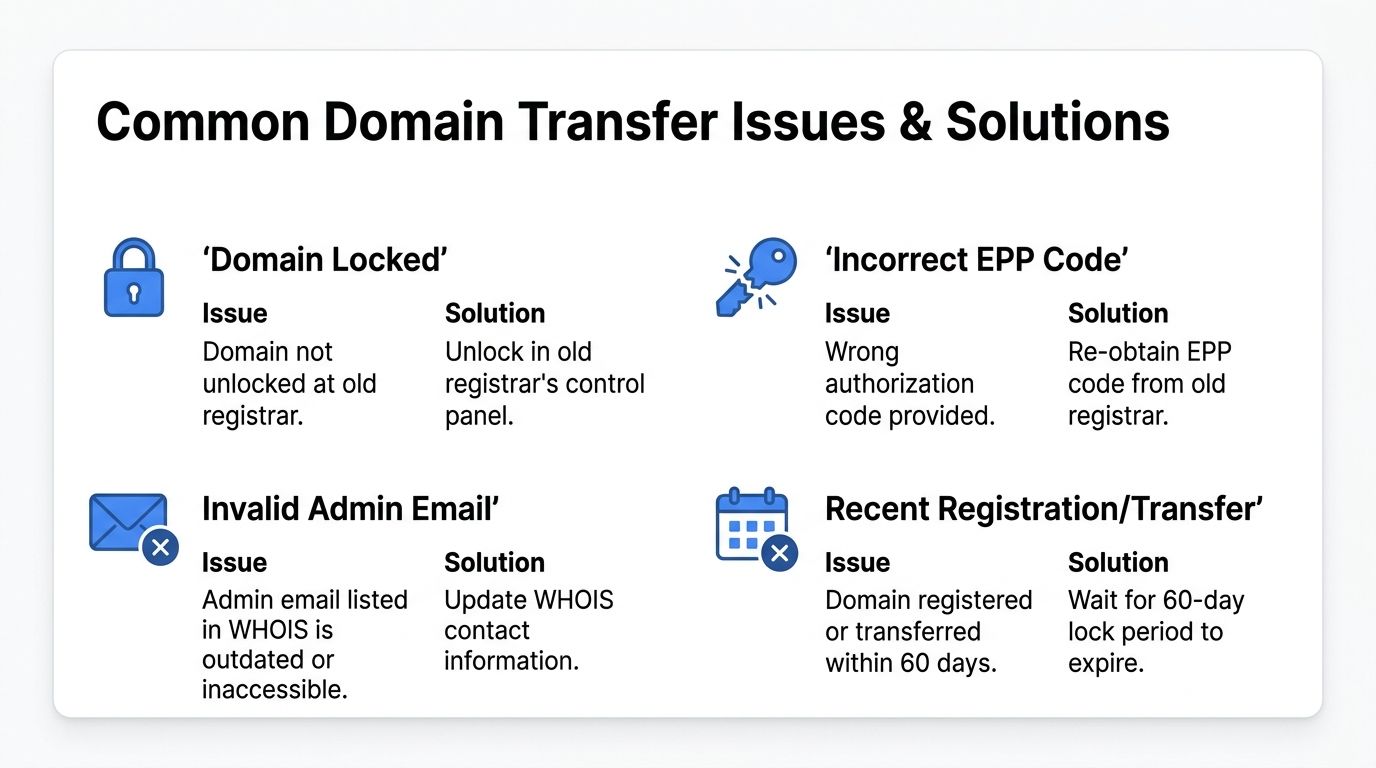
Four failure patterns I see constantly
The domain is still locked
Symptom: the transfer order exists, but nothing progresses.
Cause: the old registrar still has transfer lock enabled, often labeled with a status like clientTransferProhibited in registrar tools or lookup results.
Fix: release the domain in the current registrar panel, then confirm the change saved. Some interfaces make you click through multiple confirmations.
The EPP code is wrong
Symptom: immediate rejection or a request to re-enter the authorization code.
Cause: copy error, stale code, or confusion over which domain's code was exported.
Fix: generate or retrieve a fresh code from the current registrar. Then paste it carefully. If I'm moving several domains, I never trust clipboard history alone.
The approval email went nowhere useful
Symptom: transfer sits pending even though the order was placed.
Cause: the admin contact email is old, inaccessible, or filtered.
Fix: regain access to the mailbox before starting, or update contact details if your registrar allows it without triggering other complications. This is why inbox access is part of the initial checklist, not an afterthought.
Timing is the real problem
Symptom: the registrar says the domain can't be transferred yet.
Cause: new registration, recent prior transfer, or a bad post-expiration sequence.
Fix: stop forcing it. Check dates. If the domain is inside the mandatory lock window, waiting is the only clean answer.
The fastest troubleshooting mindset
When a transfer fails, I don't keep clicking retry. I ask three questions in order:
- Is the domain eligible to transfer right now
- Is the domain's transfer lock disabled
- Can the registrant approve from the correct inbox
If those three are solid, most remaining issues become obvious quickly.
Don't debug a transfer by guessing. Check eligibility, lock status, and approval path first.
One pain point worth respecting
The post-expiration renewal scenario deserves extra caution. If a domain expired, got renewed, and you're now eager to move it, slow down and verify the sequence first. This is one of those situations where “I already paid, so I'm safe” turns out to be wrong. The domain may be active again, but the transfer timing can still punish you.
Pro Tips for Domain Investors and Marketers
For investors, SEOs, and agencies, a domain transfer isn't admin work. It's asset management. The transfer decision affects security, resale speed, team access, renewal discipline, and how quickly you can put a newly acquired name to work.
That's why mature portfolios usually drift toward standardization. Not because every registrar is identical, but because operational chaos gets expensive in time and attention. If you manage domains across multiple clients, niche sites, redirect properties, and future brand holds, scattered registrars create scattered risk.
Consolidate for control, not just convenience
A consolidated portfolio is easier to secure and easier to audit. You can apply the same renewal habits, the same access rules, and the same registrar-level protections across the whole stack.
What that helps with in practice:
- Cleaner ownership records when a buyer asks for proof or transfer readiness
- Faster team handoffs because everyone knows the same interface
- Less renewal drift when domains aren't hiding across old accounts
- Simpler security reviews around locks, approvals, and account access
That said, don't consolidate blindly. If a domain is close to an awkward timing window, actively in a sale process, or tied to registrar-hosted DNS you haven't migrated yet, forcing it into your “cleanup week” can create more trouble than it solves.
Premium names can wreck your assumptions
Basic transfer guides often make pricing sound uniform. It isn't. Premium domains often have transfer pricing set by the central registry, not the registrar, and that can make a transfer materially different from a standard-name move (premium domain transfer pricing notes).
That matters most in investor workflows. You spot a strong brandable, negotiate the buy, and assume the transfer fee will be ordinary. Then the registry reminds you that premium inventory plays by different pricing rules. If you deal in brandables or high-interest terms, check transfer economics early, not after the deal memo is mentally signed.
What to do right after acquisition
A newly acquired domain is most vulnerable right after it lands. The transfer may be done, but your work isn't.
I like a simple post-acquisition routine:
Lock it again
Once the move is complete, re-enable protection.Verify the renewal settings
Don't assume the new registrar copied your preferences sensibly.Audit the domain's past use
For SEO assets, check whether the name carries spam baggage or mismatched history.Set the intended role immediately
Holding page, redirect candidate, rebuild, resale asset, or brand reserve. Decide early.Document where it lives and why you own it
This sounds boring until you're reviewing a portfolio months later.
The best transfer is the one that ends with the domain secured, documented, and ready for its next job.
For marketers, the key is strategic benefit. A cleanly acquired and cleanly transferred domain can become a campaign asset, a brand launch, a redirect property, or a rebuild candidate. But only if you treat the transfer as part of the strategy, not the finish line.
If you're hunting for your next acquisition, NameSnag is worth a look. You can browse available dropped domains that can be registered right away, or track expiring domains that are still in a grace period and likely to drop soon. The time filters are handy too, especially when you want to focus on what's happening today versus scanning a wider window.
Find Your Perfect Domain
Get access to thousands of high-value expired domains with our AI-powered search.
Start Free Trial