
To quickly check when a domain name expires, your best bet is a public WHOIS lookup tool like the ICANN Lookup service or simply logging into your domain registrar's account dashboard. Both will show you the exact "Registry Expiry Date," giving you immediate clarity on when you need to renew.
Why Your Domain Expiration Date Matters
Ever felt that jolt of panic when you pull up your own website and see... nothing? Just a cold, sterile error page? It’s a gut-wrenching experience that happens way more often than you'd think.
One day your site is live, humming along, generating leads or making sales. The next, it’s vanished into the digital ether. The most common culprit is a surprisingly simple oversight: an expired domain name.
This isn't just about a broken link. When your domain expires, your entire digital identity goes dark. Your website becomes inaccessible, and just as critically, every email address tied to that domain stops working.
Imagine missing crucial client messages, support tickets, or partnership opportunities just because your renewal slipped through the cracks. The cost of this downtime can be staggering. Some studies suggest the average cost of website downtime is thousands of dollars per minute.
But beyond the immediate financial hit, an expired domain can inflict long-term damage on your brand and SEO.
Protecting Your Brand and SEO Authority
Your domain name is the bedrock of your brand's online presence. It's on your business cards, your social media profiles, and hopefully, in the minds of your customers. If you lose it, a competitor or a domain squatter could snatch it up the moment it becomes available.
Suddenly, your hard-earned traffic could be redirected to an irrelevant, ad-filled page or, even worse, to a direct competitor's site.
This one mistake creates a nasty ripple effect:
- Loss of Customer Trust: Visitors who can't reach your site might assume your business has shuttered, damaging the reputation you’ve worked so hard to build.
- SEO Devastation: All the backlinks, keyword rankings, and domain authority you've accumulated over years can be wiped out overnight. Rebuilding that SEO equity from scratch is a monumental and expensive task.
- Security Vulnerabilities: An attacker could register your expired domain and use it for phishing attacks, tricking your customers into believing they're interacting with your legitimate business.
Forgetting to renew a domain isn't just an inconvenience; it's a critical business risk. The cost of recovery, both in fees and lost reputation, far outweighs the small annual cost of renewal.
Sidestepping Costly Recovery Fees
So, what happens if you miss the date? Can you just buy it back the next day? Not quite.
After a domain expires, it enters a "grace period," typically lasting 30-40 days, where you can usually renew it at the standard price. No harm, no foul.
Miss that window, though, and things get expensive. The domain then enters a "Redemption Period," another 30-day phase where you might still get it back, but it will cost you. Registrars often charge a hefty redemption fee—sometimes over $100—on top of the regular renewal cost.
If you fail to act during the redemption period, the domain is eventually deleted and released back to the public. At this point, it's a free-for-all.
The Offensive Strategy: Finding Hidden Gems
But knowing how to check when a domain name expires isn't just a defensive move. It's also a powerful offensive strategy for savvy entrepreneurs and SEOs.
Thousands of valuable domains expire every single day, and many of them come with a rich history of backlinks and authority.
Instead of waiting for a domain to go through the entire messy expiration cycle, you can use tools to find opportunities proactively. For instance, you could search for Expiring domains that are currently in their grace period, giving you a heads-up on what will be dropping soon. You can even filter for domains dropping in the next 3 Days or 7 Days.
Even better, you can find recently dropped Available domains that can be registered immediately, letting you skip the line and secure a valuable asset before anyone else. This turns a simple administrative task into a strategic advantage.
Understanding the Full Domain Expiration Lifecycle
So, you've figured out when a domain expires. Great. But that date on the calendar isn't a guillotine—it's more like the starting gun for a surprisingly complicated process. A domain doesn't just flip from "yours" to "up for grabs" overnight.
Instead, it tumbles into a multi-stage lifecycle, a sort of digital limbo with safety nets and last chances. Getting a handle on this is crucial, whether you're trying to save your own domain from the abyss or strategically waiting to pounce on a valuable one the second it drops.
Think of the expiration date not as a cliff, but as the beginning of a winding, and sometimes expensive, road.
The First Safety Net: Auto-Renew Grace Period
The moment a domain sails past its expiration date, it enters the Auto-Renew Grace Period. This is your first and best shot at fixing the mistake without any real pain. Your website and email might go dark, which is alarming, but the domain is still functionally yours.
Registrars offer this buffer, which can last anywhere from 0 to 45 days (a month is pretty standard for .com domains), to give owners time to sort out a failed credit card or just remember to renew. During this phase, you can almost always renew the domain at the normal price. No harm, no foul.
This period exists because renewal failures happen all the time. It's a massive numbers game. For legacy TLDs like .com and .net, renewal rates hover around a healthy 75.3%. That sounds high, but it still means roughly a quarter of them—over 40 million domains in that group alone—expire annually without an immediate renewal. This creates a huge pool of opportunities, and you can dive into more of the global registration trends to see the full scope of the numbers.
The Costly Last Chance: Redemption Period
If you miss the grace period, things get serious. The domain then falls into the Redemption Period, sometimes called the Pending Delete Restorable period. This is basically the domain equivalent of having your car impounded.
Lasting for about 30 days, this is your final opportunity to reclaim your domain. But getting it back now comes with a steep price tag. You'll have to pay a hefty redemption fee, often $100-$200 or more, on top of the regular renewal cost.
The Redemption Period is designed to be a painful, expensive lesson. Registrars impose this fee to discourage owners from letting valuable domains lapse and to cover the administrative costs of holding and restoring the name.
During this time, the domain is completely offline and can't be transferred. For everyone else, it’s still untouchable—it's just sitting in a holding pattern, waiting for the original owner to either pay the ransom or abandon it for good.
The Final Countdown: Pending Delete
Once the Redemption Period ends without the owner stepping in, the domain moves into its final, irreversible phase: Pending Delete. This is the point of no return.
This stage is mercifully short, usually lasting only 5 days. During this window, the domain is locked down. No one can renew it, restore it, or modify it in any way. It's officially been queued up for deletion from the central registry.
At the end of these five days, the domain is "dropped" and released back into the wild. This is the moment domain investors and savvy entrepreneurs have been waiting for. It becomes a first-come, first-served frenzy to register a potentially valuable asset.
This is exactly where tools that track expiring domains prove their worth. Instead of refreshing a page every day, you can get an alert the second a name you're watching drops. Better yet, you can find Available domains that have just completed this lifecycle and can be registered immediately. You can even filter for names that dropped Today or in the last 3 Days, letting you snap up great finds without the stressful waiting game.
The Domain Expiration Timeline at a Glance
To make this all a bit clearer, it helps to see the entire process laid out from start to finish. Each phase has a distinct purpose and a different set of rules for the owner.
| Lifecycle Phase | Typical Duration | What It Means for the Owner | Can Someone Else Register It? |
|---|---|---|---|
| Active | Up to Expiry Date | Full control; website and email are live. | No |
| Grace Period | 0-45 Days | Website is offline, but you can renew at the standard price. | No |
| Redemption Period | 30 Days | Domain is locked; you can restore it for a high fee. | No |
| Pending Delete | 5 Days | The domain is locked and cannot be recovered by anyone. | No |
| Available | Indefinite | The domain has been deleted and is available for registration. | Yes |
As you can see, there are multiple opportunities for the original owner to recover their domain. But once it hits that final "Available" stage, it's a whole new ballgame.
Automate Your Domain Monitoring and Never Forget Again
Relying on your memory to check when a domain name expires is a dangerous game. It's like hoping you'll remember to pay your taxes without a calendar reminder—a strategy that's doomed to fail. Manually checking dates is just asking for trouble, especially once you have more than a couple of domains to track.
It's time to build a system that works for you. This isn't about buying complex software; it’s about setting up simple, effective safety nets that turn domain monitoring into something you can truly set and forget.
Your First Line of Defense: Simple Alerts
Let’s start with the absolute basics. The easiest way to sidestep an accidental expiration is to put the date somewhere you'll actually see it.
- Calendar Alerts: Open whatever calendar you use—Google Calendar, Outlook, it doesn't matter. Create an event for your domain's expiration date. Now, set up a few reminders: one for 60 days out, another for 30 days, and a final, more frantic one for 7 days before it’s all over.
- Registrar Notifications: Dig into your registrar's settings. Most services like GoDaddy or Namecheap send renewal reminders by default. But you need to confirm those emails are going to an address you actively check and aren't getting lost in your spam folder. If they offer SMS alerts, turn those on, too.
The whole point here is redundancy. A single point of failure, like a missed email, is all it takes for your website to go dark. A calendar pop-up working in tandem with an email reminder is a much tougher system to beat.
Taking Automation to the Next Level
For those of us managing a portfolio of domains—or who just love a good automated workflow—simple reminders might not cut it. This is where you can get a bit more sophisticated without needing a computer science degree.
Third-party monitoring services are a fantastic option. Tools like UptimeRobot often include domain expiration monitoring in their packages. They'll ping you via email, SMS, or even a Slack notification long before a domain is in any real danger. This is a lifesaver if you manage domains across multiple registrars and just want a single dashboard to see everything.
This timeline shows the critical stages a domain goes through, from being actively registered to eventually being deleted and available again.
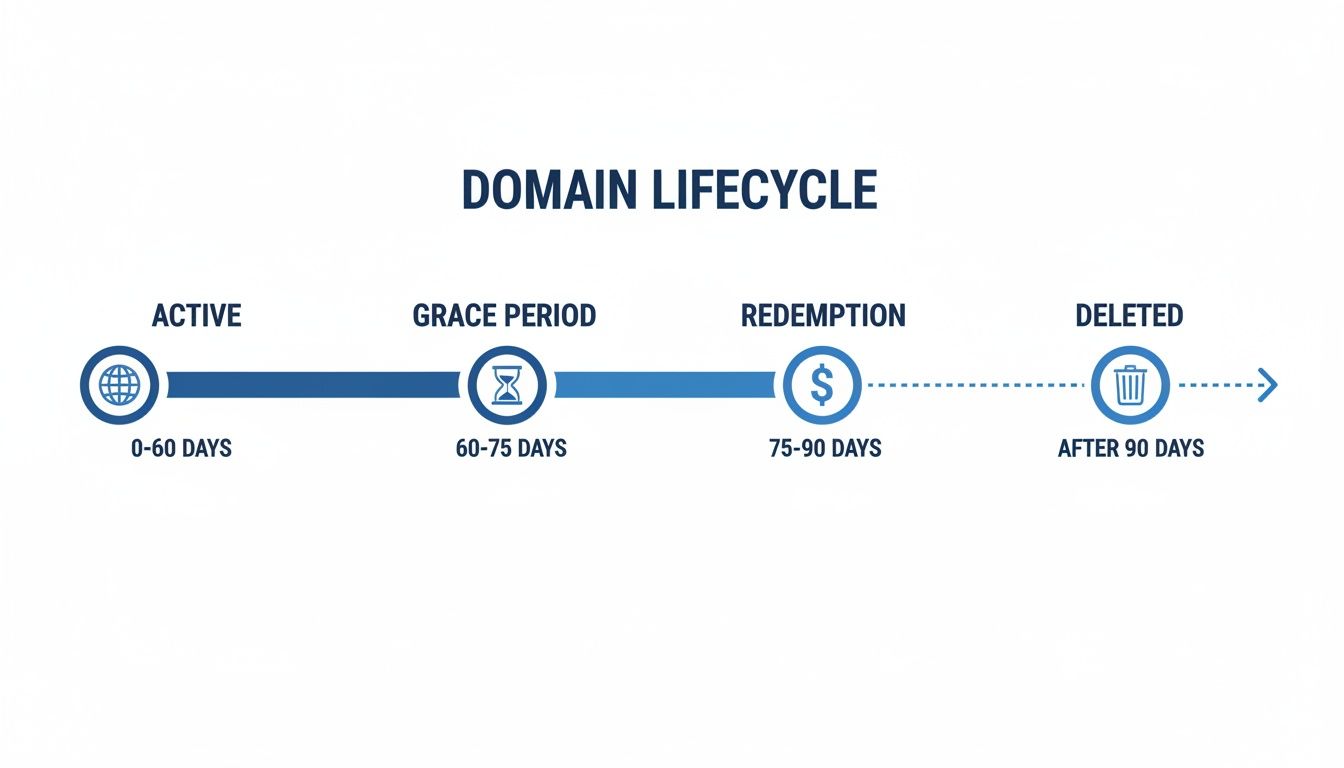
Understanding this lifecycle is crucial because automation can help you keep an eye on domains at every stage, not just your own.
For the more technically inclined, a simple automated script is another powerful choice. You can use libraries in languages like Python (think python-whois) to check expiration dates programmatically. Set that script up as a cron job on a server, and you've built your own custom monitoring system that can check a list of domains daily and email you a summary. It's a bit more work upfront but gives you total control.
You can even build these checks using a powerful WHOIS API to get structured data back. To see what's possible, explore the NameSnag API documentation and see how it works.
The Offensive Strategy: Monitoring for Opportunities
So why limit your monitoring to just the domains you own? You can apply these same automation principles to track domains you want to acquire. Manually checking a competitor's domain every single day is mind-numbing and flat-out inefficient.
Instead, let a dedicated service watch those domains for you. When a target domain enters its grace period or is about to be deleted, you get an alert.
This is where you shift from defense to offense. A truly smart tactic is to use a tool that specifically finds Expiring domains already in their grace period. They aren't available just yet, but they're prime candidates for dropping soon. Setting up a monitor for these gives you a huge heads-up, letting you get ready to register them the second they become available. It turns a frustrating, manual waiting game into a strategic, automated hunt for digital gold.
Finding SEO Gold in the Expired Domain Market
So far, we've mostly talked about checking a domain's expiration date as a defensive move—a way to hang onto your own digital turf. But what if I told you those expiration dates are also clues on a treasure map?
Every single day, thousands of domains with real authority, backlinks, and even traffic get dropped. For a savvy marketer, that's a goldmine. This isn't about starting from zero; it's about finding a domain that’s already got a running start. Imagine picking up a name that Google already trusts, one with a history of relevant content and links pointed right at it. That’s the entire game when hunting for expired domains.
This isn't just a niche hobby; it's a huge secondary market. For example, the 42.9 million new gTLDs have a shockingly low renewal rate of just 32.2%. That means over two-thirds of them become available every year. This massive churn fuels a multi-billion dollar market where you can find some real gems if you know where to look. You can dive deeper into these numbers with these insights from the 2025 Domain Survey.
What Makes an Expired Domain Valuable
Not all dropped domains are created equal. A lot of them are junk, abandoned for very good reasons. The real skill is learning how to separate the treasure from the trash. When I'm vetting a potential domain, I put on my detective hat and look for a few key things.
Your investigation should zero in on these core metrics:
- Backlink Profile: This is the big one. Does it have quality, relevant links from authoritative sites? I use tools like Ahrefs or Majestic to dig into its link history.
- Domain Age: All things being equal, older domains often carry more weight with search engines, as long as their history is clean. An aged domain can give you an instant authority boost.
- Keyword Relevance: Does the domain name itself have valuable keywords? Was it previously used for a topic that lines up with your niche?
- Traffic History: Was the domain getting organic traffic before it dropped? This is a strong signal that it has ranking power you can bring back to life.
The goal is to find a domain with a squeaky-clean, spam-free history. A killer backlink profile is useless if the domain was previously a spammy link farm or got hit with a penalty. Always, always check its past on the Wayback Machine.
Vetting for a Spammy Past
Before you get too excited about a domain's metrics, you need to check its closets for skeletons. A domain with a toxic history can do more harm than good, potentially passing on a Google penalty to whatever you build on it.
First stop: the Wayback Machine. See what the site looked like in its past life. Was it a real business, a blog, or something sketchy? If you see pages in foreign languages, weird pharmaceutical ads, or other spammy content, it's an immediate red flag. Run away.
Next, I dig into the backlink profile and look for anything that smells off. A ton of links from low-quality directories, comment spam, or private blog networks (PBNs) are deal-breakers. What you're looking for is a clean, natural-looking link profile. Using a good expired domain checker can help you spot these patterns much more quickly.
The Pro Move: Finding Instantly Available Domains
Here’s a little secret: waiting for a great domain to go through the whole expiration lifecycle can be a long, frustrating game. You can track a name for months only to get outbid in a backorder auction at the last second. The real pro move is to skip the line entirely.
This is where a specialized tool like NameSnag completely changes the equation. Instead of just watching domains that are about to expire, you can filter directly for Available domains. These are domains that have already gone through the whole deletion process and are ready to be registered instantly at any standard registrar.
Think about the edge this gives you. While everyone else is waiting around, you can swoop in and grab high-value names the moment they're available again. You can even narrow your search to find domains that dropped Today or within the last 7 Days, giving you first pick of the freshest inventory before the competition even knows it exists. It transforms the whole process from a passive waiting game into an active, strategic hunt for undervalued digital assets.
Solving Tricky Domain Expiration Roadblocks
You've tried a WHOIS lookup. You've scoured your registrar's dashboard. But you've hit a wall. Sometimes, finding a domain's expiration date feels less like a simple search and more like digital detective work. Certain situations can throw a wrench in the works, making a straightforward task surprisingly frustrating.
Don't worry, you're not at a dead end. We're going to tackle the most common roadblocks you'll run into and give you the strategies to solve them like a pro. These aren't just edge cases; they're the tricky scenarios that separate the amateurs from the experts.
Decoding WHOIS Privacy
You run a WHOIS search on a domain you’re eyeing, only to find a mess of redacted information. All you see are generic details from a service like "Domains By Proxy" or "PrivacyProtect.org." This is WHOIS privacy protection in action—a service that shields an owner's personal information from the public.
It’s a common and smart practice for domain owners, but it can feel like a complete dead end when you're doing research.
But here's the good news: the most critical piece of data, the expiration date, is almost always still visible. While the owner's name, email, and phone number are hidden, the "Registry Expiry Date" is considered a fundamental part of the public record. You may have to scroll a bit, but it should be there.
The real challenge with privacy protection is that you can't contact the owner to get a feel for their renewal plans. There's no way to just send a friendly email asking if they're going to let it drop. This is where a solid monitoring strategy becomes absolutely essential.
The Wild West of ccTLDs
Not all domains play by the same rules. While the big players like .com, .net, and .org follow a fairly standard expiration lifecycle (Grace Period -> Redemption Period -> Pending Delete), country-code top-level domains (ccTLDs) often march to the beat of their own drum.
Think of domains like Germany's .de, the UK's .co.uk, or Japan's .jp. Each country's registry gets to set its own policies for expiration, redemption, and deletion.
- No Redemption Period: Some ccTLDs have no redemption period at all. Once the grace period is over, the domain is deleted and immediately becomes available for anyone to register.
- Registrar-Specific Rules: For others, the renewal and recovery processes are handled entirely by the registrar, with no central registry "redemption" phase to speak of.
- Variable Timelines: Grace periods can be wildly different. Some last a few days, others several months, and some don't exist at all.
When you're dealing with a ccTLD, you simply can't assume the standard expiration timeline applies. Your best bet is to check the specific policies of that country's registry or dig into your registrar's documentation for that particular extension.
When Registrar and WHOIS Data Don't Match
Here’s a real head-scratcher you might run into: you check a domain's expiration date in your registrar's dashboard, and it says one thing. Then, you run a public WHOIS lookup, and it shows a slightly different date. What gives?
This discrepancy usually comes down to your registrar's internal billing cycle versus the official date logged at the registry. Some registrars might mark a domain as "expired" in their system a day or two before the actual registry expiration date to give you a nudge to renew on time.
To avoid any confusion, always trust the Registry Expiry Date from a public WHOIS lookup over your registrar's billing status. The public WHOIS record is almost always the "source of truth," as it reflects the date held by the central domain registry (like Verisign for .com). While you'll still renew through your registrar, the WHOIS date is the official deadline.
Verifying a domain's history is crucial, too. It’s always smart to investigate a domain's past with the Wayback Machine to ensure its history is clean before you commit.
Answering Your Burning Questions About Domain Expiration
So, you've started digging into domain expiration dates. It's a journey that often kicks up more questions than answers at first. Let's tackle some of the most common head-scratchers I hear all the time. Getting these straight will save you a world of headache down the road.
What’s the Deal with the ‘Expiry Date’ vs. the ‘Updated Date’?
This one trips people up constantly when they look at a WHOIS record. Think of it like this:
The ‘Expiry Date’ is the only one that truly matters. It’s the hard deadline. If the domain isn't renewed by this date, it officially starts the whole expiration process we've been talking about.
The ‘Updated Date’ is just a timestamp for any change made to the record. It could be a new email address, a nameserver tweak, or yes, even a renewal. A recent ‘Updated Date’ might hint at a renewal, but it’s not a guarantee. Always, always anchor your strategy to the ‘Expiry Date’.
Can I Just Grab an Expired Domain the Next Day?
In a word: no. This is probably the biggest misconception out there, and it leads to a lot of frustration.
The moment a domain expires, it doesn't just become a free-for-all. It actually enters a grace period, which usually lasts 30-40 days. During this window, only the original owner has the right to renew it, no questions asked.
If they still don't renew, it often rolls into another 30-day redemption period. Only after surviving that gauntlet and being officially deleted by the registry does it hit the open market. The whole ordeal can easily take two months or more from the day it first expired.
This built-in delay is precisely why you can't just casually watch a domain. You can't swoop in the next day. A real strategy involves tracking domains through this entire lifecycle.
How Does WHOIS Privacy Mess Things Up?
It usually doesn't, at least not for finding the date. WHOIS privacy services are great for hiding personal info like a name, email, and phone number, but they almost never conceal the crucial domain dates.
You should have no problem seeing the registration, updated, and—most importantly—the expiration date. The real hurdle privacy creates is that you can't just email the owner and ask, "Hey, are you letting this one go?" For simply finding the date, though, you're in the clear.
What's the Smartest Way to Get a Domain After It Expires?
Manually checking a domain every day for 60-80 days is a surefire way to drive yourself crazy and miss the opportunity. A much better approach is to use a tool built for this exact purpose. It gives you an incredible edge over everyone else playing the waiting game.
For instance, you can find Expiring domains that are already in their grace period, giving you a curated list of names that will drop soon. Or, even better, you can pounce on high-value Available domains that were released today, letting you register them right away before they even hit most people's radar.
Ready to stop waiting and start finding? NameSnag uses powerful analytics to uncover high-value expired and expiring domains with proven SEO potential. Find your next winning domain with NameSnag today.
Find Your Perfect Domain
Get access to thousands of high-value expired domains with our AI-powered search.
Start Free Trial