
You bought a GoDaddy domain years ago. It was fine then. Now it feels cramped, awkward, too long, too niche, or tied to a version of your business that no longer exists.
That’s usually when people search can you change your domain name on godaddy and expect to find a rename button hiding in the dashboard.
There isn’t one.
The good news is you’re not stuck. The bad news is the fix isn’t a rename. It’s a migration, and that difference matters because migrations affect branding, SEO, analytics, email, redirects, and every little integration you forgot your site relies on.
So You Want to Change Your GoDaddy Domain Name
Monday morning, a founder decides the old domain has to go. By lunch, the team is in GoDaddy hunting for a rename button that does not exist. By the end of the day, they have learned the expensive version of the truth. The process involves replacing your online address, not editing it.
No, you can’t directly rename a registered GoDaddy domain. GoDaddy’s own help documentation explains that registered domain names cannot be changed once purchased because the registration itself is tied to a specific string in the registry system (GoDaddy help).
That frustrates site owners because it feels like a dashboard limitation. It is really a registry rule.
The practical answer is still yes. You can move to a better domain by registering the new one, rebuilding the connections around it, and redirecting the old domain correctly. For sites with existing traffic, the standard method is a 301 redirect, which Google recognizes as the signal for a permanent move (Google Search Central).
That distinction is critical. A domain move affects branding, SEO, analytics, paid traffic, email, forms, CRM attribution, and every forgotten tool that still points at the old URL.
I have seen this play out dozens of times. The domain purchase is usually the cheap part. The actual cost shows up later in developer time, QA, redirect mapping, search volatility, and fixing broken email or tracking after launch. If the new domain is a genuine upgrade, shorter, cleaner, easier to remember, better aligned with the business, the move can be worth it. But it should be treated like an investment decision, not a cosmetic edit.
Use a simple rule here.
Practical rule: If the current domain has rankings, backlinks, branded searches, ad history, or active email accounts, handle the change like a full migration with a checklist and rollback plan.
That sounds heavier than many owners expect. In practice, it is manageable. The mistake is assuming GoDaddy is where the whole job happens. GoDaddy handles the registrar side. Your host, CMS, DNS, SSL, analytics stack, Search Console, ad platforms, and inbox setup determine whether the move goes smoothly or turns into a week of cleanup.
A better domain can absolutely justify the hassle. It can improve memorability, trust, click-through rate, and brand positioning for years. The key is being honest about the trade-off before you touch anything.
Why Your Domain Name Is More Like a Tattoo Than a T-Shirt
A domain name feels editable because it looks like text. That’s the trap.
When you register a domain, you’re not creating a draft label you can polish later. You’re reserving a unique identifier inside a global registration system. That identifier behaves more like a serial number than a username.

Why GoDaddy can’t just flip the text
Think of your domain like a VIN on a car.
You can repaint the car. You can change the wheels. You can sell it. You can move it to another garage. But you don’t “edit” the VIN because the VIN is the thing the system uses to identify the car.
Domains work the same way. The registration itself is the identity.
That’s why “change domain name” usually means one of two things in normal conversation:
- Buy a different domain
- Move the website to that different domain
Once you frame it that way, GoDaddy’s limitation stops being annoying and starts being useful. It forces you to think like an operator instead of a button-clicker.
What this means in real life
If your current domain is oldbrand.com and you want newbrand.com, the path is simple in concept:
- Register newbrand.com
- Point hosting correctly
- Move the site or switch the primary site domain
- Redirect oldbrand.com to newbrand.com
- Update the rest of your stack
That’s the internet version of moving offices and forwarding your mail.
The mailing address analogy is close, but not perfect. A better one is a tattoo. You can cover it, work around it, or get a new one somewhere else, but you’re not casually editing the original ink.
The mindset that saves people trouble
The domain itself is only one asset in the system.
Your actual business footprint includes:
- Search equity
- Backlinks
- Internal links
- Email addresses
- Tool integrations
- Brand mentions
- Direct traffic habits
When people ask can you change your domain name on godaddy, they usually mean “Can I swap this out without breaking everything?” This is the core question, and the answer is yes, but only if you handle the move like a controlled relocation.
A clean migration beats a rushed rename fantasy every time.
Your Four Paths to a New Domain Identity
Not every domain change should become a full migration. Sometimes the new domain is an obvious upgrade. Sometimes it’s only slightly better and not worth the operational drag.
That’s where most how-to content falls flat. It jumps straight to setup steps without asking whether the move is smart in the first place.
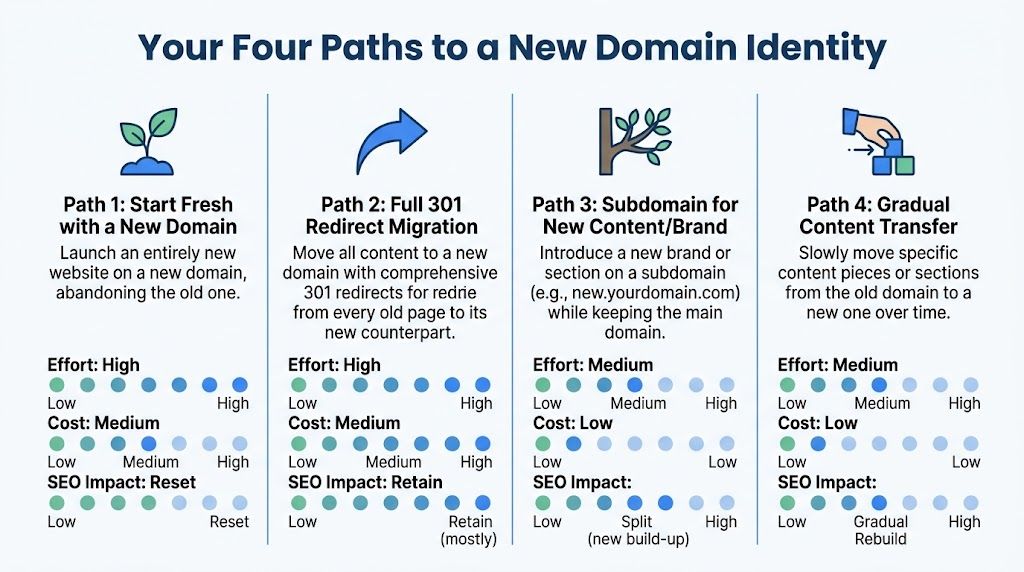
Path one start fresh and leave the old site behind
This is the hard reset.
You register a new domain, launch a new site there, and don’t attempt a full continuity play. This makes sense when the old domain is toxic to the brand, attached to a failed niche, or so messy that salvaging it creates more problems than value.
Pros
- Clean brand start
- No migration complexity on old URL structures
- Easier if you’re rebuilding the business model anyway
Cons
- You leave old equity behind
- Existing bookmarks and backlinks may stop helping
- You’ll have to rebuild authority more intentionally
This route is emotionally satisfying and operationally brutal if the old domain had meaningful history.
Path two full 301 redirect migration
This is the professional move for established sites.
You set up the new domain, map old URLs to matching new URLs, implement permanent redirects, update internal systems, and notify search engines. It takes work, but it gives you the best shot at preserving what the old site already earned.
Here’s a good visual walkthrough if you want a second perspective before touching settings:
This path also comes with hidden work that simple guides gloss over. The decision to migrate can trigger dual domain renewals, redirect monitoring, analytics reconfiguration, and a propagation window that can take 24 to 72 hours (reference).
That matters because a migration isn’t just “buy a better name.” It’s “buy a better name and accept a temporary operations project.”
Path three change the primary domain on your hosting setup
This one confuses a lot of people because the dashboard makes it feel like the whole solution.
It isn’t.
Changing the primary domain in hosting or in a site builder can make the new domain load the website, but that does not automatically mean you handled SEO, redirects, canonical issues, old links, or external systems. It’s a technical switch, not a complete business migration.
It’s one step inside a larger plan.
Path four transfer the domain to another registrar
This solves a different problem.
A registrar transfer moves your domain management from GoDaddy to another registrar. It does not rename the domain. If you hate the billing experience, renewal workflow, or account structure, a transfer can make sense. But it won’t answer the branding issue.
That’s why people sometimes do two separate projects without realizing it:
| Option | Solves branding problem | Solves registrar problem | SEO-sensitive |
|---|---|---|---|
| New domain with migration | Yes | Maybe | Yes |
| Hosting primary domain swap | Partly | No | Yes |
| Registrar transfer only | No | Yes | Usually less so |
| Fresh restart | Yes | Maybe | Very |
Which path usually wins
For a real business site, full 301 migration is usually the right answer when:
- The new domain is clearly stronger for brand recall or positioning
- The old domain has authority worth preserving
- You can tolerate overlap costs while both domains stay active
- You have enough control over hosting, redirects, CMS settings, and analytics
If you don’t even know whether the replacement domain is materially better, pause there first. That’s the strategic bottleneck.
A short, strong domain can justify the move. A tiny improvement often doesn’t.
And if the old domain no longer fits at all, you may eventually need to retire it. If that’s part of the plan, this guide on how to cancel a domain name on GoDaddy helps you think through timing so you don’t shut things off too early.
Don’t migrate for a lateral move. Migrate for a meaningful upgrade.
The Ultimate GoDaddy Domain Migration Playbook
Friday afternoon is a terrible time to change a domain.
That is usually when somebody finally gets approval to rebrand, flips a few GoDaddy settings, and assumes the rest will sort itself out. By Monday, the new domain half-works, the old one half-redirects, forms disappear into the void, and paid traffic starts landing on pages nobody meant to publish.
A clean migration is much less dramatic. It feels almost uneventful. The new domain resolves, the old URLs redirect page for page, SSL stays valid, analytics keeps collecting, and the team has nothing exciting to complain about.
That kind of boring launch takes planning. It also has a cost. You are not just “changing a domain name on GoDaddy.” You are paying for overlap time on domains, hosting, QA, redirect mapping, and post-launch monitoring so you do not torch years of SEO equity for a small brand upgrade. If the new name is materially better, that cost can be a smart investment. If it is a marginal improvement, the bill is harder to justify.
Pre-flight checklist
Before touching DNS, forwarding, or hosting settings in GoDaddy, build a migration inventory. I treat this as the insurance policy for the whole project.
Audit the current site
Get a full list of live, indexable URLs. You need to know what exists before you can preserve it.
Review:
- Top pages by organic traffic, conversions, and backlinks
- Core templates such as blog posts, product pages, service pages, category pages, and contact forms
- Canonical setup on the current domain
- Analytics, tag manager, pixels, and call tracking
- Email services and third-party integrations
- Any hard-coded references to the old domain in buttons, PDFs, scripts, or app settings
Small sites can track this in a spreadsheet. Larger sites need a real worksheet with URL mapping, owner, redirect target, and test status. The Ultimate Website Migration Checklist is useful because it covers the boring dependencies that tend to break first.
Buy and prepare the new domain
Register the new domain, then decide what is changing. Domain swap. Hosting setup. DNS. Sometimes all three.
If the site will stay on the same host, add the new domain there first and confirm the server can answer for it before the public switch. If you also need to update DNS, document the current records before changing anything. This guide on how to change nameservers in GoDaddy is a good refresher if that part is fuzzy.
Keep the old domain active. Do not cancel it. Do not let it expire. Your redirects depend on it.
Back up everything
Host backups are nice. Your own backups are safer.
Save copies of:
- Site files
- Database
- Theme or template customizations
- Existing redirect rules
- DNS records
- Email-related settings
- Analytics and tag configurations
I also save screenshots of key settings before launch. They are ugly, but they settle arguments fast when a plugin, host panel, or DNS record gets changed mid-migration.
The big move
A domain migration has two jobs. The new domain must serve the site correctly. The old domain must send every useful URL to the best matching new URL.
Plenty of site owners finish the first job and assume the second is automatic. It is not.
Set up the new domain in GoDaddy and hosting
In GoDaddy, you will usually start under My Products, select the domain or hosting product, choose Manage, and work from the domain settings or hosting connection area. The exact menu changes by product, but the order of operations matters more than the button labels.
Use this sequence:
- Attach the new domain to the hosting environment
- Load the site on the new domain in a staging or controlled state
- Install or verify SSL for the new domain
- Confirm the CMS recognizes the new primary domain
- Only then point public traffic to it
Domain and DNS changes do not update instantly across every resolver. GoDaddy notes that DNS changes can take time to propagate, often up to 48 hours depending on the record and provider documentation at https://www.godaddy.com/help/change-my-domain-nameservers-664.
That delay is why rushed launches create such a mess. During propagation, different users can hit different destinations.
Put redirects in place before traffic starts splitting
Redirects need to be ready before users and crawlers start reaching the new setup.
For a real site, homepage-to-homepage forwarding is lazy and expensive. You want old URLs redirected to the closest equivalent new URLs whenever those pages still exist. That preserves relevance, helps rankings stabilize faster, and keeps users from bouncing because they landed somewhere generic.
A redirect map should follow a few rules:
- Send each old URL to the closest matching new URL
- Use permanent 301 redirects
- Avoid redirect chains and loops
- Keep the old domain live long enough for search engines, bookmarks, and old links to catch up
- Handle high-value pages first if the site is large
The hidden cost shows up here. A five-page brochure site can be remapped quickly. A site with hundreds of posts, product URLs, PDFs, subfolders, and campaign landing pages turns into a real operations project. In such cases, a better replacement domain needs to earn its keep.
Update site-level references
After the new domain is live, clean up the site so it stops pointing back at the old one internally.
Check:
- Navigation links
- Footer links
- Hard-coded buttons
- Image and asset URLs where relevant
- CMS site URL settings
- Plugin or app settings
- Canonical tags
This work is tedious, but it matters. Internal links that still point to the old domain force users and crawlers through unnecessary redirects. That adds latency, creates more places for mistakes to hide, and muddies your reporting.
Post-launch systems check
Launch day is a validation exercise, not a victory lap.
Test like somebody who expects problems
Do not stop at the homepage.
Check:
- Homepage and priority landing pages
- A sample of old URLs to confirm they redirect correctly
- Forms and lead routing
- Checkout, booking, or account flows
- Tracking scripts and conversions
- Email sends and notifications
- Mobile rendering
- Browser security warnings and mixed content
Have each department test the part they own. Marketing should verify attribution and campaign links. Sales should test forms and CRM routing. Operations should test transactions and notifications. Domain migrations fail in the handoffs.
Watch the first day closely
The first 24 hours usually reveal whether you have a small cleanup list or a long weekend.
Monitor for:
- Unexpected 404s
- Traffic hitting old URLs without redirecting
- SSL certificate warnings
- Pages loading with old canonicals
- Analytics collecting under the wrong hostname
- Search Console or verification issues
Keep the launch narrow. Do not pair a domain migration with a redesign, template rewrite, plugin cleanup, and analytics rebuild unless you enjoy guessing which change caused the break.
The Pro-Level SEO and Technical Cleanup
A domain migration can “work” and still bleed value unnoticed.
The site loads. Redirects exist. Nobody panics. Then rankings wobble, analytics splits, old URLs stay indexed too long, and your inbox fills with weird edge-case problems.
That’s why the cleanup work matters.

Tell Google what changed
If you use Google Search Console, verify both domains and use the Change of Address process for the site move.
That doesn’t replace redirects. It complements them.
Also submit a fresh sitemap for the new domain. Keep the old property monitored so you can spot crawl issues, indexing lag, and redirect misses. If the site had a disavow workflow before the move, make sure that file handling is reviewed as part of the migration work.
Clean up internal signals
Search engines can follow redirects, but you don’t want your own site behaving like it still lives on the old domain.
Check these one by one:
- Canonical tags should reference the new domain
- Internal links should point directly to the new URLs
- XML sitemap entries should only list new-domain URLs
- Robots instructions should be reviewed after launch
- Structured data references should reflect the new host where relevant
This is also a good time to review guidance on SEO domain changes if you want a separate checklist focused on preserving search value rather than just flipping the technical switch.
Fix the leftovers that always appear
Even careful migrations leave a tail of broken assets, orphaned URLs, and missed redirects.
A proper crawler will usually expose them fast. If you start seeing 404s on pages that used to attract links or traffic, use a process like this guide to fixing 404 errors and reclaiming lost SEO value to prioritize what gets repaired first.
Here’s the order that usually makes sense:
- High-value linked pages
- Traffic-driving pages
- Conversion pages
- Brand-critical pages
- Everything else
That order prevents you from spending half a day fixing some old tag archive nobody cared about while an important linked page sits broken.
Update the stack outside the website
This is the part people remember only after something goes missing.
Make a pass through:
| System | What to review |
|---|---|
| Analytics | Property settings, referral exclusions, hostname reporting |
| Tag manager | Triggers, variables, custom events |
| Email platform | Sending domain, tracked links, branded URLs |
| CRM | Form callbacks, lead source tracking, landing page links |
| Payment tools | Return URLs, webhook endpoints where applicable |
| Ad platforms | Final URLs, conversion paths, remarketing assets |
None of this is glamorous. All of it matters.
The migration isn’t complete when the site loads. It’s complete when the business systems stop referencing the old domain by accident.
Reach out for link updates
Redirects pass users along, but the cleanest backlink is still one that points to the new URL directly.
You don’t need to email the entire internet. Start with the links that matter most:
- Brand mentions on partner sites
- Directory profiles you control
- Podcast, guest post, or PR links
- Industry associations
- Top authority backlinks you can realistically update
That outreach compounds over time because it reduces dependence on the old domain and tightens the signal around the new one.
Your Migration Troubleshooting and Rollback Plan
Even good migrations wobble. The difference between an amateur launch and a professional one is that the professional expects wobble and already knows what to do next.
Scenario one the homepage works but inner pages return 404s
This usually means the site-level domain switch happened, but the URL mapping didn’t.
Check whether:
- Only the homepage was forwarded
- Page-level redirects were skipped
- Permalink or routing settings changed
- CMS rules differ between old and new environments
If old blog posts or product pages matter, test a sample from each template type, not just one page.
Scenario two traffic falls right after launch
Don’t panic on the first hour. Do investigate the first day.
The common causes are familiar:
- Redirects were added too late
- Redirect chains slow or break routing
- Canonicals still point to the old domain
- Analytics is misconfigured and underreporting
- Important pages were left out of the move
Open your crawler, check Search Console coverage, and manually test the pages that historically matter most.
Scenario three the browser shows security or mixed-content warnings
This usually points to SSL or hard-coded asset issues.
Look for pages loading scripts, images, or styles from the wrong protocol or old domain. Fixing this often means updating theme settings, page builder content, or CDN references.
Scenario four email or integrations stop behaving
In this situation, rollback thinking pays off.
Before launch, decide:
- What counts as acceptable disruption
- Who approves rollback
- Which settings must be restored first
- How to return traffic to the old setup quickly if needed
A rollback plan doesn’t mean the migration failed. It means you respect the fact that live systems break in weird ways.
If you can’t explain how to reverse the move before launch, you’re not ready to launch.
Keep records of the original DNS, host mappings, redirect rules, and platform settings. When something goes wrong, memory is a terrible backup system.
Conclusion Your New Digital Address Awaits
So, can you change your domain name on GoDaddy?
Not in the literal sense. You can’t rename the registered domain like it’s a draft file. But you can absolutely replace it with a better one and move your site the right way.
That distinction matters because it turns a frustrating support question into a strategic business decision. A strong domain can sharpen brand recall, clean up positioning, and make the whole company look more credible. A sloppy migration can do the opposite.
The best moves come from being honest about trade-offs. You’re not just buying a new domain. You’re taking on redirect work, testing, cleanup, overlap costs, and a short period of uncertainty. If the new domain is significantly better, that effort is worth it.
If it isn’t, keep your powder dry and wait for the right asset.
Done properly, a migration isn’t a technical chore. It’s an upgrade. The old name got you here. The next one should be built for where the business is going.
If you're still hunting for a domain that’s worth migrating to, NameSnag makes the search a lot less painful. You can browse available domains that just dropped and can be registered right away, or watch expiring domains that may be dropping soon. The time filters are especially useful when you want to scan today’s list fast or widen the net across the last few days without drowning in junk.
Find Your Perfect Domain
Get access to thousands of high-value expired domains with our AI-powered search.
Start Free Trial