You've probably done this the painful way already. A list of domains lands in your inbox, you open three SEO tools, paste one domain at a time, wait for scores, dump the results into a spreadsheet, then try to remember which numbers came from which vendor.
That process works for ten domains. It falls apart when you're screening drop lists, qualifying outreach prospects, or building an internal SEO tool. The bottleneck isn't analysis. It's data collection. That's where a Domain Authority checker API stops being a convenience and starts being infrastructure.
Used well, it gives you machine-readable authority metrics you can sort, filter, cache, and combine with your own logic. Used badly, it gives you a false sense of precision and a bigger bill. The difference comes down to how you handle metric definitions, request volume, and the step between raw JSON and a real decision.
Tired of Manual Domain Metric Lookups
The manual workflow always looks manageable at first. You grab a list of expired domains, open a browser tab for each vendor, and tell yourself you'll knock it out in an hour. Two hours later, your sheet has inconsistent formats, a few duplicate rows, and at least one domain you checked twice because the tabs blurred together.

That's the primary appeal of a Domain Authority checker API. It replaces clicking and copy-pasting with repeatable requests your code can run on demand. Instead of “check this domain,” your system can do “check every domain in this list, return authority metrics, then keep only the ones that meet our minimum standards.”
Where the manual process breaks
A manual process usually fails in the same few places:
- Volume gets ugly fast. A small review list becomes a large one without warning.
- Humans normalize badly. One person writes
example.com, another writeshttps://example.com/. - Spreadsheets hide mistakes. Wrong rows look fine until they affect a buy or outreach decision.
- Timing matters. Domain opportunities don't wait while you bounce between tabs.
The main technical value of this kind of API is straightforward. It turns proprietary authority metrics into machine-readable outputs for workflow automation. That's what makes it useful in prospecting dashboards, expired-domain pipelines, and internal audit tools.
Practical rule: If a metric matters enough to influence a decision, it matters enough to fetch programmatically and store consistently.
What changes when you automate
The useful shift isn't just speed. It's control.
Once authority data comes in through an API, you can apply rules the same way every time. You can queue jobs, enrich domain lists, cache previous lookups, and tag records that need a deeper manual review. That's a very different workflow from relying on memory and browser history.
For SEO teams, domain investors, and agencies, the win is simple. The API handles collection so you can spend your time on judgment.
Decoding the Alphabet Soup of Authority Metrics
Most confusion starts with one bad assumption. People see DA, DR, PA, trust metrics, and “authority score,” then assume they all mean the same thing. They don't.
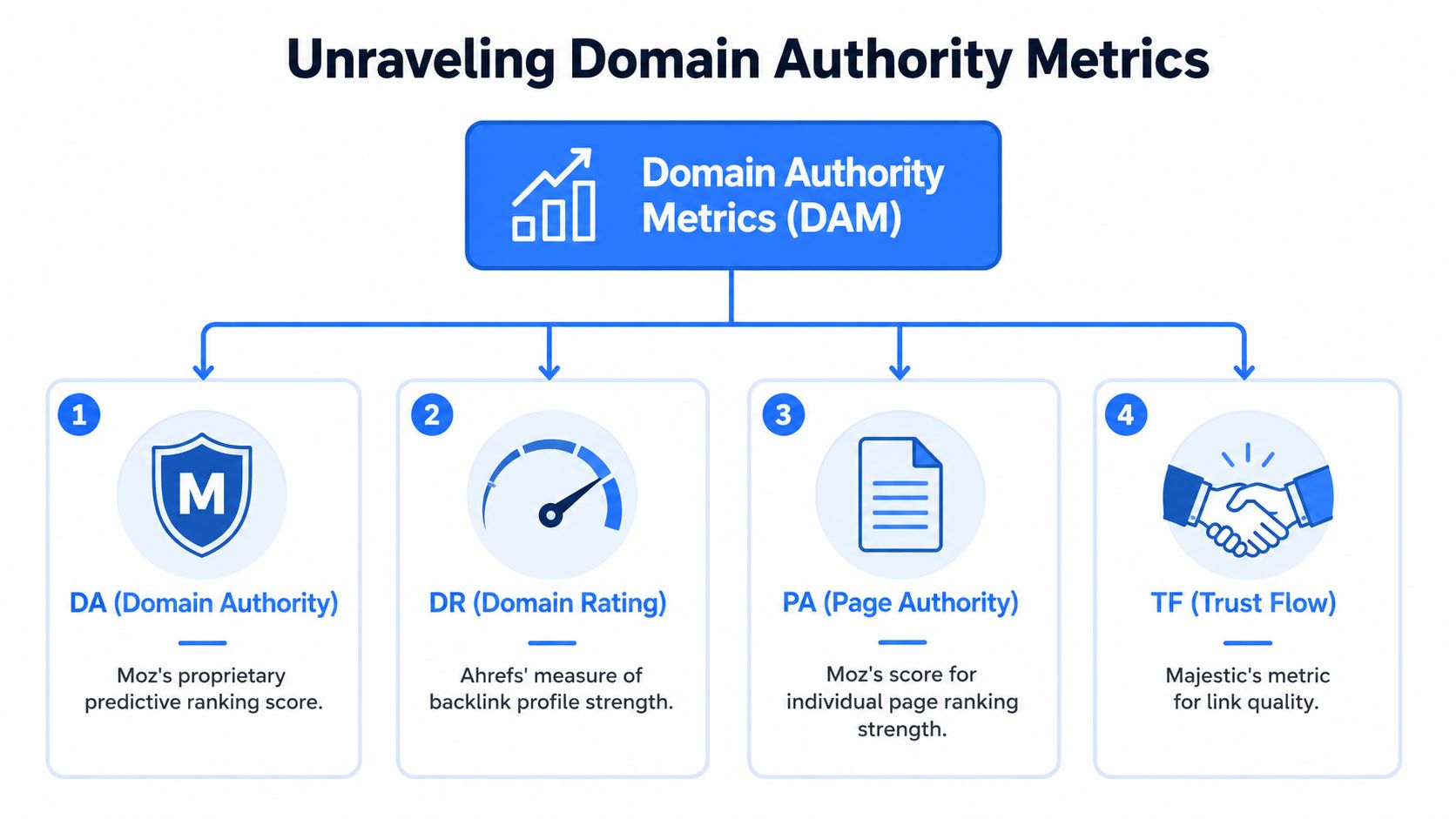
The cleanest way to think about them is this. Each vendor creates its own model for estimating strength or ranking potential. Those models overlap in spirit, but not in methodology. That's why a domain can look strong in one tool and average in another.
What the main labels usually mean
DA is Moz's specific metric. It's a 0 to 100 predictive score for how likely a domain is to rank, and it has been a standard benchmark for over 17 years since Moz introduced it in 2007. It's built from a proprietary link index and uses a logarithmic scale, which is why jumps in score don't behave linearly.
PA is Page Authority. Same general idea, but applied to a specific URL instead of the whole domain.
DR is Ahrefs' Domain Rating. It's not Moz DA under a different name. Ahrefs is explicit that its “website authority” language describes a broader SEO concept, not Moz's metric. That distinction matters if you're comparing outputs or building scoring rules. You can see that difference called out on the Ahrefs website authority checker.
TF usually refers to Majestic's Trust Flow. In practice, people use it as a shorthand for perceived link quality, especially in aged-domain and backlink evaluation workflows.
Why the scores don't match
The mismatch isn't a bug. It's what you should expect.
Current content often uses DA, PA, domain authority, website authority, and authority score interchangeably, but they aren't the same. Moz DA is a specific Moz metric. Ahrefs separates its own concept of website authority from Moz DA. Semrush computes authority score using backlinks, organic traffic, and spam signals, which makes it a different input mix again.
That means two things for API buyers:
Pick one primary provider per workflow.
Mixing vendors inside one scoring system creates noise.Treat authority as comparative, not absolute.
A score is most useful when you compare domains under the same provider and the same logic.
If you want a broader primer on how practitioners interpret these metrics without turning them into gospel, this guide on SEO domain authority is a good companion read.
A domain metric is a proxy. It's useful because it simplifies. It becomes dangerous when you forget what it simplified away.
Which metric fits which job
A practical mapping looks like this:
- DA for broad domain triage when you want a familiar benchmark in outreach or expired-domain review
- PA for URL-level checks when one page matters more than the whole site
- DR for link-profile comparisons if your team already works inside Ahrefs data
- TF for trust-oriented filtering when link quality questions are front and center
The mistake isn't using third-party metrics. The mistake is pretending they're interchangeable.
Comparing the Top Domain Authority Checker APIs
Once you stop treating all authority metrics as the same thing, provider selection gets easier. You're not buying “the best number.” You're buying a dataset, a methodology, a request model, and a billing structure that fits your workflow.
Some teams need a branded metric they already trust internally. Others just need a reliable API that can process large lists without forcing analysts back into a browser. For many builds, consistency matters more than prestige.
What I look at before picking a provider
I usually pressure-test four things first:
- Metric definition. Are you getting Moz DA and PA, or a vendor's own authority score?
- Response format. Clean JSON beats awkward wrappers every time.
- Operational fit. Can you run it in bulk, queue it, and store it sanely?
- Commercial model. Monthly pricing, request limits, and trial access affect architecture decisions fast.
The commercial side is often more concrete than the marketing copy. SEO Review Tools lists pricing from $75 USD per month for API Lite up to $450 USD for API Advanced, with $175 USD per month for the API Standard tier, and some platforms also offer a 7-day free trial for testing before you commit, as shown on the SEO Review Tools authority score API page.
Domain Authority API feature comparison
| Provider | Key Metrics | Pricing Model | Typical Use Case |
|---|---|---|---|
| Moz | DA, PA, and related search-oriented metrics | Usually subscription or usage-based access through its ecosystem | Teams that specifically want Moz definitions in internal reporting |
| Ahrefs | Proprietary authority-style metrics and backlink-centric data | Commercial subscription model | Link analysis workflows already standardized on Ahrefs |
| Semrush | Authority-style scoring combined with other SEO signals | Commercial subscription model | Broader SEO platforms where authority is one signal among several |
| SEO Review Tools | DA, PA | Monthly tiered API plans | Agencies and consultants who need direct DA/PA checks in code |
| Multi-source internal stack | Normalized vendor outputs plus your own filters | Depends on the vendors you connect | Custom tools, ETL jobs, and domain screening pipelines |
That table looks simple because differences show up after implementation.
What works and what doesn't
What works:
- One provider per production workflow
- A local cache between your app and the vendor
- Thresholds used for ranking, not blind approval
- Vendor scores combined with your own risk checks
What doesn't:
- Comparing one provider's score directly against another's
- Re-querying the same domain every time a user loads a screen
- Hardcoding a single cutoff and calling it due diligence
- Letting pricing surprise you after launch
If you're evaluating the tooling options before you commit, this roundup of domain authority checker tools is useful for shortlisting options without turning the choice into a month-long research project.
One candid note. A lot of teams overbuy. They pick the broadest dataset before they know what the app needs. Start with the smallest setup that supports your filtering logic. Expand once the bottleneck is real.
Anatomy of an API Request and Response
Once you've picked a provider, the mechanics are usually familiar. You authenticate, send a request with a domain or URL, ask for the fields you care about, then parse the JSON response.
That's the easy part. The part that causes trouble is sloppy input handling. If your app sends mixed URL formats, doesn't normalize hostnames, or stores duplicate records under slightly different strings, your API layer gets expensive and your dataset gets messy.
The request shape
Most authority APIs revolve around a simple pattern:
- Authenticate with an API key or token
- Pass a target such as a domain or URL
- Select metrics if the provider supports field selection
- Receive structured JSON back
A practical request often includes normalization before the call. Strip protocols if your provider expects bare domains. Lowercase hostnames. Decide early whether www.example.com and example.com should be treated as distinct records in your system.
The metric selector matters
Some providers let you request only the metrics you need. That's useful for keeping responses lean and reducing unnecessary parsing logic. SEO Review Tools documents a request pattern that accepts a URL plus metric selectors such as pa|da, and notes that the score is computed from backlinks, unique referring domains, quality, and relevancy on a logarithmic 0 to 100 scale.
In practice, selective requests help keep your enrichment jobs tidy. If your filter only needs domain-level authority, don't pull extra fields just because they're available.
Build your parser for the response you need today, but design your storage so you can add fields later without rewriting the pipeline.
What the response is really for
JSON is not the end product. It's the transport format.
Your application still has to decide:
- Which fields are stored permanently
- Which fields are cached briefly
- Which fields trigger a rule or queue a review
- Which records get shown to users versus kept internal
A common pattern is to split the output into two layers. One table stores the vendor response in normalized form. Another table stores your own derived fields, such as “passes initial quality gate” or “needs manual backlink review.”
That separation saves a lot of pain later. Vendor metrics change. Your business logic changes too. Keeping them distinct makes both easier to update.
Walkthrough Building a Domain Finder with NameSnag API
The most practical use case for a Domain Authority checker API isn't reporting. It's filtering. You want to start with a pile of domains and end with a shortlist worth actual attention.
A good example is a domain finder workflow. Pull a set of candidate domains, enrich them with metrics, then sort or filter based on the signals that matter to you. If you're building that kind of tool, the first stop is the NameSnag API docs.
Start with a live domain list
For testing, I'd begin with a real stream of candidates rather than a hand-made CSV. Two useful entry points are the lists of available domains and expiring domains. Both are practical because they reflect the actual screening problem. Too many domains, not enough time.
The time filters matter too. If you're building a tighter workflow, “Today” keeps the queue small. If you're hunting more broadly, the longer windows give your script more to work with.
A simple implementation pattern
The pipeline is straightforward:
- Pull a list of domains from your source
- Loop through each domain
- Fetch the metrics your app needs
- Store the response
- Apply your filtering rules
- Return the shortlist
Here's the shape, without overcomplicating it:
- Fetch candidates from your chosen list
- Normalize domains so duplicates don't slip in under different formats
- Call the API for each domain
- Persist raw output and your own derived flags
- Filter by your criteria
- Sort by the strongest combined opportunities
The key is not the loop. It's the scoring logic after the loop.
What to filter on
A weak implementation uses one metric cutoff and calls it done. A better implementation stacks a few checks in order:
- Authority first for fast triage
- Link quality review on the reduced list
- History and spam review before any buy decision
- Brand fit if the domain is meant for a real business, not just SEO value
That layered approach keeps the API doing the heavy lifting without pretending the API can make the whole decision.
If your filter produces too many “good” domains, the threshold is too loose. If it produces none, the threshold is too rigid or the source list is poor.
Example filtering logic
A domain finder app usually becomes useful when you stop asking “what's the DA?” and start asking questions like these:
- Which domains clear the initial authority gate?
- Which ones deserve a manual backlink review?
- Which ones are strong enough to watch if they haven't dropped yet?
- Which ones look fine numerically but fail the sniff test on branding?
That's where a practical build starts to feel less like a metric checker and more like a decision engine.
Turning API Data into Actionable Insights
Raw authority data is tidy. Real decisions aren't.
A Domain Authority checker API earns its keep when it feeds a larger evaluation pipeline, not when it becomes the pipeline. The machine-readable output is the starting point. The decision layer sits on top.
The most useful way to think about this is comparative screening. The API gives you a consistent signal you can use to reduce a large set of candidates into a smaller review queue. That's exactly where proxy metrics shine.
Use proxy metrics like proxies
The technical value here is clear in the Zyla Labs overview of a domain authority checker API. It frames DA and PA as machine-readable outputs built for workflow automation, while also making the important point that they are proxy metrics, not Google ranking factors.
That distinction should shape your whole implementation.
A sensible workflow looks like this:
First pass
Use authority metrics to remove obvious low-priority domains.Second pass
Review the survivors for backlink quality, relevance, and obvious risk signals.Final pass
Judge the business fit. Brandability, naming risk, niche alignment, and acquisition context still matter.
Build a scoring layer, not a hard gate
I prefer weighted decision logic over strict pass-fail logic. Hard gates are tempting because they're easy to explain, but they throw away context.
A practical internal model might do things like:
- rank domains higher if authority is strong
- reduce confidence if other checks suggest risk
- push edge cases into a manual review queue
- separate SEO candidates from branding candidates
That's where broader analytics thinking helps. If you're trying to turn mixed inputs into usable decisions, this piece on understanding data analytics AI for competitive advantage is worth reading because it maps well to the same problem. Data only becomes an advantage when you turn it into a repeatable decision system.
Field note: A metric should shorten your review list. It should not replace your judgment.
What good output looks like
The output your team needs usually isn't “DA for domain X.” It's one of these:
| Output type | What it helps you do |
|---|---|
| Shortlist | Decide what to review today |
| Ranked queue | Prioritize analysts or outreach teams |
| Alert trigger | Flag domains worth watching |
| Rejection bucket | Remove weak candidates early |
That's how API data becomes operational. Not by being impressive, but by helping someone make a cleaner next move.
Pro Tips for Caching and Scaling Your API Usage
If you're building anything beyond a personal script, caching is not optional. It's the difference between a clean, affordable system and a tool that burns through quota every time someone refreshes a page.
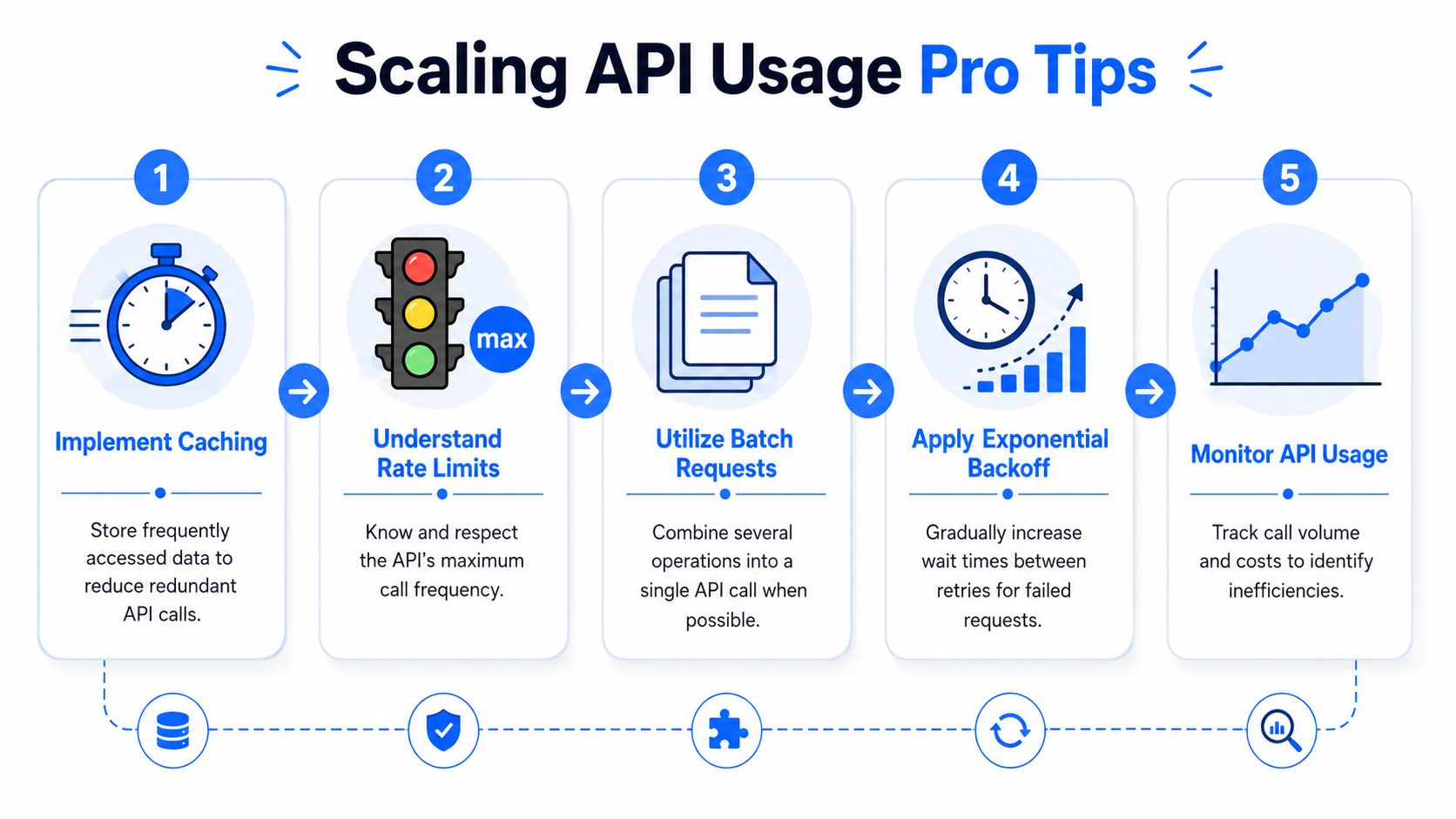
Many development teams wait too long to add a cache because the first version works without one. Then usage grows, rate limits show up, and every design mistake becomes expensive.
Cache by domain and by freshness window
The basic pattern is simple. Store the latest response for each normalized domain, along with when you fetched it. When the app needs that metric again, check the cache first. Only call the vendor if the record is missing or stale.
That gives you three immediate benefits:
- Lower cost because repeated lookups don't hit the vendor
- Faster screens because cached data loads locally
- Better resilience because your app keeps working during temporary vendor issues
For most workflows, not every domain needs fresh data every time. A prospecting dashboard and an expired-domain sniper tool may need different refresh windows. Treat freshness as a product decision, not a default.
Bucket your alerts sensibly
Understanding the scale of DA is important. DA uses a logarithmic model, and approximately 90% of websites have a DA below 30, while only the top 1% exceed 70. That distribution changes how your alerts and thresholds should behave.
If you treat authority as linear, your buckets will be noisy. A move across one range may mean little operationally, while another range deserves attention immediately.
A better pattern is to create broad bands that match how humans review domains:
- Low-priority pool for routine exclusions
- Review queue for candidates that might be worth manual inspection
- High-interest queue for domains that justify immediate attention
You don't need a hyper-granular dashboard if the team only acts on a few meaningful bands.
Cache aggressively, but never forget cache invalidation has business consequences. If stale authority data can change a purchase decision, define that refresh policy explicitly.
Handle failure without wrecking the pipeline
Scaling isn't just about request count. It's about surviving normal failure.
Build for:
- Retry logic with increasing delays after transient errors
- Partial completion so one failed lookup doesn't kill the batch
- Usage monitoring so cost spikes show up before finance does
- Secret handling so your API keys don't end up hardcoded in scripts
On that last point, if your team is still passing tokens around in loose config files, this guide to secure development practices is a solid refresher. API integrations are boring until credential handling goes wrong.
Frequently Asked Questions on DA Checker APIs
How often do authority scores update
That depends on the provider. The practical answer is to treat vendor refresh cycles as external dependencies and design your app so it doesn't assume real-time movement unless the provider clearly supports that behavior.
Can I check subdomains and individual URLs
Usually yes, but you need to be deliberate about what you're querying. Domain-level metrics and URL-level metrics answer different questions. If you care about one article, use the page-level metric. If you care about the root asset, query the domain consistently.
Which API is best for domain investing
The best one is the one that matches your workflow and stays consistent inside it. For domain investing, authority alone isn't enough. You still need history checks, link-quality review, and a sense of whether the domain is commercially usable.
Should I scrape metrics instead of paying for an API
Usually no. If a vendor already offers a stable API, use it. Scraping public interfaces is fragile, legally messy in some contexts, and operationally annoying. If you do any large-scale collection elsewhere in your stack, this guide to web scraping best practices is worth keeping handy.
Is DA a Google ranking factor
No. It's a third-party proxy metric. Useful, often very useful, but still a proxy.
What's the biggest implementation mistake
Treating one metric as truth instead of one input. The second biggest mistake is forgetting to cache.
If you want to stop bouncing between tabs and start reviewing cleaner domain opportunities, NameSnag is built for exactly that workflow. It helps you surface available and expiring domains faster, apply meaningful filters, and focus your time on domains that deserve a closer look.
Find Your Perfect Domain
Get access to thousands of high-value expired domains with our AI-powered search.
Start Free Trial